
Your catalog tool returned "person, indoor, table" for a candid shot of the bride laughing during the toast, and the same three tags for the dance-floor photo, and the same three for the cake-cutting. That is what an object-detection API looks like at work. The model saw nouns, not the photo.
Why the choice of vision model matters most
The vision model decides how good a tagged library feels to use; the ingest and the index are commodity plumbing by comparison. All three touch every photo in a bulk tagging pipeline, but only the model determines whether the tags describe the photo or merely inventory its nouns.
Two services running the same orchestration over the same Drive folder, one wired to a generic object detector and the other wired to Claude vision, produce libraries that feel like different products. The first returns "20,000 photos containing a person" when you search "bride laughing during the toast." The second returns the one shot you wanted.
We covered the broader pipeline in the complete guide to AI photo tagging. This post is the deeper look at the model-choice step.
One scope note: this post covers Claude vision as a catalog backend, the model reading photos through the API at scale. If you arrived asking whether the Claude assistant itself can organize your photos, it is the one assistant that genuinely renames and sorts local folders, and that post maps where it works and where it stops; the Claude-and-Dropbox breakdown does the same for the Dropbox connector.
What Claude vision sees
Claude vision returns the focal subject, the scene's intent, and a publishable alt-text sentence from a single prompt, and that combination is exactly what a catalog needs. Mechanically, it takes an image and a text prompt and responds with text, so prompt design is most of the work. If the prompt-and-response loop is new to you, the plain-English guide to how AI photo tagging works walks the whole loop.
A prompt that asks for "five tags" gets five tags. A prompt that asks for "the focal subject, the surrounding context, a one-sentence alt-text description, and any branded or named-subject signals you can identify" gets exactly that, structured, every time.
The model is unusually strong on three things that matter for catalogs:
- Focal-subject identification. Claude picks the single dominant element of a scene reliably, even when an object detector would surface a long flat list of every visible noun. For a wedding photo it returns "bride and groom mid first-dance" rather than "person, person, floor, lights."
- Scene-level intent. It reads the implied purpose of the photo (a ceremony shot vs. a candid vs. a portrait) and weights tags accordingly.
- Editorial sentence output. Asked for alt text, it returns a full sentence in publishable prose, not a comma list. The Web Content Accessibility Guidelines from the W3C ask for descriptive text that conveys the information a sighted reader gets from the image, and a comma list does not clear that bar. A Claude sentence does.
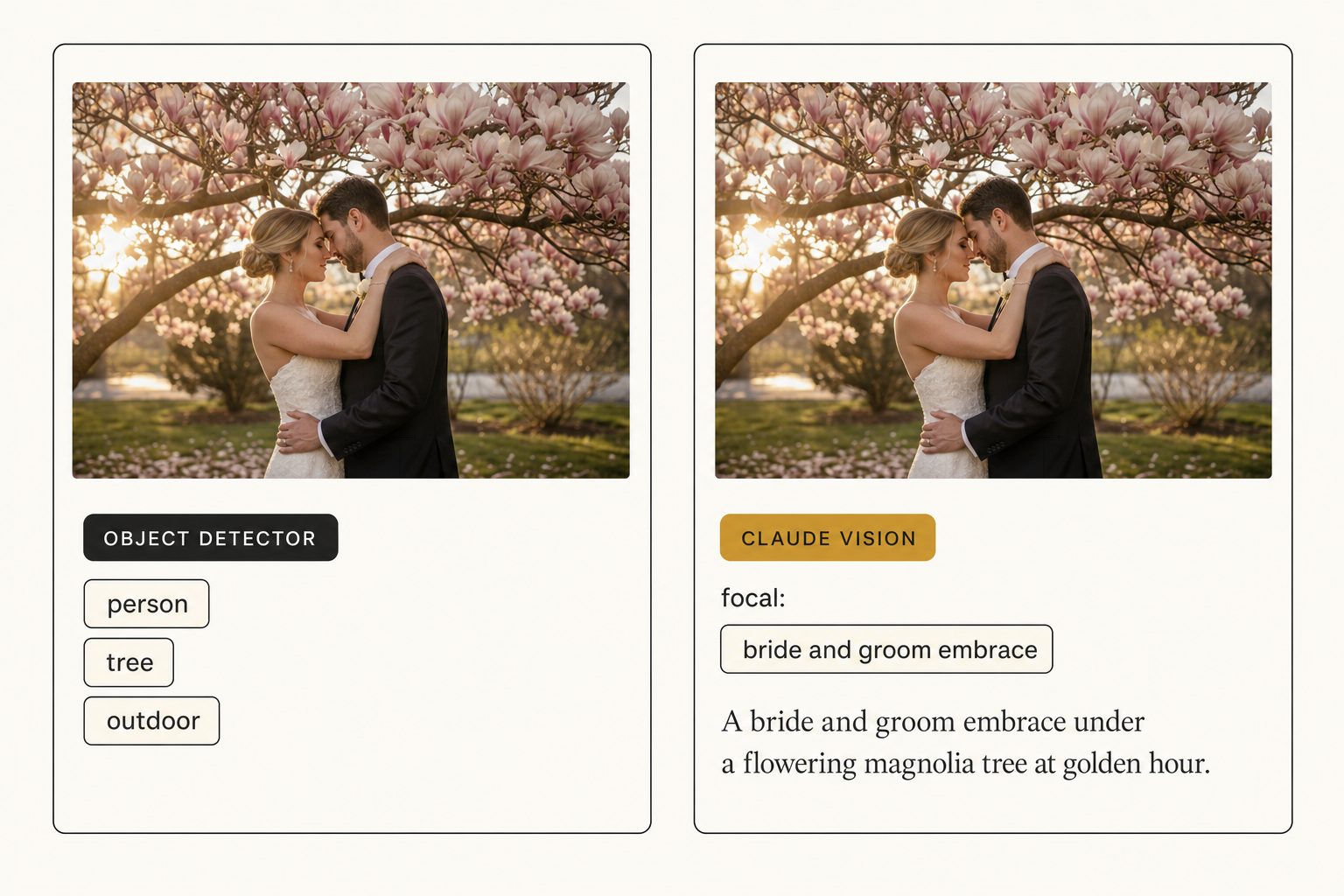
What Claude misses: named individuals it has not been told about (it does not know your client roster), specific branded products in a busy shot (a sneaker model becomes "a white low-top sneaker," not "Air Force 1"), and decorative or abstract images (a close-up of a stucco wall gets a literal description).
Note. None of those weaknesses are unique to Claude. Every vision model has them. The difference is Claude tells you what it sees plainly, so a human pass on the 1 to 5 percent where the output is wrong takes minutes, not hours.
How Claude vision compares to Google Vision, AWS Rekognition, and CLIP
Claude vision is the only one of the four common catalog backends that returns publishable descriptive text; Google Vision and Rekognition return label lists, and CLIP returns vectors. Here are all four, with their strengths and tradeoffs:
| Model | Output shape | Strength | Weakness for catalogs |
|---|---|---|---|
| Claude vision | Natural-language description + structured tags via prompt | Focal-subject reasoning, editorial alt text, named-context handling | Costs more per image than object detectors. Slower than CLIP for pure search. |
| Google Vision API | List of object labels with confidence scores | Mature, cheap, great for OCR and safe-search | Generic labels. No focal hierarchy. No descriptive sentences. |
| AWS Rekognition | Object labels, celebrity match, content moderation | Strong on faces, moderation, brand-logo detection | Same flat-label shape as Google Vision. Descriptive captioning needs Bedrock vision on top. |
| CLIP and embedding models | A numerical vector per image (no human text) | Lets you search by image similarity, blazing fast at scale | Cannot generate alt text. The results are only meaningful inside a vector index. |
Object detectors and embedding models are excellent tools, just not the same tool. A serious catalog stack often uses two of them together (Claude vision for descriptive output, an embedding model for similarity search), each doing the job it is best at.
Anthropic publishes a full feature breakdown in their vision documentation; Google maintains the Cloud Vision API reference.
A real measurement, hand-scored
Claude vision named the correct focal subject on 26 of 30 hand-scored photos; the two object detectors landed under half. In the test, the same 30 photographs from a working library were tagged through Google Vision's default label endpoint, AWS Rekognition's label detection, and Claude vision with a focal-subject prompt, then scored against a hand-written ground truth.
- Google Vision returned the correct top noun on 11 of 30 photos. The rest landed on generic labels like "person" or "indoor."
- AWS Rekognition returned the correct top noun on 13 of 30, stronger on photos with faces.
- Claude vision returned the correct focal-subject phrase on 26 of 30, with the remaining 4 split between near-misses and genuinely ambiguous photos.
The same pattern held at scale: in Tagrly's own testing on a 5,000-photo set, focal-subject tagging surfaced the correct top match in roughly 9 of 10 searches, against roughly 4 of 10 for the same library under a generic object detector. The numbers shift a few points either way depending on prompt design, but the gap is consistent.
Numbers like these are worth collecting yourself: run a sample of your own photos through any tool you are considering and score the focal labels by hand.
The gap shows up because Claude vision pairs naturally with the focal-subject tagging method: prompt the model for the single dominant element of the scene first, then the supporting context tags, then rank focal matches above context matches in the index. Object detectors can be coaxed toward something similar by post-processing the label list, but they still mislabel a candid moment as "indoor" because they are reading pixels, not photographer intent.
When NOT to use Claude vision
Object detectors and embedding models beat Claude vision at moderation, OCR, logo detection, and pure similarity search. Pick a different tool when:
- Pure moderation or safe-search. Rekognition's moderation labels and Google Vision's
safe_searchare mature and cheap. Claude returns a careful description, which is the wrong shape for a moderation queue. - OCR on receipts, screenshots, or signage. Google Vision's text detection is excellent and dirt cheap. Claude reads text in images but is overkill for high-volume OCR.
- Brand-logo detection at scale. Rekognition's logo endpoints are purpose-built. Claude returns "a sneaker," not "Nike Air Force 1."
- Pure image-similarity search. CLIP-style embeddings are the right tool. Vector search beats text matching for "more photos that look like this one."
Warning. Some vendors advertise "AI alt text" but run a generic object detector and concatenate the labels into a comma list. Ask for 10 sample alt-text outputs against your photos before you sign up. The signal you are looking at descriptive output and not concatenated tags: complete sentences with verbs.
How to decide
Match the model to where its output goes:
- Pick Claude vision as your catalog backend if your photos go into a searchable index, get pasted into alt-text fields, or appear on public pages. Descriptive output is what makes AI photo search return the shot you described instead of a noun list.
- Pick Google Vision or AWS Rekognition if your workload is moderation, OCR, or brand-logo detection at scale. Cheap and mature.
- Pick a CLIP-based embedding model if your only use case is image-similarity search and you are comfortable working with vectors.
- Pick a stack that combines two of these if your catalog needs both descriptive tags and similarity search. Most serious teams end up here.
If you want to see what Claude vision-powered tagging looks like on your library before paying anyone, Tagrly's free tier tags the first 500 photos in any Google Drive or Dropbox folder for free, no credit card. Connect a folder and judge the output on your own photos. For broader category context, see the AI vs. manual keywording head-to-head and the auto-generated alt-text guide.
The model choice is the load-bearing decision in any bulk-tagging stack. Get it right and the rest of the orchestration is plumbing.
Frequently asked questions
What is Claude vision and how does it differ from Google Vision or AWS Rekognition?
Claude vision is Anthropic's multimodal model family that reads an image and responds in natural language. The big practical difference: Google Vision and AWS Rekognition return structured object and label detections (a list of nouns with confidence scores), while Claude vision returns a full descriptive response that names the focal subject, the surrounding context, and the apparent intent of the photo. For an image catalog, the latter is what you paste into an alt-text field. The former is what you graph in a dashboard. Object-detection APIs are excellent for moderation, OCR, and brand-logo detection. Claude vision is the model you reach for when the output goes on a public page or into a searchable catalog.
Is Claude vision accurate enough to tag a real photo library?
Yes, with the right prompt. In Tagrly's own testing on a 5,000-photo set, focal-subject tagging surfaced the correct top match in roughly 9 of 10 searches, with the misses split between near-misses (the correct subject was in the top 3 tags but not first) and ambiguous photos where no single subject dominates. In production use, the same approach surfaces the right shot first when a team member searches a natural-language query. One caveat: every vision model misreads decorative or abstract images, so a 1 to 2 percent human pass on a fresh scan catches the edge cases.
How much does Claude vision cost per image for bulk tagging?
Anthropic prices images by resolution: per its vision docs, a one-megapixel photo costs roughly $1.30 to $6.50 per thousand images in input tokens depending on the model, as of writing in September 2026, with prompt length and output tokens added on top. For a 10,000-photo library that lands somewhere between about $20 and a few hundred dollars depending on model and prompt design. Per-image cost has fallen steeply since 2022, which is what turned bulk tagging from a budget meeting into a normal Tuesday operation. Check Anthropic's current pricing page before committing to a large run.
Can I use Claude vision directly through the API instead of through a tagging service?
Yes. Anthropic publishes a vision endpoint and the messages API accepts image inputs. If you have engineering time, a script that walks your library and sends each photo to Claude vision is the cheapest per-image path. The price you pay is 1 to 2 days writing the orchestration (rate limits, retries, prompt design, CSV export, decorative-image handling) and the ongoing maintenance. For one-time runs that is fine. For ongoing workflows with a team using the results, a service that wraps the API and stores the output in a searchable catalog is usually faster to get value from.
What types of photos does Claude vision get wrong?
Three categories. Photos where the focal subject is genuinely ambiguous (a group shot with no obvious main subject), photos of named individuals where the meaning depends on identity (Claude does not know your client roster), and decorative or abstract images where there is no clear subject at all. For the first two categories a light human pass on the output catches the gap. For the third, mark the folder or tag as decorative so the tool skips it instead of inventing alt text.
Does Claude vision work on RAW, HEIC, or WebP files?
The model itself accepts standard web image formats (JPEG, PNG, GIF, WebP). RAW and HEIC need a conversion step first, typically to JPEG at a sane resolution for the model. Most bulk tagging services that use Claude vision handle that conversion automatically when they scan your library, so you do not need to convert anything by hand. If you are calling the API directly, plan for that conversion in your pipeline.
Try Tagrly on your own photo library
Connect your Google Drive or Dropbox folder and Tagrly will tag every photo in bulk. Search by what is actually in the image, share specific shots with clients, and never lose a photo again.
- Free for your first 500 photos
- Read-only access, revoke anytime
- No credit card