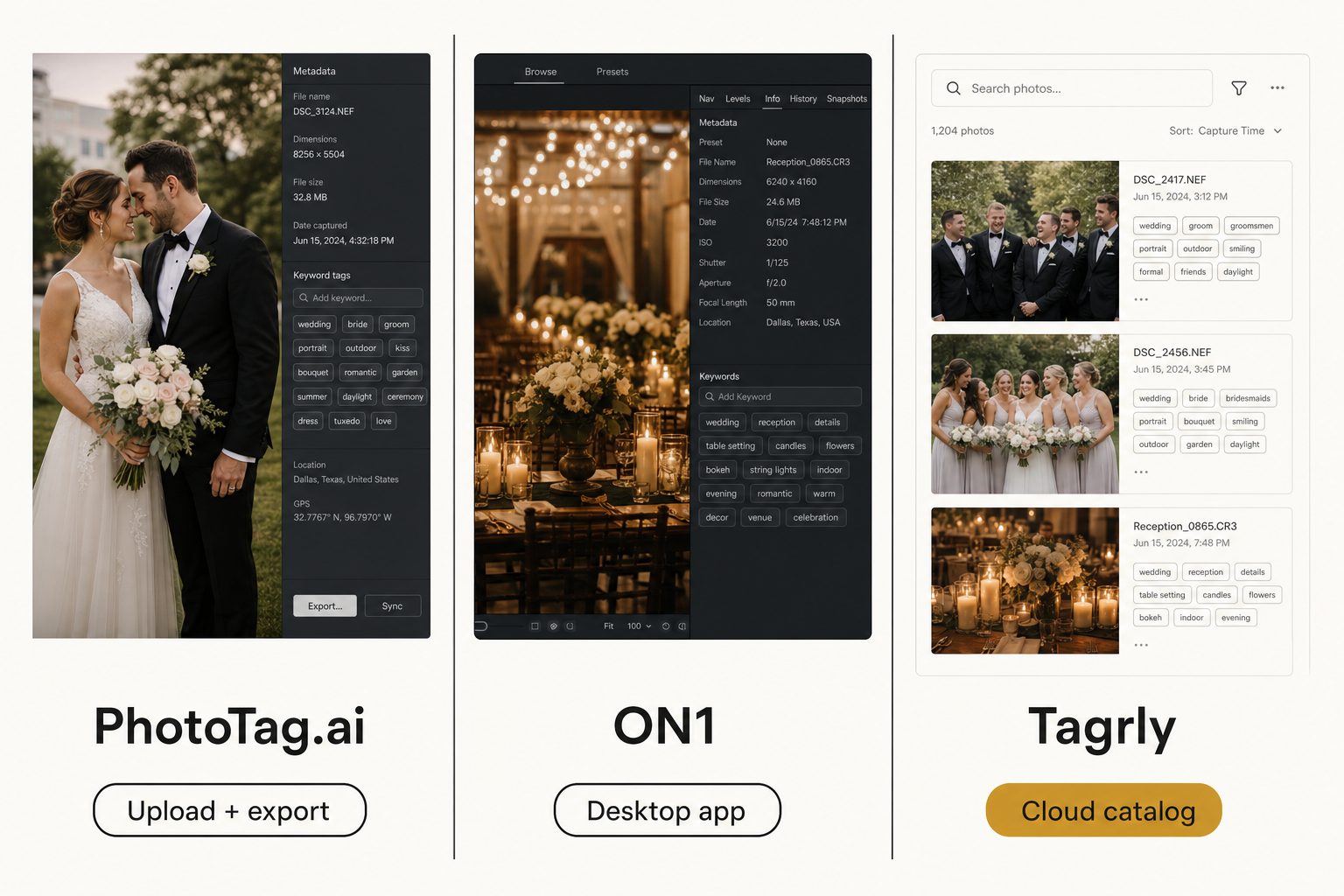
You shot 6,000 photos last quarter, they are sitting in a Drive folder named 2026-Q1-final, and you need every one of them keyworded so the team can actually find a shot when a client asks. You open a new tab, search "photo metadata generator," and get back a wall of tools that all promise the same thing in slightly different words. Three of them keep coming up: PhotoTag.ai, ON1 Photo Keyword AI, and Tagrly. They sound interchangeable. They are not.
What a photo metadata generator actually does
Every tool in this category does the same three jobs in some order: read the image, generate text about it, and put that text somewhere useful.
The reading step uses a vision model to identify what is in the photo. The generating step turns that into output: a list of keywords, a caption, a description, and sometimes a sentence of alt text. The storing step is where these tools split apart, and it is the single most important difference between them.
Some tools embed the metadata directly into the photo file, in the IPTC and XMP fields that Lightroom, Bridge, and stock agencies read. The tags travel with the file. Other tools store the metadata in a separate database that points back at your originals, so a team can search one shared catalog without touching the files at all.
Neither approach is wrong. They solve different problems. Embedded metadata is what a stock contributor needs when the file leaves their control. A catalog is what a marketing team needs when the library lives in shared storage and keeps growing.
Note. "Metadata generator," "AI photo tagger," and "AI keyword tool" mostly describe the same category. The label a vendor picks usually tells you their audience: "metadata" leans stock-photo, "tagging" leans organization, "keyword" leans Lightroom. Read past the label to where the output ends up.
PhotoTag.ai: built for stock-photo contributors
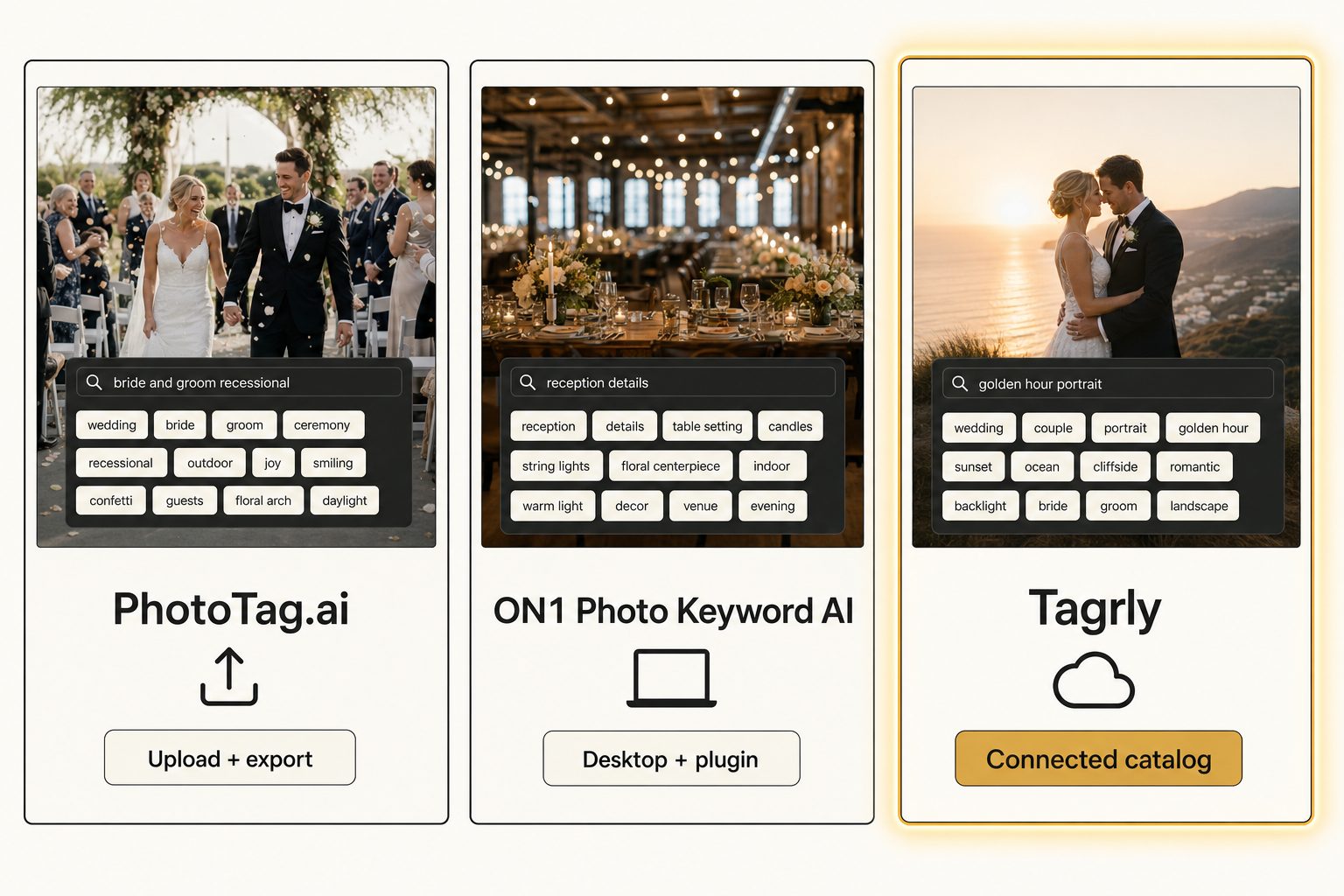
PhotoTag.ai is the right pick when you tag a batch, export it, and move on; it is the wrong pick when a team needs to search the library afterward. It is an upload-based web app and API. You drag a batch of images in, it generates keywords and a description for each, you review and tweak, then you export a CSV or embed the metadata back into the JPEGs.
Its home turf is stock-photo submission. The output is shaped for agency search: up to dozens of keywords per image, a title, a description, and CSV export formatted for the big stock platforms. If you are a microstock contributor uploading to Adobe Stock or Shutterstock, this is a tool built for your exact workflow.
Pricing is pay-as-you-go credits, one credit per file. As of writing, September 2026, the packages run about $18 for 2,000 credits, $59 for 10,000, and $190 for 50,000, with a small free allotment to test it. Credit packs change over time, so check PhotoTag.ai's pricing page for current figures before committing.
The math is the thing to understand. Per-image pricing is cheap for a one-time batch and gets expensive when you re-tag. If you tag a 5,000-photo set once and never touch it again, you spend around $30 and you are done. If you re-scan that library every quarter as it grows, you pay again every time.
The limit: PhotoTag.ai does not connect to Google Drive or Dropbox and walk your folders, and it does not keep a searchable catalog you return to. You upload, you export, you leave. For a stock contributor that is exactly right. For a team whose photos live in cloud storage and who search them every week, it is the wrong shape.
ON1 Photo Keyword AI: built for the solo Lightroom photographer
ON1 Photo Keyword AI is the buy-once option for a solo photographer who lives in Lightroom Classic or Capture One. It is a desktop application you buy once and own, and it runs as a plugin for both of those apps. There is no subscription and no per-image charge. After you buy the license, tagging is free forever on your own machine.
It reads your photos, generates keywords, and embeds them into the files as XMP metadata, so the tags travel with each photo and any IPTC-aware app can read them later. It supports nested keywords, full EXIF and IPTC fields, RAW files from hundreds of cameras, and a fast browser for culling. If you already live in Lightroom and want AI keywords written into your existing catalog, ON1 fits cleanly into that workflow.
Pricing is a one-time license as of writing, September 2026, usable standalone on two computers or as a plugin. The exact standalone price moves around and the tool is sometimes bundled into ON1's larger Photo RAW package, so check ON1's product page for the current figure rather than trusting one that may be stale by the time you read this.
The limit is the same one every desktop tool hits: it runs on a single machine against photos on that machine. The tags live in the file or the local catalog.
That is great for one photographer and a problem the moment a second person needs to search the same library. Two people means two catalogs, two machines, and no shared search surface. We cover this exact tradeoff, AI keywording versus the team layer, in our comparison of AI photo tagging and manual keywording.
ON1 is also not the only desktop embedder in the landscape. If you like the keywords-written-into-the-file shape but would rather supply your own AI key and pay per photo at cost than buy a license, see the bring-your-own-key desktop tier, compared.
Tagrly: built for teams whose photos live in the cloud
Tagrly is the third shape, a connected catalog, and it is the pick when the library lives in cloud storage and more than one person searches it. Instead of uploading photos or running on your laptop, it connects to your Google Drive or Dropbox over read-only access, walks the folders you choose, sends each photo through a vision model, and writes the results to a searchable database. Your originals never move. A whole team searches one shared AI photo search surface.
Every photo gets two grades of output from one reading: fast structured tags built for internal search, and editorial-grade alt text, full sentences you can paste onto a public page without rewriting. That second output is the gap most metadata generators leave open, and it matters if your photos end up on a website rather than a stock agency. We go deep on it in our guide to auto-generating alt text for thousands of images.
The scan runs unattended in the background, producing focal-subject labels, alt-text strings, and a searchable index, and what is already read is searchable while the rest is still going. In Tagrly's own testing on a 5,000-photo set, focal-subject tagging surfaced the correct top match in roughly 9 of 10 searches. A human keyworder at 150 photos per hour would have spent multiple weeks of focused work on the same library.
The vision model is the part that drives output quality, and Tagrly uses Anthropic's Claude under the hood. We cover what that buys you over a generic object detector in Claude vision for image catalogs. Pricing is a monthly subscription, and the free tier tags the first 500 photos in any folder with no credit card, which is enough to judge the output on your own photos before paying.
Tagrly has limits too: it is not a photo editor and does not do RAW conversion, and if your only goal is a one-time CSV for a stock submission, a per-image tool is simpler and cheaper. Tagrly earns its keep when the library is alive, growing, and shared.
Tip. Want to see focal-subject tagging on your own photos before you compare anything? Connect a Drive or Dropbox folder and the first 500 photos are tagged free, no credit card.
PhotoTag.ai vs. ON1 vs. Tagrly, side by side
The three tools are not really competing on the same axis. They are three answers to "where do my photos live and who needs them."
| PhotoTag.ai | ON1 Photo Keyword AI | Tagrly | |
|---|---|---|---|
| Shape | Upload + export | Desktop app + Lightroom plugin | Connected cloud catalog |
| Connects to Drive / Dropbox | No | No | Yes (read-only) |
| Where tags live | Embedded in file + CSV | Embedded in file + local catalog | Searchable database (export on demand) |
| Pricing model | Pay-as-you-go credits | One-time license | Monthly subscription + free tier |
| Team-shareable search | No | No | Yes |
| Editorial alt text | Keyword-style | Keyword-style | Yes (every photo) |
| Best audience | Stock contributors | Solo Lightroom photographers | Teams with cloud libraries |
A few things worth saying plainly. PhotoTag.ai and ON1 both embed metadata into the file, which Tagrly does only on demand as an export. That is a real point for the other two if your files leave your control.
On the other side, neither PhotoTag.ai nor ON1 gives a team a shared searchable catalog; Tagrly is built around exactly that gap.
Warning. Watch for the word "bulk." PhotoTag.ai's bulk means what you can hand-upload in a batch, and the per-batch cap has moved over time, so check their current limits. Tagrly's bulk means a connector that walks a 100,000-photo folder on its own. Both are legitimate, but they are not the same scale. If your library is bigger than what you can hand-upload, the upload tools quietly stop being bulk tools.
How to actually choose
One question decides this comparison: where do your photos live, and who needs to find them later?
- Pick PhotoTag.ai if you are a stock-photo contributor, you tag in batches, you need agency-formatted CSV and embedded IPTC, and you do not need a catalog you come back to. Per-image pricing is cheap for one-and-done batches.
- Pick ON1 Photo Keyword AI if you are a solo photographer who lives in Lightroom or Capture One, you want keywords embedded in your files, and you would rather buy once than subscribe. It is the natural fit if everything already runs through your local catalog.
- Pick Tagrly if your photos are in Google Drive or Dropbox, a team needs to search them, the library keeps growing, and you want editorial-grade alt text for public pages. The free first-500-photo tier lets you check the output before committing.
If you are torn between ON1 and Tagrly, the deciding question is almost always team size. One person who lives in Lightroom should buy ON1. Two or more people sharing a cloud library should use a connected catalog. The split is not about which AI is smarter; it is about whether the tags need to live in one person's app or on a surface the whole team can search.
And if none of these three matches your situation, the category is bigger than this three-way. Start from the full field, sorted by situation and work back to the shape that fits.
For the wider category and how these tools fit the full landscape of bulk tagging, see the complete guide to AI photo tagging. The short version of this whole post: there is no single best photo metadata generator, only the one that matches where your photos live and who has to find them on a Thursday afternoon.
Frequently asked questions
What is a photo metadata generator?
A photo metadata generator is a tool that looks at an image and writes structured information about it: keywords, a caption or description, and sometimes copyright and location fields. Modern ones use a vision model to read the photo and produce the text automatically, then either embed it into the file's IPTC, XMP, and EXIF fields or store it in a separate searchable database. The output is what makes a photo findable later, whether you are submitting to a stock agency, adding alt text to a website, or searching a large internal library. The three best-known options in 2026 are PhotoTag.ai, ON1 Photo Keyword AI, and Tagrly, and they take three very different approaches to the same problem.
Which photo metadata generator is cheapest?
It depends on your volume and how often you tag. PhotoTag.ai is pay-as-you-go credits, roughly $18 for 2,000 images down to about $190 for 50,000 as of writing in September 2026, so it is cheap for a one-time batch and expensive if you re-tag often. ON1 Photo Keyword AI is a one-time license, so after you buy it the tagging itself is free forever on your own machine. Tagrly is a monthly subscription with a free tier for the first 500 photos. For a single 5,000-photo batch you will never touch again, PhotoTag.ai or ON1 wins on price. For a library you keep adding to and a team that keeps searching it, a subscription is usually cheaper per year because you are not paying per image.
Does PhotoTag.ai connect to Google Drive or Dropbox?
No. PhotoTag.ai is an upload-based tool. You drag a batch of images into the web app or send them through its API, it generates keywords and descriptions, and you download a CSV or embed the metadata back into the files. It does not connect to a Google Drive or Dropbox folder and walk it for you, and it does not keep a searchable catalog you can come back to. That makes it a strong fit for stock-photo contributors who export to an agency and a poor fit for a team whose photos live in cloud storage and who need to search them repeatedly.
Is ON1 Photo Keyword AI a subscription?
No. ON1 sells Photo Keyword AI as a one-time license with no subscription, and it runs as a standalone app and as a plugin for Adobe Lightroom Classic and Capture One. It writes keywords and metadata into the file as XMP, so the tags travel with the photo and any IPTC-aware app can read them. Check the current price on ON1's buy page, since the standalone license is sometimes bundled into their larger Photo RAW package. The catch is that it runs against photos on a single machine, so it does not give a team a shared searchable surface the way a connected catalog does.
What is the difference between embedding metadata in the file and storing it in a catalog?
Embedded metadata is written into the photo file itself, in the IPTC and XMP fields, so it travels with the file wherever it goes and any compatible app can read it. PhotoTag.ai and ON1 both do this. A catalog stores the tags in a separate database that points back at your originals, which is how a team searches one shared surface without each person installing software. Tagrly works this way. Embedded metadata is better when the file leaves your control, like a stock submission. A catalog is better when a team needs to search a living library that keeps growing. Some tools offer both: store in a catalog, then export to embedded IPTC on demand.
Can a photo metadata generator write alt text I can publish?
Some can, most cannot. Most metadata generators produce a comma-separated keyword list, which is built for stock-agency search and reads stiff as website alt text. Editorial-grade alt text is a full descriptive sentence, like 'A bride and groom embrace under a flowering magnolia tree at golden hour.' If you need alt text for a public web page, ask any tool you are evaluating for a sample of ten alt-text outputs on your own photos before paying. A keyword list is not the same thing as a publishable sentence, and rewriting every one by hand defeats the purpose of automating it.
Try Tagrly on your own photo library
Connect your Google Drive or Dropbox folder and Tagrly will tag every photo in bulk. Search by what is actually in the image, share specific shots with clients, and never lose a photo again.
- Free for your first 500 photos
- Read-only access, revoke anytime
- No credit card