
Your export folder holds 4,000 files named IMG_4827.JPG, one mystery file named final_v2_FINAL.jpg, and a client asking for the first-dance shots from two seasons back. A photo file naming convention is the cheapest fix in all of photo organization, and it costs nothing but the discipline to apply it.
The four-part photo file naming convention
Every naming system that survives contact with a real archive uses the same skeleton: date, project, content, sequence, in that order. Institutional photo archives converged on this shape years ago; Columbia University's photo library publishes its version.
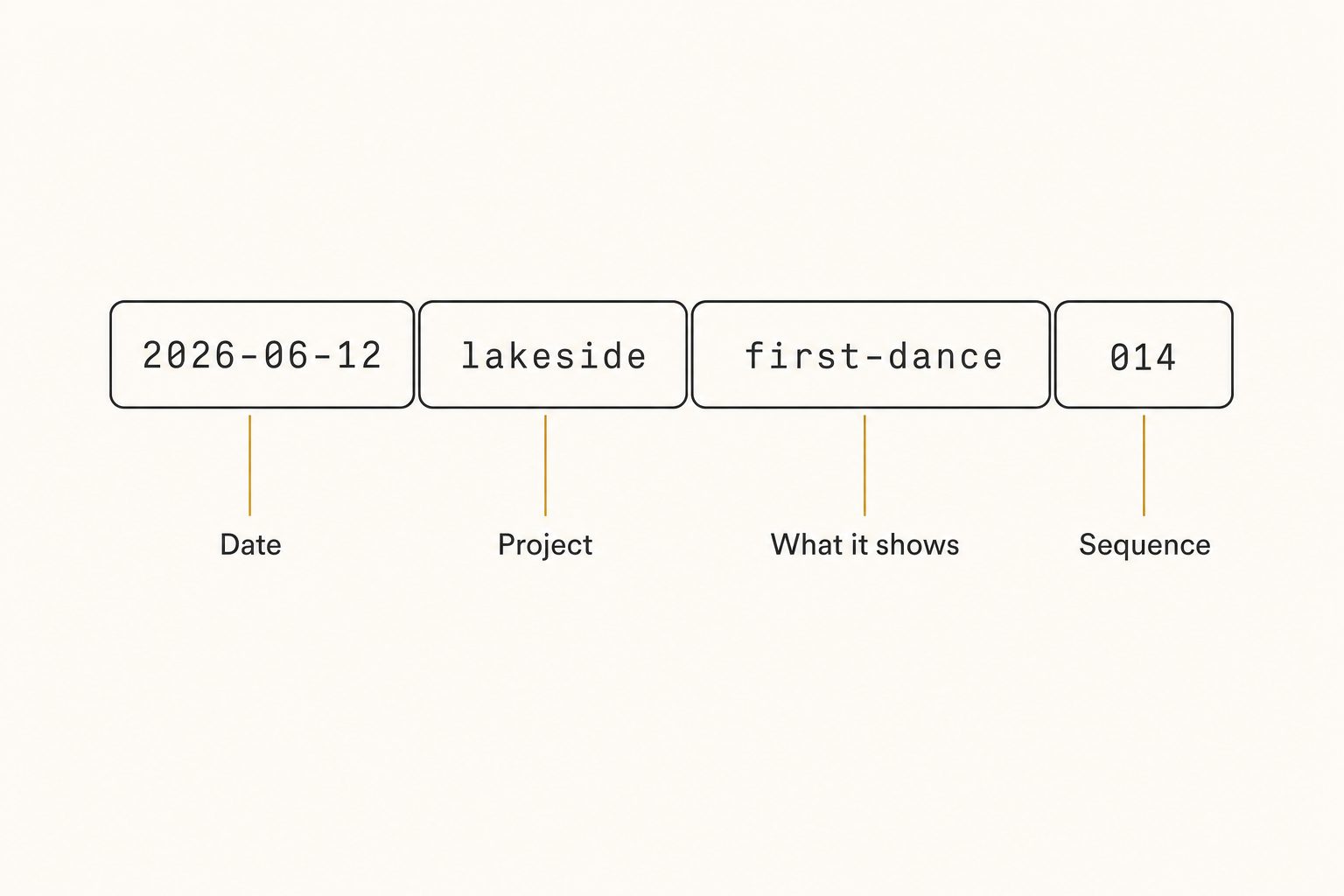
Date first, in year-month-day order
2026-06-12 sorts correctly by name alone, because year-month-day order makes alphabetical and chronological order the same thing. Month-first dates break that, and they are ambiguous outside the US. The date is also the one element you will never misremember, since the camera recorded it for you.
A short project or client code
lakeside, not the-hendersons-lakeside-wedding-june. The code groups a shoot's files even when they scatter across folders, exports, and email attachments. Keep a running list so the same client gets the same code every time; two spellings of one client is two shoots as far as your file browser is concerned.
Two or three words for what the shot shows
first-dance, rooftop-toast, menu-flatlay. This descriptor is the only element a search box can match later, which makes it the most valuable real estate in the name. It is also the slowest to write, so be realistic: give descriptors to the selects you deliver and reuse, and let the rest of the take live on date, project, and sequence.
A padded sequence number
014, not 14. Computers sort digit by digit, so an unpadded sequence runs 1, 10, 11, 2 and your frames shuffle out of order. Pad to the size of your biggest shoot: three digits covers 999 frames, four covers a full wedding day.
Character rules that keep filenames portable
A filename travels through operating systems, browsers, backup tools, and other people's computers, and each one punishes a different bad habit. The portability rules are short, and the University of Michigan's image-management guide backs every one.
- Lowercase everything. Some filesystems treat
Lakeside.jpgandlakeside.jpgas different files, some as the same. Never depend on case. - No spaces. Spaces become
%20in URLs and break scripts and command-line tools. Use hyphens inside an element and underscores between elements, or all hyphens; pick one and stop thinking about it. - Letters, numbers, hyphens, underscores. Nothing else. Slashes, colons, question marks, and ampersands each break something somewhere.
- Keep it under about 60 characters. Long names make long paths, which is where sync tools and backups start throwing errors.
Then there is versioning, where final_v2_FINAL.jpg goes to die. Drop the word "final" and use suffixes that say what a file is for: -v2 for a revision, -web for the downsized export, -print for full resolution. When the name says the job, nobody opens five copies to find the right one.
Making the convention survive a team
Naming conventions do not die from bad design. They die from exceptions: the rushed Friday, the intern who never got told, the one shoot someone filed from their phone. Three habits keep the system alive.
Write it down on one page. The convention, three example filenames, and the list of project codes. If the rule lives in one person's head, it leaves when they do.
Rename at intake, in batch. The ten minutes after a shoot lands is when you still remember what it was, and tools you already own do the work: Lightroom renames on import from a template, Adobe Bridge is free and batch-renames anything, and Finder or File Explorer rename selected files in bulk.
Make the importer responsible. One person renames each shoot as it arrives, instead of everyone renaming sometimes. Shared responsibility is how half a library ends up named and the other half stays DSC_0481.jpg.
Tip. Consistency beats cleverness. A plain convention applied to every file outperforms a beautiful one applied to most files, because a single unrenamed folder breaks sorting and search for everything in it.
Filenames carry half the load; the folder tree carries the rest. The folder side of the system is in our guides to organizing photos in Google Drive and organizing Dropbox photos. If your phone auto-uploads through Camera Uploads, those timestamps are already date-first names, so you only add the project layer.
What a photo filename can never hold
Now the honest part the standard naming guides skip. A filename records what you knew and typed at intake: a date, a project, two or three words. It cannot hold the other twenty things visible in the frame.
If you typed first-dance, a search for "champagne toast" or "string lights" returns nothing, even though both are right there in the photo.
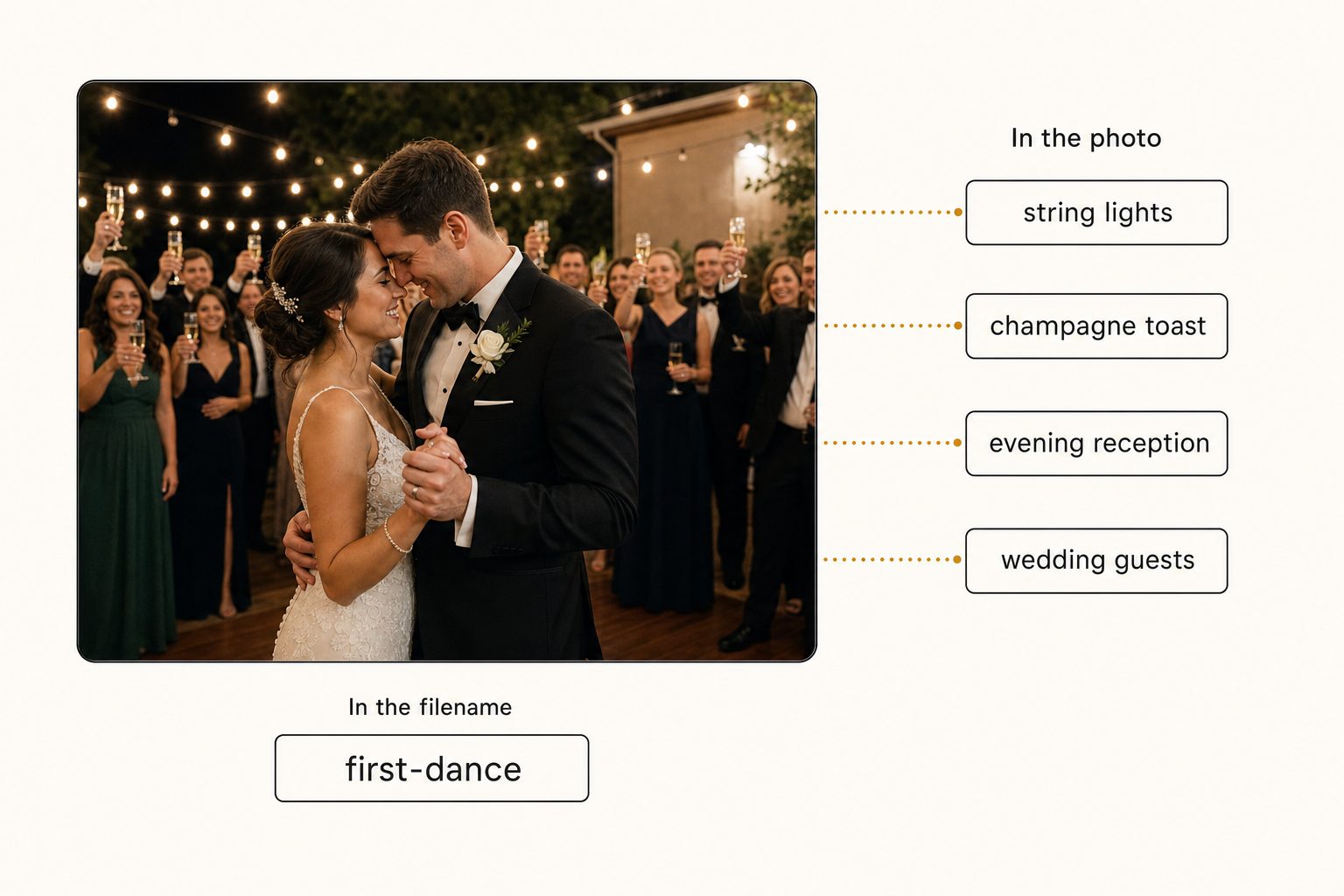
That ceiling arrives at the 1,000-photo wall, the point somewhere between 1,000 and 5,000 photos where a library outgrows anyone's memory. Below it, dates and project codes genuinely work. Above it, the questions change shape: you stop looking for "the June 12 shoot" and start looking for "that shot of the couple under the string lights," and no filename you wrote three years ago can answer that.
The scale math is blunt. Effectively every file arrived under a camera-serial name. Renaming them by hand at even ten seconds per file is more than 50 hours of typing. An AI indexing pass read the same archive unattended and made every frame searchable by what it shows, with the original filenames untouched.
Past the wall, you keep the naming convention for sorting and delivery and add a search layer for content; the full method is in our guide to finding any photo in your library.
Tip. You can test the search layer without renaming a single file. Tagrly's free tier reads the first 500 photos in any Google Drive or Dropbox folder, no credit card, so you can run it on a real folder and search by what the photos show.
Do photo filenames matter for SEO?
For photos that end up on the web, yes, modestly. Google's image documentation recommends descriptive filenames because the name sits in the image URL, so lakeside-first-dance.jpg hands the crawler context that IMG_4827.jpg does not. It is one signal among several, and alt text and surrounding page text matter more; the full map of which image tags Google actually reads is in our image tagging for SEO guide.
Warning. Fix names before you upload, not after. Renaming a published web image changes its URL, which breaks existing links to it and resets any search signals the image has earned.
Which photo naming convention fits your library
There is no single right system, only the right one for how you shoot and who searches.
- Pick plain date-plus-sequence (
2026-06-12_014.jpg) if you shoot for yourself and browse by time. It is the fastest to apply and covers a personal archive fine. - Pick the full four-part convention if you deliver to clients or share files with a team. The project code and descriptor are what make a file findable by someone who did not shoot it.
- Pick descriptors-on-selects if renaming a whole take is unrealistic. Rename everything with date, project, and sequence at import, and add content words only to the delivered shots.
- Pick a search layer instead of a renaming project if your library is already past the 1,000-photo wall. Fifty hours of retroactive typing is not a plan; indexing the photos by content is.
Photo file naming conventions are the rare free tool that keeps paying off: date first, short project code, real words for the selects, padded numbers, lowercase, no spaces, written down once and applied every time. Name files as if you will be the one searching for them in three years, because you will be. And when the library grows past what typed names can hold, stop asking filenames to do a search engine's job; try a content search on your own folder and keep the convention for what it does best.
Frequently asked questions
What is the best file naming convention for photos?
Date first in year-month-day form, then a short project or client code, then a few words describing the shot, then a padded sequence number. For example, 2026-06-12_lakeside_first-dance_014.jpg. Date-first names sort chronologically in any file browser, the project code keeps a shoot together even when files scatter, the descriptor gives search something real to match, and the padded number keeps frames in order. Use lowercase, no spaces, and only letters, numbers, hyphens, and underscores. The exact shape matters less than applying one shape to every file, every time. A mediocre convention applied consistently beats a clever one applied occasionally.
Should photo filenames use YYYYMMDD or YYYY-MM-DD?
Either sorts correctly, because both put the year first. YYYY-MM-DD is easier for a human to read at a glance and the hyphens cost nothing, so it is the better default for most libraries. The two rules that actually matter: always put the year first, and never switch formats midway. A folder where half the files start 2026-06-12 and half start 06-12-2026 sorts into nonsense, and month-first dates are ambiguous to anyone outside the US. Pick one format, write it into your convention document, and keep it forever.
How do I rename thousands of photos at once?
With batch renaming, never one file at a time. Lightroom renames on import using a template you define once (date, custom text, sequence). Adobe Bridge, which is free, has a Batch Rename tool. On a Mac, Finder renames selected files in bulk; on Windows, File Explorer and PowerToys PowerRename do the same. The bigger habit is renaming at intake, in the ten minutes after a shoot lands, while you still remember what it was. Renaming an old archive of tens of thousands of files by hand is usually not worth the hours; for those, an AI catalog that indexes photos by content is faster than any renaming project.
Do photo file names matter for SEO?
Yes, modestly, for photos published on the web. Google's image documentation recommends descriptive filenames because the name appears in the image URL and gives the crawler context before it reads anything else. A file named lakeside-first-dance.jpg tells Google what the photo shows; IMG_4827.jpg tells it nothing. Set the name before you upload, because renaming a published image changes its URL and resets any signals it has earned. Filenames are a smaller signal than alt text and the text around the image, so treat them as an easy baseline rather than a strategy.
When do photo naming conventions stop working?
Somewhere between 1,000 and 5,000 photos, the point we call the 1,000-photo wall. A filename only holds what you typed when you named it, usually a date, a project, and two or three words. It cannot hold the other twenty things visible in the frame, so a search for champagne toast returns nothing if you typed first-dance three years ago. Past the wall, keep the convention for sorting and delivery, but stop asking filenames to make the library searchable. A search layer that reads every photo and records what each one shows covers that gap without renaming anything.
Try Tagrly on your own photo library
Connect your Google Drive or Dropbox folder and Tagrly will tag every photo in bulk. Search by what is actually in the image, share specific shots with clients, and never lose a photo again.
- Free for your first 500 photos
- Read-only access, revoke anytime
- No credit card