
The wedding-sales manager needs the rooftop set for a ceremony at sunset, the press kit needs the renovated spa, and the booking channels still show guest rooms from two renovations ago. Every one of those photos exists. They are just spread across ten years of agency shoots, a few staff phones, and folders only one person can navigate.
What a hospitality photo library holds
A property's photo library spans six kinds of shots, and that spread is exactly why it scatters. No other business generates photography from this many rooms, teams, and vendors at once.
- Guest rooms and suites. Every room category, shot per renovation, the photos your booking channels live on.
- Public spaces. The lobby, the pool, the rooftop, the grounds, lit for morning and for evening.
- Food and beverage outlets. The restaurant, the bar, in-room dining, banquet plating. On a property these are one bucket among six, not the whole archive.
- Spa and wellness. Treatment rooms, the fitness floor, the quiet shots the press kit always asks for.
- Events and weddings. Ballroom sets, rooftop ceremonies, corporate buyouts. The photos your sales team sends prospects every week.
- Seasonal and press. Holiday decor, renovation reveals, and the approved hero shots media requests pull from.
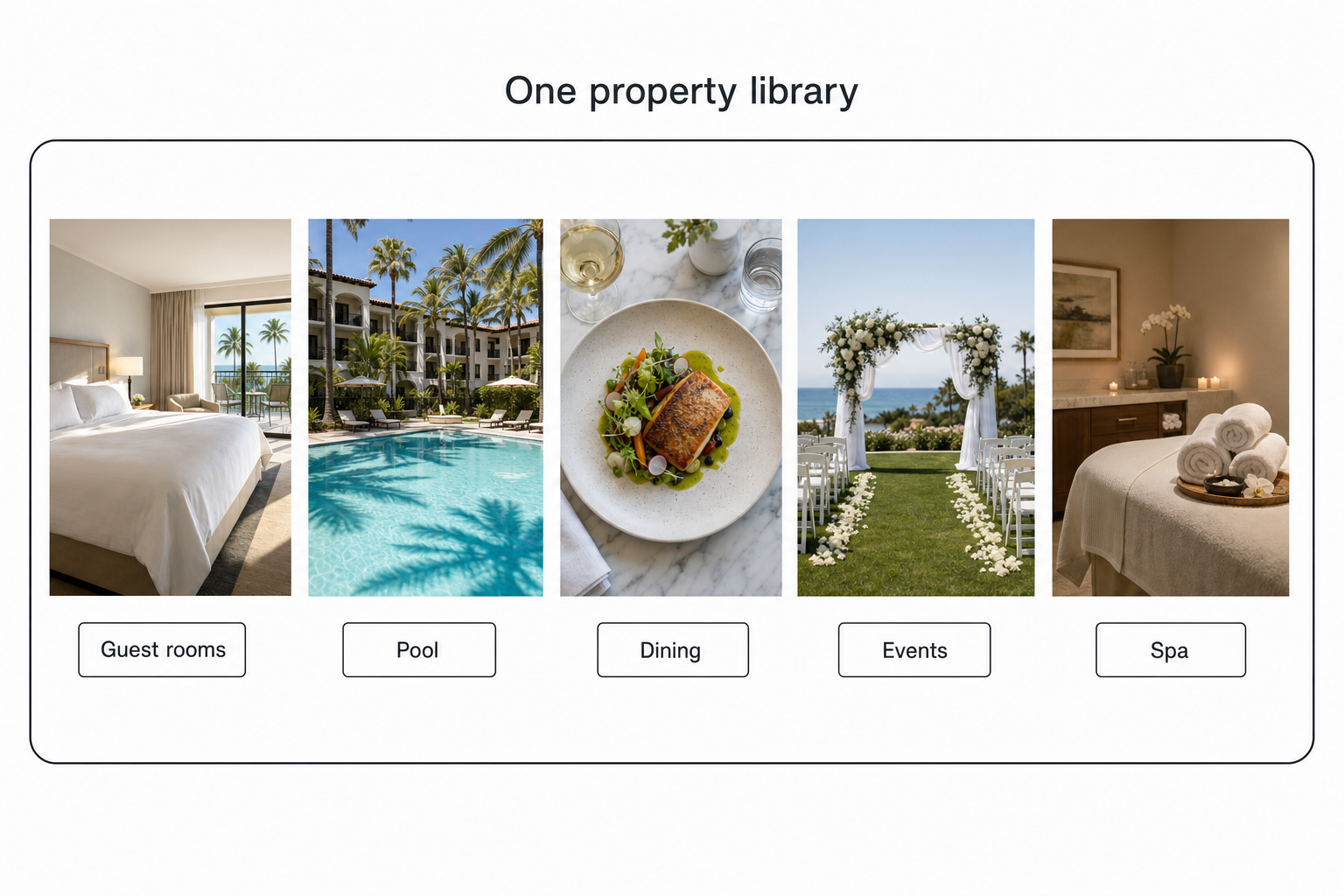
Those photos feed the channels that fill rooms: your website, the booking platforms, sales proposals, and your Google Business Profile, where listings with photos get 42% more direction requests and 35% more website clicks. The archive is revenue infrastructure, not decoration.
One boundary before going further. If what you run is a standalone restaurant rather than a property with outlets, our restaurant photo organization guide owns that case end to end, from menu-calendar folders to delivery-app shares. This guide is for hotels, resorts, and venues, where dining is one wing of a much larger archive.
Give the property one photo home it owns
Before any tool, the archive needs a single home that belongs to the property, not to a person or an agency. In Google Workspace that means a shared drive owned by the property, not a folder in the marketing manager's My Drive; a Dropbox team folder works the same way.
Hospitality turns over staff and agencies faster than almost any industry, and every departure is a chance for photos to leave with someone. The GM with the renovation shoot on a personal phone, the coordinator whose My Drive holds the wedding portfolio: each one is a resignation away from taking part of the archive along.
Agencies are the bigger leak. Properties routinely let the agency of record keep the masters, and when the contract ends, a decade of brand photography ends with it. Write delivery into the property's own storage into every photography and agency agreement, then pull the historical shoots in before anything else. If you are setting up access for the marketing team, our guide to building a shared photo library covers ownership and permissions in detail.
Warning. If your agency holds the only copies of your brand shoots, you do not own your archive, you rent it. Getting the masters delivered into a property-owned shared drive is the single highest-value step in this guide, and the one properties most often discover too late.
Make the hospitality photo library searchable
Folders and filenames stop working at what we call the 1,000-photo wall, and a full-service property hits it within a season or two. The wall is described in our complete guide to bulk image tagging: past roughly 1,000 photos, the library gets too big to remember and too big to rename by hand.
Manual keywording does not rescue it. Tagging at editorial depth runs 5 to 8 hours per 1,000 photos of focused human typing, and a property archive spanning six buckets and ten years is tens of thousands of frames. Nobody at a hotel is going to do that, so it never happens.
An AI photo catalog closes the gap without the typing. It connects to the property's shared drive read-only, reads each photo once, and writes tags and a description for every shot. Your originals never move. Anyone on the team then searches in plain words, "rooftop set for a ceremony", "ocean-view balcony at sunrise", "ballroom banquet style", and the matches come back in seconds, ranked so the closest shot is first.
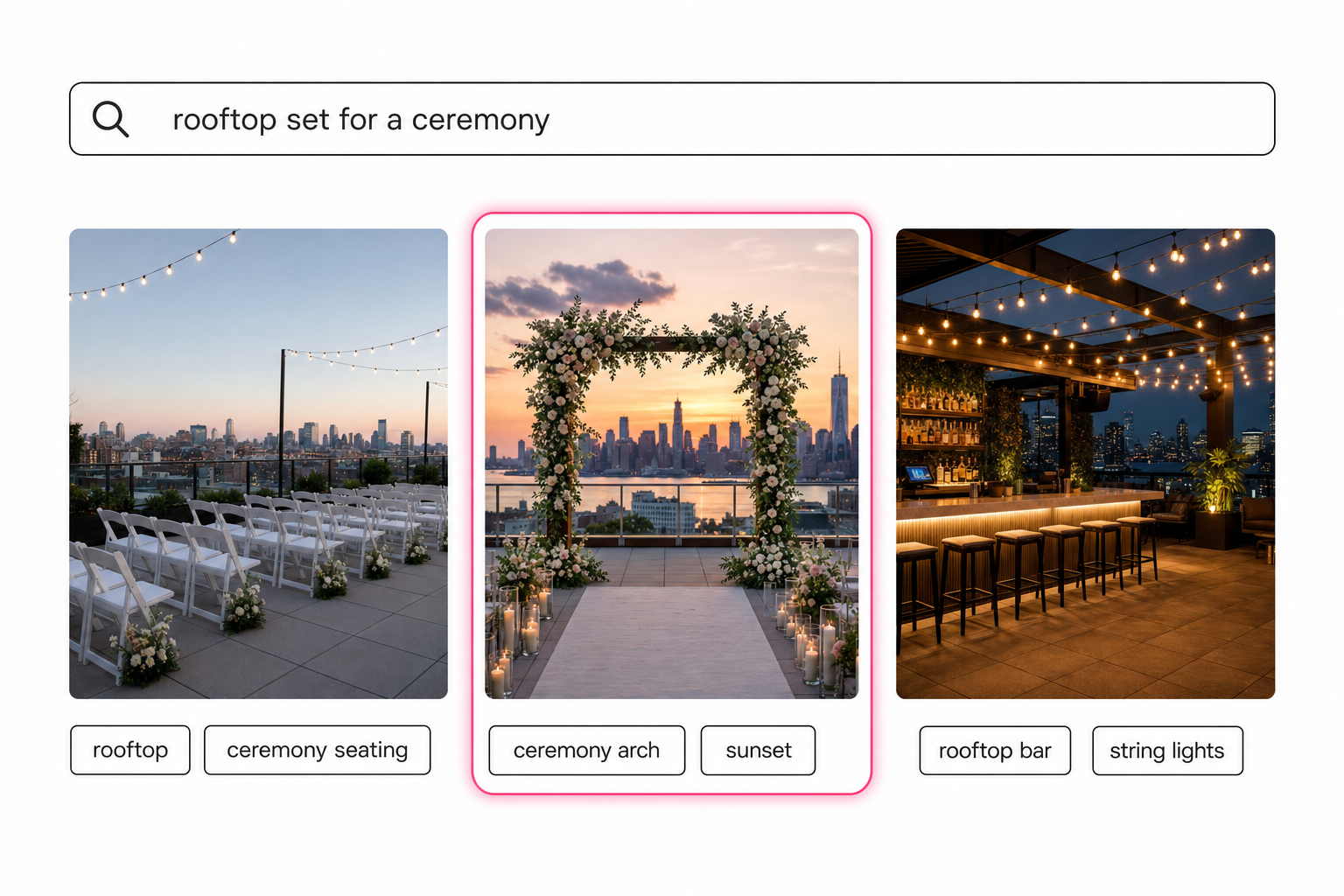
The same reading pass writes publish-ready alt text for every image, which matters more in hospitality than most industries: booking pages and hotel sites carry hundreds of images, and accessible image descriptions are a standard the W3C's image guidance lays out plainly. An archive that arrives tagged and alt-texted clears that backlog as a side effect.
This method is not hotel-specific; it is how any large library becomes findable, and the full version lives in our guide to finding any photo in your library. The hospitality difference is vocabulary: a catalog that reads your photos describes them in the words a planner or a journalist would actually ask for.
Tip. Tagrly's free tier reads the first 500 photos in any Drive or Dropbox folder, no credit card. Run it on one property shoot, search "pool at sunset" against your own frames, and judge the output before paying anyone.
Share property photos with planners, press, and booking channels
Outward sharing is where a folder-based hospitality archive leaks. A wedding planner wants six shots of the rooftop set for a ceremony. A journalist wants three approved hero images. A booking platform wants current room photos. The folder-based answer is to share the whole events folder, which exposes rejects, last renovation's rooms, and photos never cleared for press.
The better pattern is a collection: pick the approved shots and send one link that shows only those, usually with an expiry date. The requester gets exactly what they asked for, and nothing they should not see travels with it.
Weddings at the venue add one more wrinkle. The couple's photographer delivers to the couple, but the property needs its own set of the space dressed and lit, because those become the sales photos for the next hundred inquiries. How photographers hand off event coverage is covered in our event photography delivery guide; the property's job is making sure a usage-cleared copy of every venue shot lands in its own library.
Which hospitality photo setup fits your property
The right setup depends on the property's size and how often photos leave the building.
- A boutique property under 1,000 photos. A property-owned shared drive, a naming convention, and folder-level access. Free and genuinely enough. Do not pay for a tool yet.
- A full-service hotel or resort. Keep the shared drive for storage and add an AI photo catalog so search and outward sharing stop eating the marketing team's week. Tagrly is one option here, and not the only one that connects to shared storage; Foto Owl and Pics.io do too. Judge each on the words it writes for your photos. What the output looks like on property shots is on our hotels and resorts page.
- A group or management company. Prioritize one central searchable archive with per-property collections, so the team finds any shot and one property's photos never reach another's channels.
- A large chain with procurement. An enterprise photo platform with approval workflows and brand governance may justify its price. Below about 25 marketing seats, it is usually overkill.
A hospitality photo library comes down to one rule: one property-owned home the whole team can search. A shared drive and a naming convention carry a boutique property a long way, and there is no reason to pay before the 1,000-photo wall. Past it, a catalog that reads every guest room, rooftop, and plated dish turns ten years of scattered shoots into something the sales team can answer a planner from in seconds. The fastest way to know if that fits your property is to run it on a real folder of your own shots and search the results.
Frequently asked questions
How do you organize a hotel photo library?
Move every photo into one home the property owns, a shared drive in Google Workspace or a Dropbox team folder, instead of leaving shoots split across agency accounts and staff phones. Structure it by space and season: guest rooms, public spaces, dining outlets, spa, events, and press. Add a naming convention so a plain filename search still returns something. That free setup carries a property to roughly 1,000 photos. Past that point, add a photo catalog that reads each image, so anyone on the team can search by what a shot shows, like 'rooftop set for a ceremony', instead of remembering which agency delivered it or which year's folder it landed in.
Where should a hotel or resort store its photos?
In storage the property owns, not in a person's account and not in an agency's. A shared drive in Google Workspace or a Dropbox team folder both survive staff turnover and agency changes, and hospitality has plenty of both. The pattern that costs properties their archives is the agency keeping the masters: the contract ends, and ten years of brand photography ends with it. Make delivery into the property's own storage a line in every photography and agency agreement, then treat that folder as the single source every channel pulls from.
How does a hotel marketing team find a specific photo fast?
By searching what the photo shows instead of scrolling folders. An AI photo catalog reads each image once, writes tags and a description for it, and stores them in a searchable index. Anyone on the team then types a plain description, 'ocean-view balcony at sunrise' or 'ballroom set banquet style', and the matching shots come back in seconds, ranked so the closest match is first. Filename search cannot do this, because agency shoots arrive as DSC files, and folder structure cannot do it either, because nobody remembers which year's shoot had the frame.
How do hotel groups manage photos across several properties?
With one central library that keeps each property's photos separate but searchable from the same place. A group or management company hits two problems at once: finding the right shot across tens of thousands of images, and never sending one property's photos to another property's channels. A shared searchable archive with per-property collections solves both. The central team searches one library, and every outward share pulls only the approved shots for that property into a single link, instead of a folder that mixes flagships and franchises.
When should a property move beyond a shared drive?
Around the 1,000-photo mark, or as soon as weekly requests from planners, press, and booking channels start eating real time. Below that, a shared drive with a naming convention is genuinely enough, and you should not pay for a tool yet. A full-service property clears 1,000 photos fast: a brand shoot per renovation, seasonal food shoots for each outlet, event coverage most weekends. Once finding a shot means asking whoever ran the shoot, the hours lost and the photos re-shot because nobody could find the original cost more than a tool would.
Try Tagrly on your own photo library
Connect your Google Drive or Dropbox folder and Tagrly will tag every photo in bulk. Search by what is actually in the image, share specific shots with clients, and never lose a photo again.
- Free for your first 500 photos
- Read-only access, revoke anytime
- No credit card