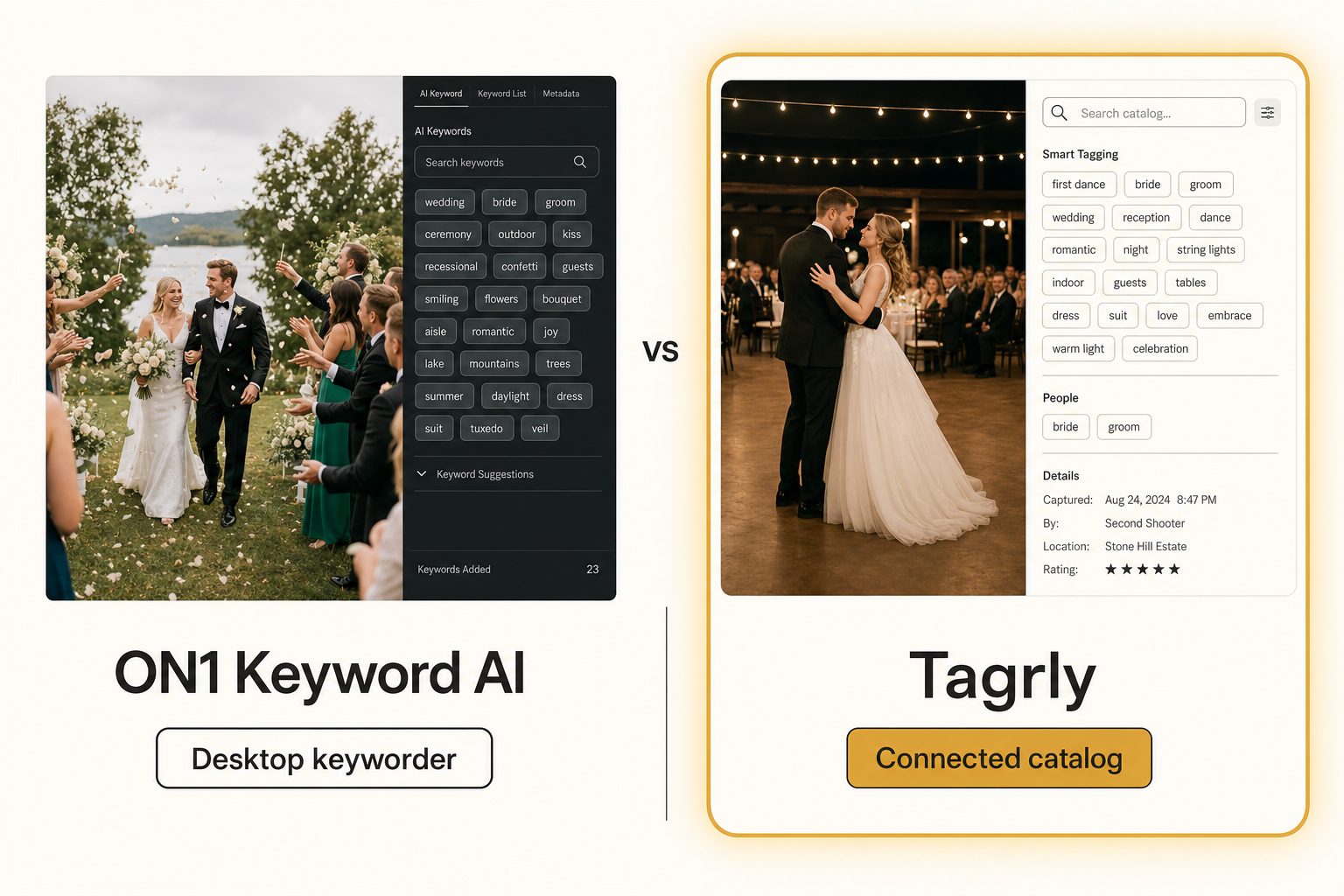
You bought ON1 Photo Keyword AI a year ago, pointed it at your Lightroom catalog, and it tagged the whole thing on your desktop. It worked.
Then the studio grew. The photos moved to a shared Google Drive, a second editor joined, and the keywords you generated are now sitting in XMP fields on one machine that nobody else can search. This is the post for that moment, when you are looking at ON1 Photo Keyword AI alternatives and trying to work out whether you need a different keyword tool or a different kind of tool entirely.
What ON1 Photo Keyword AI actually is
ON1 Photo Keyword AI is a local photo organizer that reads your images and assigns keywords automatically, so you can find a shot by what is in it without typing keywords by hand. The ON1 Photo Keyword AI product page makes the audience clear: photographers who already cull and edit on their own machine and want AI keywords written into their existing workflow.
The shape is desktop-and-plugin. You run it as a standalone app or as a plugin inside Adobe Lightroom Classic or Capture One. It analyzes each photo locally, generates keywords for the objects and scenes it detects, and embeds that metadata into the file as XMP, so the tags travel with the photo and any IPTC-aware app reads them later.
It supports hundreds of RAW formats plus the usual JPEG, PNG, TIFF, and HEIC, and it ships a fast browser for viewing and culling. DPReview's hands-on is a good neutral look at how the tagging holds up in practice.
That local focus is the point. A photographer who lives in Lightroom and wants keywords without a subscription or a per-image charge gets exactly that. ON1 does that one job and does not pretend to be a cloud service.
Note. "Keyworder," "metadata generator," and "AI photo tagger" mostly name the same category: a tool that reads an image and writes text about it. The split that matters is where the text lands. ON1 embeds it into the file on your machine. A catalog stores it on a shared surface a team returns to. The label tells you the audience; "keyword" and "embed" lean solo-photographer, "catalog" and "library" lean team.
What ON1 Photo Keyword AI costs
ON1 prices Photo Keyword AI as a one-time license you buy and own, with no monthly fee for the tagging itself. Once you buy it, tagging is free forever on your own machine. The standalone tool is also bundled into ON1's larger Photo RAW Max package, and ON1 offers a separate subscription, ON1 Everything, for people who want every app plus cloud storage.
Exact figures move around and the standalone license sometimes goes on sale, so check ON1's current pricing rather than trusting a number that may be stale by the time you read this. As of writing in June 2026, the buy-once standalone tool is the cheapest way in, the Photo RAW Max bundle costs more because it includes the full editor, and the subscription is a monthly path for people who want the whole suite.
The math is simple and it is genuinely in ON1's favor for one person. Buy once, tag your library, never pay again. That is the right cost curve for a solo photographer with a library that lives on a local drive and does not need to be shared.
The cost question only changes shape when the library moves to the cloud and other people need in, because then you are no longer paying for tagging, you are paying for shared access, and a buy-once desktop license does not sell that.
Why people look for ON1 Photo Keyword AI alternatives
Most people who own ON1 Photo Keyword AI are happy with the tagging. The reasons they go looking for an alternative cluster into three, and none of them is "the keywords are bad."
- The photos moved to the cloud. The library is now in Google Drive or Dropbox, shared with a team, and ON1 has no way to read a cloud folder. Pulling everything back down to one machine to tag it defeats the point of having moved it.
- A second person needs to search. ON1's tags live on one computer. The moment a second editor, a marketing lead, or a client-facing coordinator needs to find a shot, there is no shared surface for them to search, only one person's local catalog.
- The output goes on a website. ON1's keywords are built for filtering and culling, comma-separated and terse. They read stiff as alt text on a public page, which wants a full sentence describing the focal subject.
If none of those describe you, ON1 Photo Keyword AI is probably still the right tool and you can stop reading. If one or more do, the useful question is not "which desktop keyworder is better than ON1," it is "do I need a desktop keyworder at all, or a catalog."
Three kinds of ON1 Photo Keyword AI alternatives
The alternatives split into three groups, and the right pick depends on which of the three reasons above sent you looking.
Other desktop keyword apps
If your workflow has not changed and you just want a different local keyworder, you stay in ON1's own tier. Excire Foto is the most direct rival: a buy-once desktop tool and Lightroom plugin that tags locally and embeds keywords, with its own search engine and a different feel for the tagging. This is a lateral move, swapping one desktop tool for another, and it is the right move when the job is still "keyword my local library and stay in Lightroom." We compare the desktop tier against the upload tools and the catalog in our photo metadata generators comparison.
Multi-device organizers like Mylio Photos+
If you want one personal library synced across your own laptop, phone, and a drive at home, with face recognition and light editing, Mylio Photos+ is the rival reviewers most often name against ON1. It is built for a person or a family managing their own photos across their own devices, not for a work team sharing a cloud library. It syncs your devices; it does not turn a shared Drive into a surface several coworkers can search.
Connected catalogs
If the photos live in Drive or Dropbox and a team searches them repeatedly, the better-shaped alternative is a catalog that reads your storage and builds one searchable surface. Tagrly sits here. Instead of running on one machine, it connects read-only to the cloud folder you already have, tags everything in bulk, and lets the whole team search one place. This is not a lateral move from ON1, it is a change of category, and it is the right one when the job has shifted from "keyword my local catalog" to "let the team find a photo on a Thursday."
Where Tagrly fits as an ON1 Photo Keyword AI alternative
Tagrly answers a different question than ON1, and that difference is the whole reason to consider it.
Instead of running on your machine, Tagrly connects read-only to the Google Drive or Dropbox you already use, walks the folders you pick, sends each photo through a vision model, and writes the results to a searchable catalog. Your originals never move, nothing is installed, and the team searches one shared surface in a browser. The Drive connection uses the drive.readonly scope, so the tool can read your photos but never change or delete them.
Two things it does that a local keyworder does not. First, focal-subject tagging: every photo gets one dominant-subject label ranked above its background context, so a search for "rooftop sunset" surfaces photos that are about a rooftop sunset, not every photo that happens to contain a sky. Second, an editorial-grade alt text tier that writes a full publishable sentence per photo instead of a keyword list, which matters when the photos end up on a website rather than in a Lightroom filter. We define both frameworks in the complete guide to AI photo tagging, and cover why the underlying vision model matters in Claude vision for image catalogs.
In Tagrly's own testing on a 5,000-photo set, focal-subject tagging returned the right photo as the correct top search result in roughly 9 of 10 queries. The first scan left a fully searchable catalog, with focal-subject labels and alt text on every photo, with nobody typing keywords by hand.
The difference from a desktop keyworder is not speed, both are fast. It is what you are left holding. With ON1 you finish with keyworded files on one machine. With a catalog you finish with a surface the whole team types a query into and gets the right shot back.
Tip. Want to judge the tagging on your own photos instead of a marketing screenshot? Tagrly's free tier tags the first 500 photos in any Drive or Dropbox folder, no credit card. Connect a sample folder and read the tags it writes back before you commit to anything.
The limits matter too. Tagrly is not a photo editor. It does no RAW conversion, no culling, no local browser, and it does not embed XMP into your files by default (it exports tags on demand instead).
If your whole workflow is "edit and keyword on my own machine and keep the metadata in the file," ON1 is the better fit and a catalog would just get in the way. Tagrly earns its keep when the library is shared, growing, and searched by more than one person, not when it lives on a single desktop.
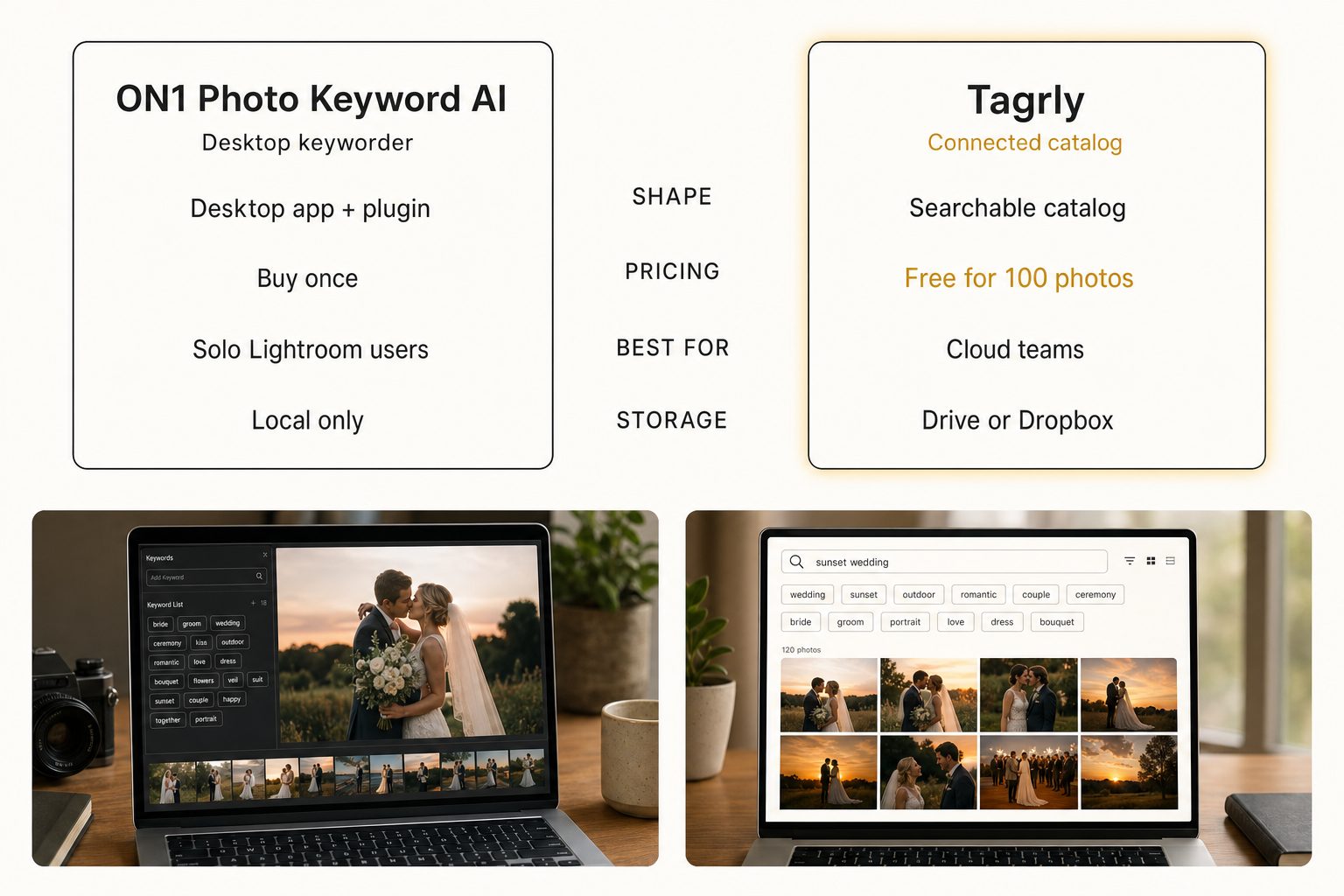
Tagrly vs. ON1 Photo Keyword AI, side by side
The two tools are not really competing on the same axis. They are two answers to "where do my photos live and who needs to find them."
| ON1 Photo Keyword AI | Tagrly | |
|---|---|---|
| Shape | Desktop app + Lightroom/Capture One plugin | Connected cloud catalog |
| Connects to Drive / Dropbox | No | Yes (read-only) |
| Where tags live | Embedded in file (XMP) + local catalog | Searchable database (export on demand) |
| Pricing model | One-time license, buy once | Monthly subscription + free first 500 photos |
| Runs | Locally on one machine | In the browser, nothing to install |
| Team-shareable search | No | Yes |
| Editorial alt text | Keyword-style | Yes (every photo) |
| RAW conversion + culling | Yes (fast browser, hundreds of RAW formats) | No (not an editor) |
| Best audience | Solo Lightroom / Capture One photographers | Teams with cloud libraries |
A few things worth saying plainly. ON1 embeds metadata into the file and gives you a culling browser and RAW support, which Tagrly does not, and that is a real point in its favor if you edit on your own machine and want the tags to live in the file. On the other side, ON1 does not connect to cloud storage and does not give a team a shared searchable catalog, which is the entire reason a connected catalog exists. Neither is "better," they are shaped for different jobs. For the IPTC and XMP metadata side of that tradeoff, embedded-in-file beats a database when the file leaves your control; a database beats embedded-in-file when a team searches one surface.
Warning. Watch the word "library." ON1's library is the catalog on your machine, fast and private and yours alone. A connected catalog's library is a shared index several people open at once. Both are legitimate, but they are not the same thing. If more than one person needs to search, a single-machine library quietly stops being enough no matter how good its tagging is.
How to choose: pick X if Y
Skip the feature checklist and answer one question: do your photos live on your own machine where you edit them, or in shared cloud storage a team needs to search?
- Pick ON1 Photo Keyword AI if you are a solo photographer who lives in Lightroom or Capture One, you want keywords embedded into your own files as XMP, you would rather buy once than subscribe, and you value the fast culling browser and broad RAW support. For a local, one-person workflow it is the right shape and a catalog would be overkill.
- Pick Excire Foto if you want the same buy-once desktop keywording but a different engine and search feel. That is a lateral swap inside the desktop tier, not a category change.
- Pick Mylio Photos+ if you want one personal library synced across your own devices with face recognition, rather than a work team's shared cloud surface.
- Pick Tagrly if your photos live in Google Drive or Dropbox, a team needs to search them, the library keeps growing, and you want editorial-grade alt text for public pages. The free first-500-photo tier lets you check the output before committing; see how the plans compare once you have a sense of your library size.
If you are torn specifically between ON1 and Tagrly, the deciding question is almost never which AI writes better keywords. It is team size and where the photos live. One person editing on one machine should buy ON1 and not think twice. Two or more people sharing a cloud library should connect a catalog and stop hunting. The split is a local catalog you own versus a shared library you live in.
For the wider category, see the complete guide to AI photo tagging, the three-way photo metadata generators comparison that puts ON1 next to the upload tools and the catalog, and our Tagrly vs. PhotoTag.ai comparison if you are also weighing the upload-and-export keyword tools. The short version: the best ON1 Photo Keyword AI alternative is the one shaped for what your photos do next, and for a team with a cloud library that turns out to be a catalog rather than another desktop keyworder.
Frequently asked questions
What is the best alternative to ON1 Photo Keyword AI?
It depends on what is pushing you off ON1. If you want a different buy-once desktop keyworder but the workflow has not changed, the closest alternatives are other local tools like Excire Foto, and you stay in that desktop tier. If you want one library synced across your own devices with face recognition, Mylio Photos+ is the common rival. If the real problem is that your photos now live in a shared Google Drive or Dropbox and a team needs to search them, that is not a desktop tool at all, it is a connected catalog. Tagrly is one example of the catalog approach, priced as a monthly subscription with a free first-500-photo tier. Match the alternative to the job: a solo desktop workflow keeps you on a desktop tool, a shared cloud library moves you to a catalog.
What is the main difference between Tagrly and ON1 Photo Keyword AI?
Where it runs and who it serves. ON1 Photo Keyword AI is a desktop application and a plugin for Adobe Lightroom Classic and Capture One. It runs locally on your machine, reads your photos, and embeds keywords into each file as XMP metadata, so the tags travel with the file and any IPTC-aware app can read them. It is a one-time purchase with no per-image charge. Tagrly is a connected catalog. It reads the Google Drive or Dropbox you already use over read-only access, tags every photo in bulk, and gives a whole team one shared searchable surface without moving anything. ON1 is built for a solo photographer who lives in Lightroom on one computer. Tagrly is built for a 1 to 10-person team whose photos live in cloud storage and who all need to find them.
Does ON1 Photo Keyword AI connect to Google Drive or Dropbox?
No. ON1 Photo Keyword AI runs locally against photos on your own machine, either as a standalone app or as a plugin inside Lightroom Classic or Capture One. It does not connect to a Google Drive or Dropbox folder and walk it for you, and it does not keep a shared online catalog that a second person can search. That is the right shape for a photographer whose library lives on a local drive or a directly attached disk. It is the wrong shape for a team whose photos live in shared cloud storage, which is the single most common reason people go looking for an ON1 Photo Keyword AI alternative.
Is ON1 Photo Keyword AI a subscription or a one-time purchase?
ON1 sells Photo Keyword AI as a one-time license you buy and own, with no monthly fee for the tagging itself. After you buy it, you can tag as many photos as you want on your own machine at no extra cost. The standalone tool is also bundled into ON1's larger Photo RAW Max package, and ON1 offers a separate subscription called ON1 Everything for users who want all their apps plus cloud storage. Exact prices move around and sometimes go on sale, so check ON1's current pricing page before you budget. The buy-once model is genuinely cheaper than a subscription if you are one person tagging a library that does not need to be shared.
Can ON1 Photo Keyword AI work for a whole team?
Not really, and that is by design. ON1 Photo Keyword AI runs on a single machine and writes tags into the file or the local catalog on that machine. A second person needs a second license, a second copy of the photos, and there is still no shared surface they can both search at once. For one photographer that is exactly right and the local-only model is a feature, not a flaw. The moment two or more people need to search the same growing library, the desktop model stops fitting and a connected catalog that several people open in a browser becomes the better tool.
When is ON1 Photo Keyword AI the right choice over a catalog like Tagrly?
When you are a solo photographer who lives in Lightroom or Capture One. Pick ON1 Photo Keyword AI if your photos sit on your own machine, you want keywords embedded into the files as XMP, you would rather buy once than subscribe, and you value the fast culling browser and broad RAW support that come with it. A connected catalog would be overkill for that workflow and would charge you monthly for sharing you do not need. You only outgrow ON1 when the photos move to shared cloud storage and a team needs to search them, at which point a local desktop tool cannot give you the one thing you now need, which is shared search.
Try Tagrly on your own photo library
Connect your Google Drive or Dropbox folder and Tagrly will tag every photo in bulk. Search by what is actually in the image, share specific shots with clients, and never lose a photo again.
- Free for your first 500 photos
- Read-only access, revoke anytime
- No credit card