
Your store has 1,800 product photos, and the alt text on most of them is empty or says IMG_2841. Every one of those blanks is a product Google Images cannot rank and a screen-reader user cannot shop. (To see a generator work first, run one product shot through our free alt text generator, no signup.)
What alt text on product images does
Alt text does three jobs on a product page, and all three depend on the words matching the photo.
- Accessibility. It tells screen readers what the photo shows, so shoppers who cannot see the image can still buy the product.
- Image search. It tells Google Images what the photo contains, which is how product photos rank in image search.
- Fallback. It stands in when the image fails to load on a slow connection.
More than half of stores get it wrong. In the Baymard Institute's 2021 accessibility review of 33 top-grossing e-commerce sites, 55% failed to describe the core content of informational images in their alt text, and product photos are the most informational images a store has.
For visual categories like apparel, furniture, and home goods, image search is a real discovery channel. Google's image SEO guidance calls alt text the most important attribute for describing an image, and Google reads it alongside computer vision and the page's own text.
Alt text is still a baseline, not a growth hack. It will not rescue a weak product page; it just stops your photos from being invisible.
The formula: how to write alt text for a product image
The best product image alt text is a description a shopper could buy from. The formula has four parts: product type, color or visible variant, material, and one distinguishing detail.
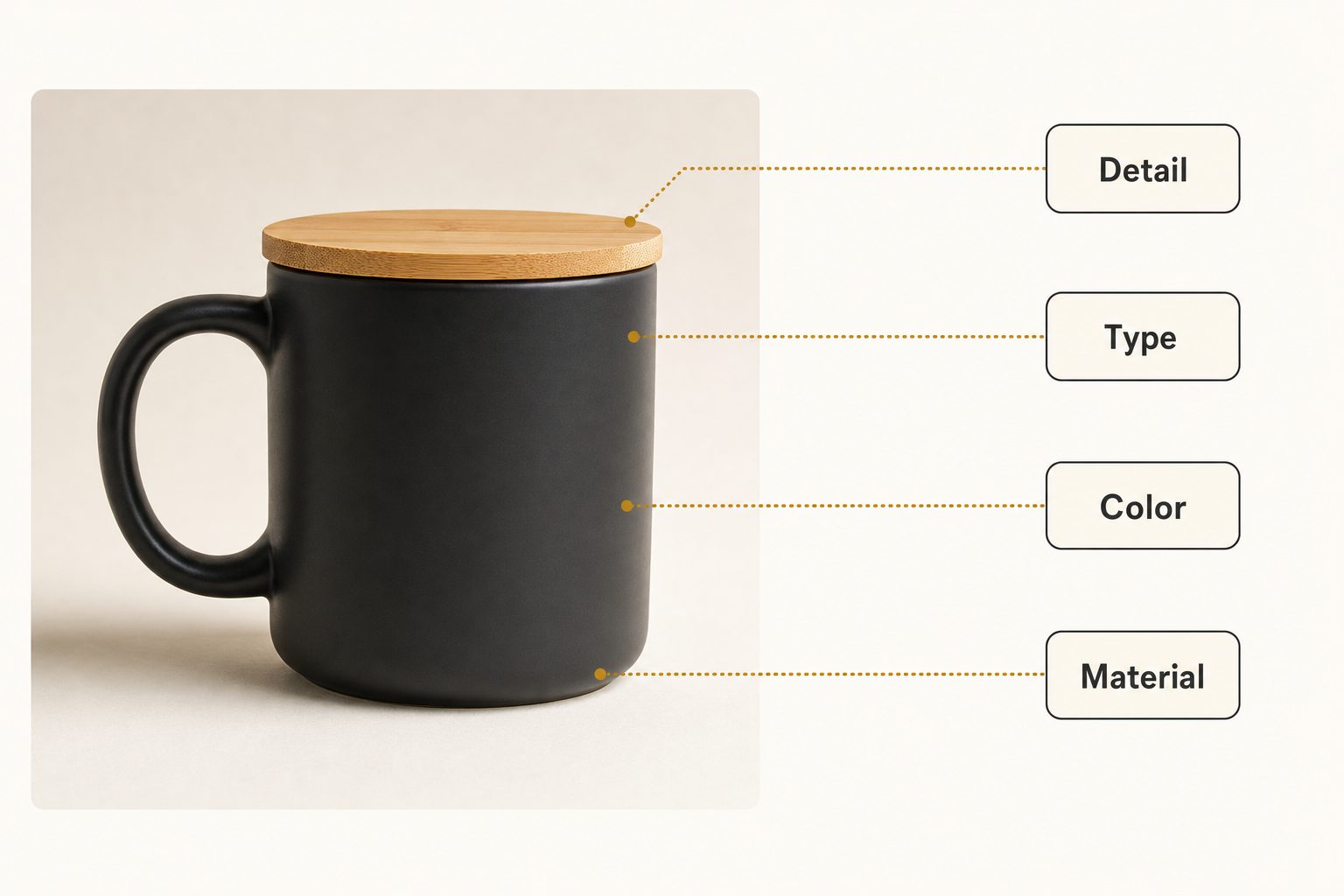
Compare the two columns:
| Weak alt text | Strong alt text |
|---|---|
| "mug" | "Matte black ceramic mug with a bamboo lid, 12 oz" |
| "shirt photo" | "Men's navy and white floral short-sleeve button-down shirt" |
| "sofa" | "Three-seat navy linen sofa with tapered oak legs" |
The rules that keep the strong column strong:
- Stay under roughly 125 characters. One tight sentence, not a paragraph. Shopify's alt text help recommends 125 or fewer and caps the field at 512.
- Skip "image of" and "photo of." Screen readers already announce it as an image.
- Front-load the product type. The first words carry the most weight for both readers and search.
- Use a keyword only when it describes something visible. "Linen" earns its place if the sofa is linen. A second and third synonym does not.
- Describe the photo, not the catalog entry. If the photo shows the mug from the back, say so. The alt text belongs to the frame, not the product.
Note. Purely decorative graphics, like a divider flourish or a background texture, get an empty alt attribute (
alt="") so screen readers skip them. Product photos never qualify: every one shows a shopper something they need to know.
One product, five photos: keep every alt text unique
Every photo in a listing needs its own alt text, because each frame shows the shopper something different. A typical listing carries four to six photos: front, back, a detail close-up, a scale shot, and a lifestyle frame.
Pasting one description across all of them is the most common mistake at this stage. It wastes four ranking chances, and a screen-reader user hears the same sentence five times without learning what the close-up shows.
The cheapest way to write each line is to describe what changed:
- Front. "Matte black ceramic mug with bamboo lid, front view"
- Detail. "Close-up of the bamboo lid's edge on a matte black ceramic mug"
- In use. "Black ceramic mug with bamboo lid on a desk beside a laptop"
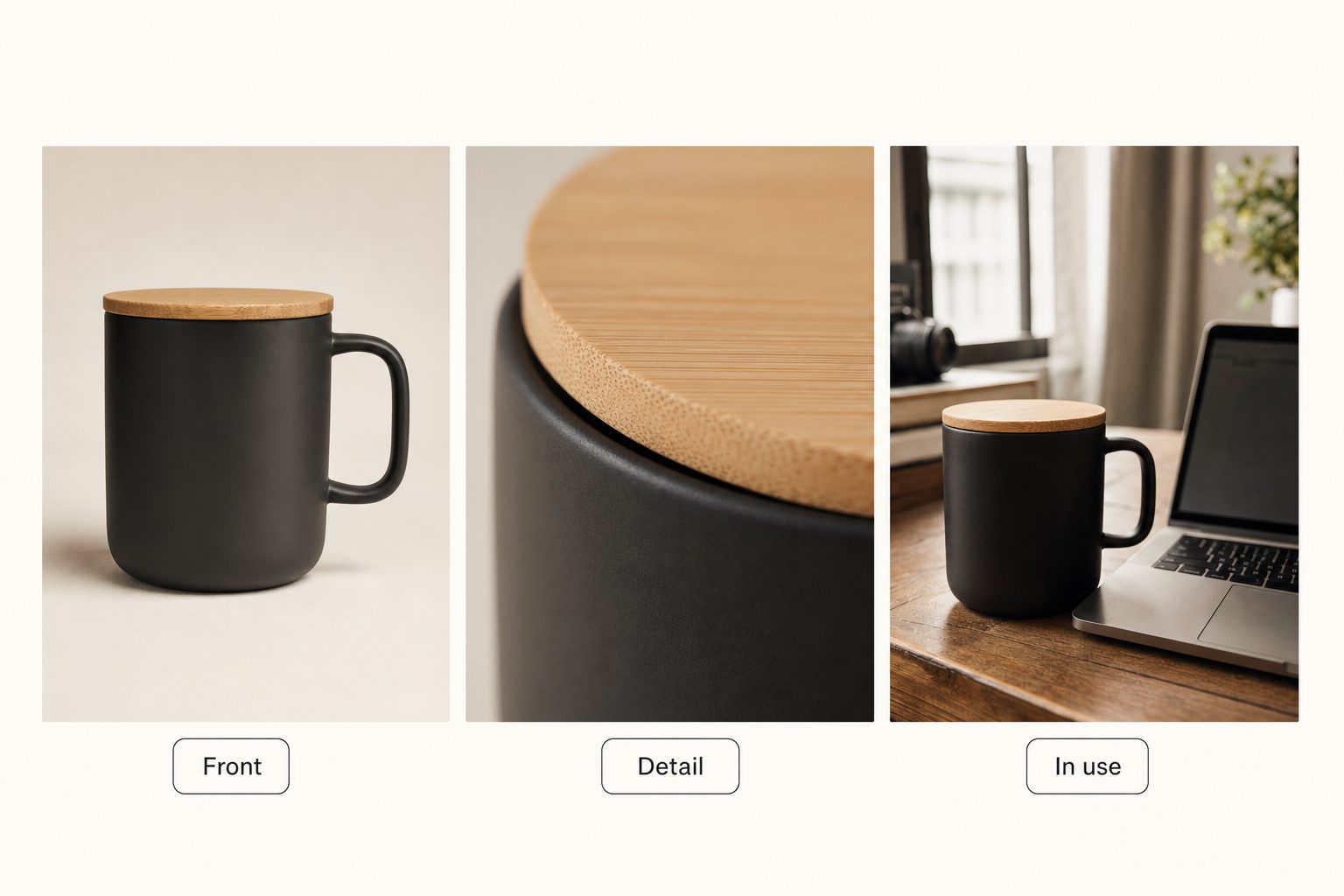
The angle-by-angle habit pays off later too, when you need the lid close-up again from a folder of 2,000 files. Descriptive text on each frame is what makes a product photo library searchable, the problem we cover in organizing e-commerce product photos at scale.
How to scale alt text across thousands of product photos
Past a few hundred photos, alt text stops being a writing problem and becomes a volume problem. A store with 400 products and five photos each has 2,000 alt attributes to fill, well past the 1,000-photo wall where a library stops being manageable by hand. There are three realistic ways through:
- Write it by hand, in bulk. Export the catalog to a spreadsheet, write alt text in a column, and re-import; Shopify's product CSV accepts alt text this way. At about a minute per photo, 2,000 photos is roughly 33 hours of typing: fine under a few hundred images, brutal past that.
- Use your store's built-in suggestions or an alt-text app. Shopify's media editor may suggest alt text for an image that has none, one image at a time, and Shopify apps and WordPress plugins fill empty fields in bulk. Quality varies widely; our AI alt text generator guide sorts the whole category by what each kind produces.
- Point an AI photo catalog at the original shoots. Many stores keep the original product shoots in Google Drive or Dropbox, and the store only holds the finished copies. A connected catalog reads those folders in place and writes a description for every frame.
Tagrly is one example of that third path. It connects to Drive or Dropbox with read-only access and never moves a file; photos on a computer can be uploaded instead (singly, as a folder, or as a zip), and Tagrly stores those copies.
Every photo it reads gets editorial-grade alt text, a complete sentence you can publish, alongside the tags that make it searchable. In Tagrly's own testing on a 5,000-photo set, focal-subject tagging (naming the main subject of each frame first) surfaced the correct top match in roughly 9 of 10 searches, so searching the catalog by description can find that lid close-up.
How the text reaches your store depends on the platform:
- WordPress or WooCommerce. Tagrly's WordPress plugin imports your Media Library, where WooCommerce keeps product photos, and its write-back button fills only empty alt fields. Alt text you wrote is never overwritten.
- Shopify or another platform. Tagrly has no Shopify app, so you copy each photo's alt text from its detail panel, or a developer pulls it through the API.
Tip. Judge tools on output, not marketing. Run ten of your own product photos through any generator and read the results out loud before you commit. Tagrly's free tier reads your first 500 photos with the same full reading every plan gets, no credit card, so you can test it on your own products before paying anything.
Whichever path you take, keep one human rule: review the AI output on your top 20 products by revenue. A vision model can see "navy linen sofa," but it cannot know you call it "The Weekender," and those are the pages where the polish pays.
Which path fits your store
The right path depends on two things: how many product photos you have, and where the originals live.
- Under about 300 product images. Write it by hand with the formula above. No tool needed, and you know your products better than any generator.
- Photos live only inside Shopify. Accept the media editor's suggestions or install an alt-text app, and spot-check the output against the formula before letting it loose on the catalog.
- A WordPress or WooCommerce store. An alt-text plugin fills the Media Library in place; Tagrly's plugin does the same and adds a library your team can search.
- Original shoots in Drive or Dropbox, reused by a team. Use a connected AI catalog, generate editorial-grade descriptions once, and reuse them everywhere the photos go. Our complete guide to AI photo tagging covers this category end to end.
- Big catalog, no budget. Do the top 50 products by traffic by hand now, and leave the long tail for a tool later. Half-covered beats untouched.
The bottom line
Alt text for product images is a formula, not an art project: product type, color, material, one detail, unique per frame, under 125 characters. The writing is easy; the volume is the problem. Past a few hundred photos, generate it with AI and keep human review for the products that earn the most. Whichever tool you choose, read its output on ten of your own product photos before you trust it with the whole catalog.
Frequently asked questions
Does alt text on product images help SEO?
Yes, in two ways. Google's image guidance calls alt text the most important attribute for describing an image, and Google reads it alongside computer vision and the page's own text, so it shapes how a product photo ranks in Google Images. Image search is a real discovery channel for visual products like clothing, furniture, and home goods. What alt text will not do is rescue a thin product page: it is one signal among many, and the same guidance warns against keyword stuffing. Treat it as a required baseline, not a growth hack.
Should alt text include the product name and keywords?
Include the product name when the photo shows the product, which for product images is almost always. A natural keyword is fine when it describes what is visible, like the material or style a shopper would search for. What fails is stuffing: cramming five keyword variations into one alt attribute reads as spam to Google and as noise to a screen-reader user. A good test is to read the alt text out loud. If it sounds like a description of the photo, keep it. If it sounds like a search query, rewrite it.
Should every product image have unique alt text?
Yes. If a product has five photos, each alt text should describe what that specific frame shows: the front view, the back, the fabric close-up, the product in use. Copying one line across all five wastes four chances to rank in image search and forces screen-reader users to hear the same sentence five times without learning what changed between images. The fix is cheap: describe the angle or detail, not just the product.
How long should alt text for product images be?
Aim for one sentence under roughly 125 characters. Shopify, for example, recommends 125 or fewer and caps the field at 512. That is enough room to name the product type, the color or variant, the material, and one distinguishing detail, which is all a shopper or a screen-reader user needs to identify the item. Longer alt text is not penalized, but most screen readers announce it as one unbroken stream, so a tight sentence is kinder than a paragraph.
Can AI write alt text for product images?
Yes, and at catalog scale it is the only realistic option. Modern vision models read a product photo and describe the type, color, material, and visible details reliably. The quality split to watch for: some tools output comma-separated tag lists, which fail as alt text, while editorial-grade tools write complete sentences you can publish. Shopify's media editor can also suggest alt text for an image that has none, one image at a time. Whatever tool you pick, keep a human review on your best-selling products, since AI cannot know your internal product names. Tagrly's free tier reads your first 500 photos with no credit card, so you can judge the output on your own catalog.
Try Tagrly on your own photo library
Connect your Google Drive or Dropbox folder and Tagrly will tag every photo in bulk. Search by what is actually in the image, share specific shots with clients, and never lose a photo again.
- Free for your first 500 photos
- Read-only access, revoke anytime
- No credit card