
A buyer messages you on Tuesday. The blue colorway of the ceramic mug is going live on the storefront Thursday, and the product page needs the clean white-background hero plus the three-quarter lifestyle frame. That shoot was three hundred products ago.
You know both frames exist. You just don't know whether they are in mug-final, ceramics-batch-3, or the export folder a freelancer zipped up in March, and every file in all three is named IMG_4821.jpg.
What's in an e-commerce product photo library
A product is never one photo, which is why the catalog grows faster than anyone plans for. A single SKU pulls a clean white-background hero, several detail and angle shots, and an on-model or in-use lifestyle frame, then the same set again for each colorway. A store with three hundred products and four colorways each is already past ten thousand images, before seasonal re-shoots.
Those frames rarely sit in one tidy folder. The white-background heroes that marketplaces require, the front, back, three-quarter, and top-down detail shots, the close-ups of texture or a logo, the lifestyle frames for the page and for social, the packaging shots: each set multiplies by every color you sell. On top of that you keep the camera raws, the retouched full-size exports, and the web-sized versions for your store.
The photos matter because they are most of the product page. In the Baymard Institute's large-scale usability testing, 56% of shoppers' first action on a product page was to start exploring the product images. The catalog is the storefront, not an afterthought.
Step 1: give every product photo one home the business owns
The first decision is where the library lives, and the rule is the one good agencies and studios follow too: it must belong to the business, not to a freelancer or a laptop.
For a small store that means one company-owned drive, not whichever designer's machine handled the last batch. Either option survives the staff and freelancer turnover e-commerce has plenty of:
- Google Workspace. A shared drive belongs to the organization, so files stay when a member leaves.
- Dropbox. A team folder owned by the business account, not by one person's login.
The photos your store runs on should not live in one contractor's personal account, because the day that arrangement ends, the archive can end with it. Our guide to building a shared photo library covers access and ownership in more detail.
Warning. If the only copy of a product shoot lives on a freelancer's drive or one external SSD, a lost drive or a soured contract takes the shoot with it, and a discontinued colorway sometimes cannot be re-shot. Copy everything into a business-owned shared drive with its own backup, the step most stores skip and later regret.
Step 2: file by SKU, name for your store
Once the photos live in one home, a little structure keeps them usable as the catalog grows. E-commerce has a natural filing key built in: the SKU.
A folder tree that works well has three levels:
- Product type at the top. Mugs, bags, knitwear, so a browse starts in the right aisle.
- One folder per SKU. The SKU is the key your store and your warehouse already share.
Raw,Hero, andWebsubfolders inside. Camera originals, retouched full-size exports, and store-sized versions never mix.
Name every file so the SKU, the color, and the angle read at a glance, like mug-blue-ceramic_white-bg_01.jpg. That makes a plain filename search return something instead of a wall of IMG_4821.jpg, and the web folder maps cleanly to your store's image slots. Our photo file naming conventions guide has more patterns that hold up.
Note. Folders and naming hold up to about 1,000 photos. Past that you hit what we call the 1,000-photo wall, described in the complete guide to bulk image tagging: the catalog gets too big to remember and too big to rename by hand. A store with multiple colorways per product clears that wall in a season or two.
Step 3: make your product photos searchable
The free setup above carries you a long way, then stops at the exact moment the catalog gets big enough to matter: search.
Folder and filename search only works if every file was named perfectly, which never survives a back-to-back shooting week with a freelance retoucher in the loop. And neither folders nor filenames can answer the questions you ask months later, like "which products do we have a top-down shot for" or "show me every blue product on a white background." Folders force you to predict, at upload time, every way you might want to find a frame later, and no one can.
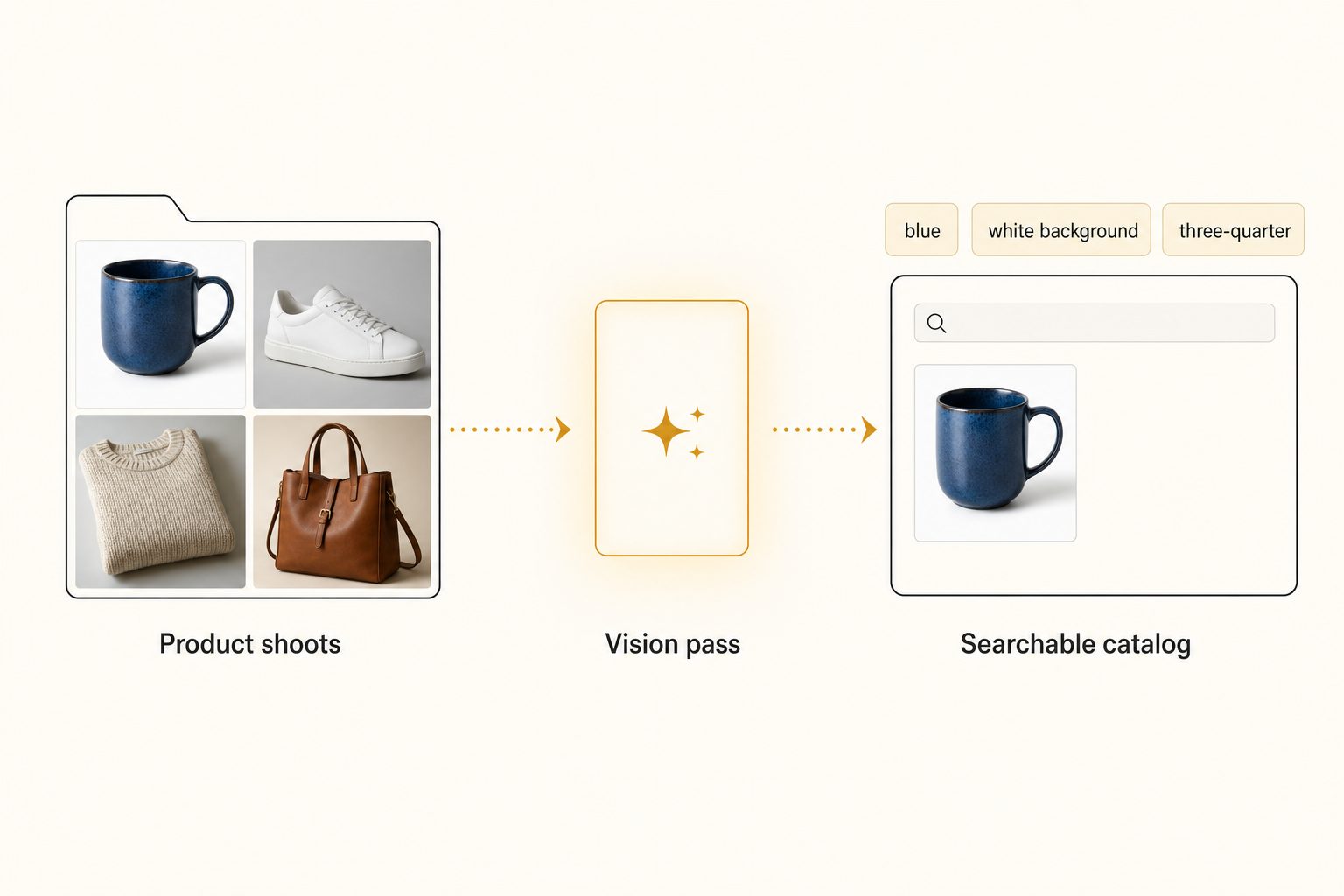
An AI photo catalog closes that gap in three moves:
- Connect. It links to your shared Drive or Dropbox with read-only access, and your originals never move.
- Read. It sends each photo to a vision model and writes a sentence and tags for every shot: the product, the color, the background, the angle.
- Search. You type a plain description, "blue ceramic mug, white background, three-quarter angle," and the matches come back ranked, strongest frame first.
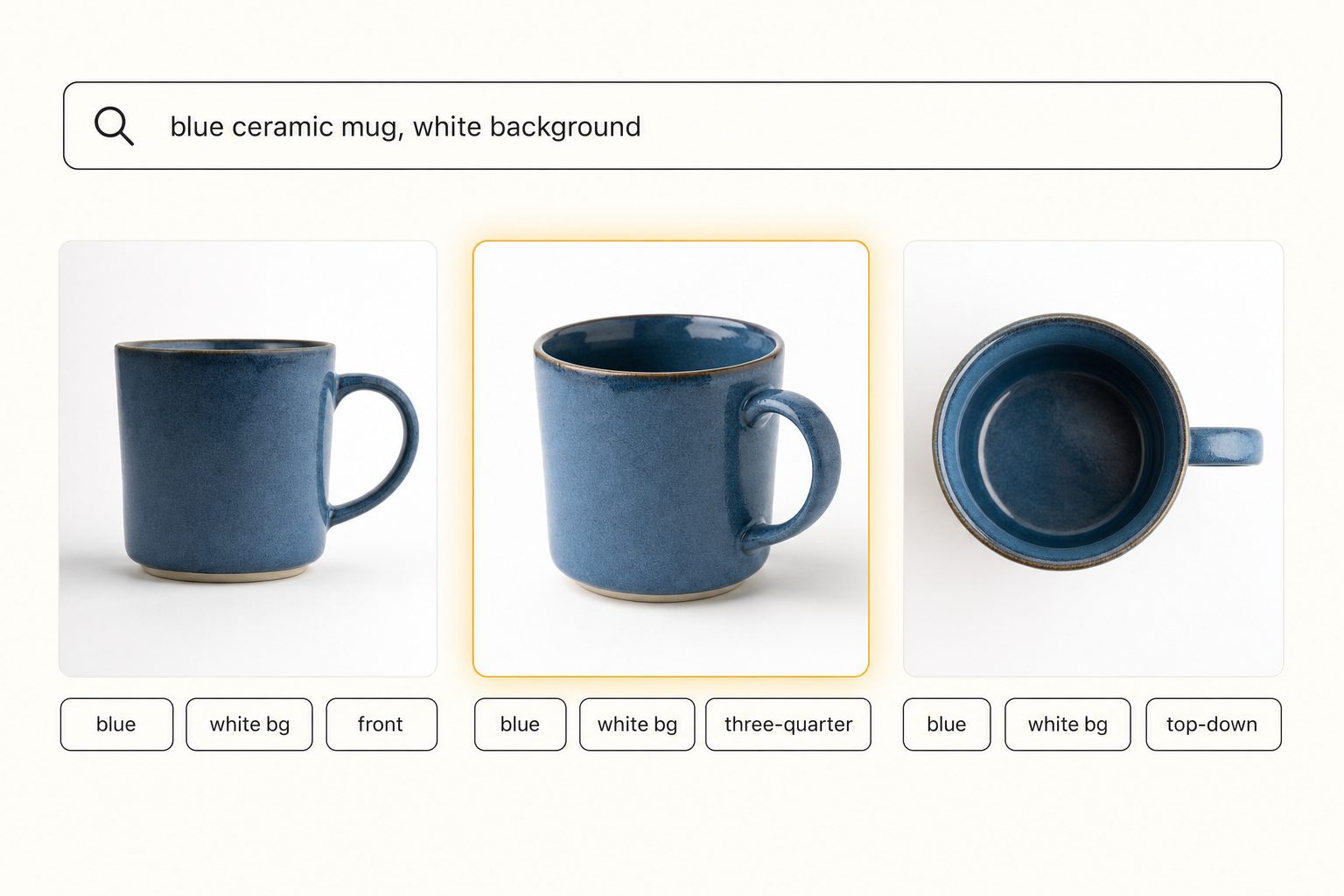
The quality of those tags decides everything. A weak tagger writes "object, cup, white" and your search for the three-quarter angle returns nothing useful. A strong one identifies the product first, then records its color, background, and angle as context.
That discipline is focal-subject tagging, and the full method lives in the 3-tier focal-subject tagging method. In Tagrly's own testing on a 5,000-photo set, focal-subject tagging surfaced the correct top match in roughly 9 of 10 searches with AI photo search.
The first full scan runs unattended in the background, and photos are searchable while it is still running. Tagrly is one tool that does this, and not the only one that connects to a shared drive, so judge any tool on the words it produces for your own products before paying for a plan. Tagrly's page for e-commerce brands shows the same search on product shots.
Tip. Want to see this on your own catalog? Tagrly's free tier tags the first 500 photos in any Drive or Dropbox folder, no credit card. Run it on one product line and search the results before you point it at the whole catalog.
Step 4: turn organized photos into product-page alt text
A searchable catalog does a second job that pays for itself on its own: it writes the alt text your product pages need.
Every product image should carry a descriptive alt attribute, both for shoppers using screen readers and because search engines read it. Writing alt text by hand for thousands of product shots is the kind of backlog that never gets cleared.
A catalog with editorial-grade output writes a full sentence per image, like "A blue ceramic mug with a matte glaze, photographed on a white background at a three-quarter angle," which you can export and drop onto the page.
That is the difference between generic tags and editorial-grade alt text, covered in detail in how to auto-generate alt text for thousands of images. The W3C's image guidance is the standard worth reading on what good alt text says.
The same catalog also thins out near-duplicates, the five nearly identical frames of one mug, once you can deduplicate by content rather than by eye.
A common question from larger stores: doesn't a product information manager already handle this? It handles part of it. A product information manager, often sold as a PIM, is the system of record for a product's title, price, specs, and final approved images.
What it cannot do is search a years-deep pile of raw and outtake shots, because it only knows the images you already chose and attached. So keep your store or product system as the home for published images, and add a searchable catalog over your full shoot archive for the find-the-frame job.
That same intake-to-publish flow is laid out in photo workflows for marketing teams. If your store runs on Shopify, the Shopify product photo organization guide maps this setup onto Shopify's variants, media gallery, and alt text fields.
Which setup fits your store
The right setup depends on how many products you carry and how often you re-use old frames.
- A new or small store under 1,000 photos. A business-owned shared drive, a strict SKU-and-color naming convention, and your editor of choice for retouching. That is enough, so do not pay for a catalog yet.
- A growing store with multiple colorways and angles per product. Keep your editor and your store, and add an AI photo catalog over your shoot archive so you can re-use any past frame by description and export alt text in the same pass.
- A multi-brand seller or marketplace operation. Prioritize one central searchable archive alongside your product system, so anyone can find a frame and nothing from one brand lands on another's listing.
- A large retailer with a procurement budget. An enterprise photo platform with approval flows and brand governance can justify its price. For a small marketing team it is usually overkill, and a connected catalog covers the find-and-share job for far less.
E-commerce product photo organization comes down to one rule: one business-owned home the whole team can search. Folders, SKUs, and naming carry a small store well past its first season, and there is no reason to pay before the 1,000-photo wall.
Past it, a catalog that reads every color, background, and angle, and writes the alt text on the way through, turns a pile of IMG_4821.jpg files into something you can ship a product page from on a Thursday deadline.
The surest way to know if it fits is to run it on a real folder of your product photos and search the results. For the bigger picture, read our guide to finding any photo in your library.
Frequently asked questions
How should an online store organize product photos?
Move every shoot into one place the business owns, a shared drive in Google Workspace or a Dropbox team folder, not a designer's laptop. Name files so the SKU is in the filename, like mug-blue-ceramic_white_01.jpg, and keep Raw, Hero, and Web folders per product. A consistent naming convention means a plain filename search still finds something, and it makes uploading to your store predictable. That structure carries a store to roughly 1,000 photos. Past that, add a photo catalog that reads each image so you can search by what the shot shows, the color, the angle, the background, instead of remembering which folder a frame landed in.
How do you find a specific product photo fast?
By searching what the photo shows instead of scrolling folders. Camera filenames like IMG_4821.jpg carry no information about the blue mug or the white background, so a filename search only finds shots you renamed by hand. An AI photo catalog reads each image, writes a sentence and tags describing the product, the color, the angle, and the backdrop, and stores them in a searchable index. You then type a plain description like 'blue ceramic mug, white background, three-quarter angle' and the matching frames come back ranked, closest match first. In Tagrly's own testing on a 5,000-photo set, focal-subject tagging surfaced the correct top match in roughly 9 of 10 searches.
When does a store need more than folders for product photos?
Around the 1,000-photo mark, or sooner if every product has multiple colorways and angles. Below that, a business-owned shared drive, a SKU-based folder tree, and a strict naming convention are enough, and you should not pay for a tool yet. A growing store blows past 1,000 photos quickly: a few hundred products, each shot in several colors from several angles, plus lifestyle frames and seasonal re-shoots. Once finding a past frame means a slow scroll or a guess about which folder it is in, the time you lose, and the re-shoots you book because you cannot find the original, cost more than a catalog would.
Can AI tag product photos by color and angle?
Yes, and that is the main reason to use one on a product catalog. A vision model looks at each photo and recognizes the product, its color, the background, and roughly the angle, so it tags a shot as a blue ceramic mug on a white background at a three-quarter angle without anyone typing those words. You can then search by any of those attributes across every product you have shot, which folders and filenames cannot do. Tag quality varies by tool, so before paying anyone, run a sample of your own product photos through and read the words it produces. Tagrly tags the first 500 photos in any folder free, so you can check the output on your own catalog first.
Does organizing product photos help with SEO and alt text?
Yes. Product pages need descriptive alt text on every image, both for accessibility and because search engines read it. Writing alt text by hand for thousands of product shots is the kind of task that never gets finished. A catalog with editorial-grade output writes a full descriptive sentence per image, like 'A blue ceramic mug with a matte glaze, photographed on a white background at a three-quarter angle,' which you can export and use on the product page. That turns alt text from a backlog into a byproduct of organizing the catalog. Always read a sample before trusting it across the whole store.
Try Tagrly on your own photo library
Connect your Google Drive or Dropbox folder and Tagrly will tag every photo in bulk. Search by what is actually in the image, share specific shots with clients, and never lose a photo again.
- Free for your first 500 photos
- Read-only access, revoke anytime
- No credit card