You shot a two-day conference, came home with 3,400 frames, and the client wants a first batch for the press release tonight and the full gallery by Friday. Four months later the same client emails asking for the one shot of the keynote handshake at the Q2 summit, and you are scrolling a folder named after an event you half remember. An event photography photo delivery workflow handles both moments: the fast delivery now, and the find later.
The two jobs hiding inside "photo delivery"
Event photographers say "delivery" and mean one thing. The work is actually two jobs that need two tools. The first is getting this event out the door fast: cull thousands of frames, edit them, and hand the client or the attendees a gallery they can use today. The second shows up months later, when someone asks for a specific shot and you have to find it across every event you have ever covered.
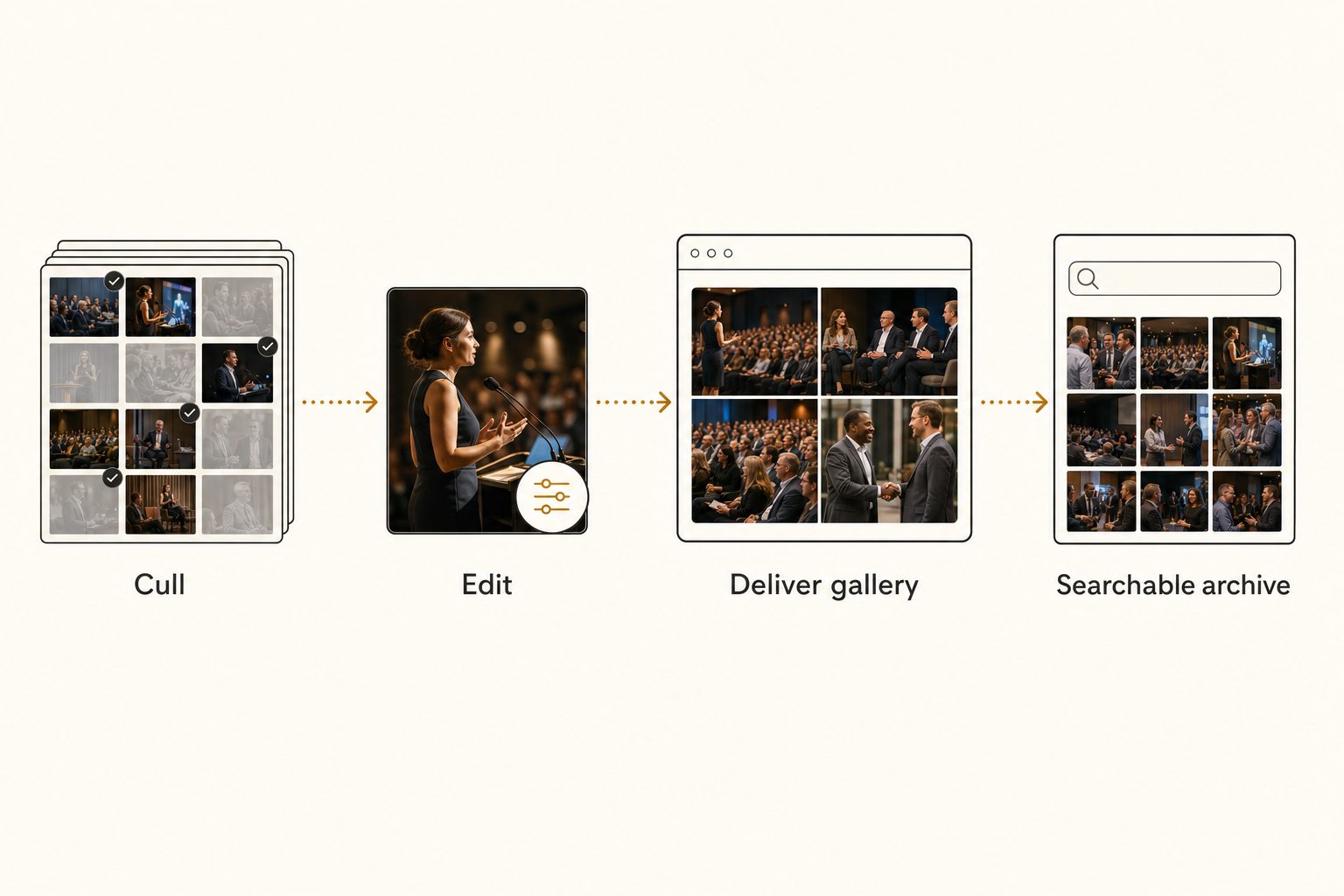
Most photographers nail the first job and improvise the second. They have a delivery gallery they like, and a folder named after each event that they pray they can navigate later. The delivery is solved. The retrieval is a scroll. This guide walks both jobs in order, with the free and paid options for each.
Stage 1: cull and edit before you deliver anything
Fast delivery starts before you touch a gallery. It starts with cutting the take down.
A conference or corporate client does not want all 3,400 frames. They want the 80 to 150 that tell the story: the keynote, the panel, the candid networking shots, the branded signage, the room at capacity. Culling hard is what makes delivery quick, because a tight gallery uploads faster and reads as a curated deliverable instead of a dump.
Dedicated culling tools (Aftershoot, Photo Mechanic, Narrative Select) rate and reject frames far faster than scrolling in your editor, which matters when you are working through thousands of frames the night after a shoot. Do a rough cull there, then a final pass during editing.
Tip. For events with a same-day need, split delivery into two batches. Push a small first set of 10 to 20 edited frames within hours for the press release or the social recap, then deliver the full gallery a day or two later. The client gets what they need on deadline, and you are not racing the whole edit in one night.
The output of this stage is one folder of finished, edited selects per event, separate from the full take. That separation is what lets you deliver the selects cleanly without exposing every test frame and blink, a problem we cover in how to share specific photos with clients.
Stage 2: deliver the selects through a gallery
This is the stage most people mean by "event photography photo delivery." A proofing and delivery gallery gives the client a branded page where they view the selects, mark favorites, and download the resolutions you allow, while your full take stays private.
Pixieset, Pic-Time, ShootProof, and Picflow all do this well. The features that matter day to day are the same across them: download controls so the client cannot grab full-resolution files unless you let them, web and print size options, favoriting so they tell you which images they want, and link expiry. Pricing runs from free starter tiers up to monthly plans for working studios, but the limits and prices change often, so check each vendor's current page rather than trusting a number in a blog post.
Plan for one friction point: most galleries still bundle a multi-photo download into a zip file, which stalls clients opening it on a phone. We cover what to send instead in how to share photos without a zip file.
For most corporate, conference, and brand events, deliver edited high-resolution JPEGs for print and press plus web-sized versions for social, and hold the RAW files in your archive. Hand over RAW only when the contract specifically calls for it, and price that as a buyout.
Note. The delivery gallery is built to present one event, not to safeguard your originals. Galleries expire and downsize files. The client's download is not a backup either. Your archive is the master copy, and the gallery, the social crops, and the press set are all just views built from it. Back up the full take to one home you own before you deliver anything.
When attendees deliver to themselves
Client delivery is one event handed to one buyer. Attendee delivery is a different shape: a festival, a race, a large conference, or a brand activation where hundreds or thousands of people each want their own handful of shots.
Hand-sorting by person does not scale there. Face-recognition delivery tools like Foto Owl and similar event-gallery platforms let an attendee take a selfie, match it against the uploaded gallery, and pull only their own photos. You still upload the edited set; the face matching replaces the manual sort.
We compare that approach in our Foto Owl alternatives breakdown. If your event is attendee-facing at scale, this is the right delivery layer, and it is a different tool from the client proofing gallery above.
Stage 3: the request that comes four months later
Here is where most workflows quietly break.
The gallery for the Q2 summit expired in August. It is now October, the client wants the keynote handshake shot for an annual report, and the only copy you control is a folder named after the event. Finding that one frame means remembering which event it was, opening the right folder, and scrolling past a few thousand near-identical conference shots.
Across a year of events, that is the slow tax on every reuse request, every "can we get that one shot" email, every portfolio cull.
The free version of this stage is discipline. A strict folder structure (year, then client, then event, with a selects subfolder) and a naming convention every file follows. That carries a solo photographer a long way at no cost, and we lay it out in setting up a shared photo library for a small team.
The stage that discipline stops covering is searching by what a photo actually shows. Folder and filename search only finds a shot if you remember which event it came from and named it perfectly at the time, which never survives a back-to-back booking season.
Past a few thousand photos you hit what we call the 1,000-photo wall, described in the complete guide to bulk image tagging: the archive gets too big to remember and too big to rename by hand. A working event photographer clears that wall inside a season or two.
Stage 4: make the event archive searchable
An image catalog closes the retrieval gap. It connects to your Google Drive or Dropbox with read-only access, streams each photo to a vision model, and writes a sentence and tags describing every shot, the focal subject first and the scene around it second. Your originals never move out of your storage.
From then on you search a plain description across every event at once. "Keynote handshake, blue stage lighting" or "founder laughing, rooftop launch, skyline" pulls the matching frames, ranked by the focal-subject tagging method so the closest match lands first. We go deeper on that search in how to search photos by description in Google Drive, and on where intake, search, and sharing fit together in the photo workflow for marketing teams.
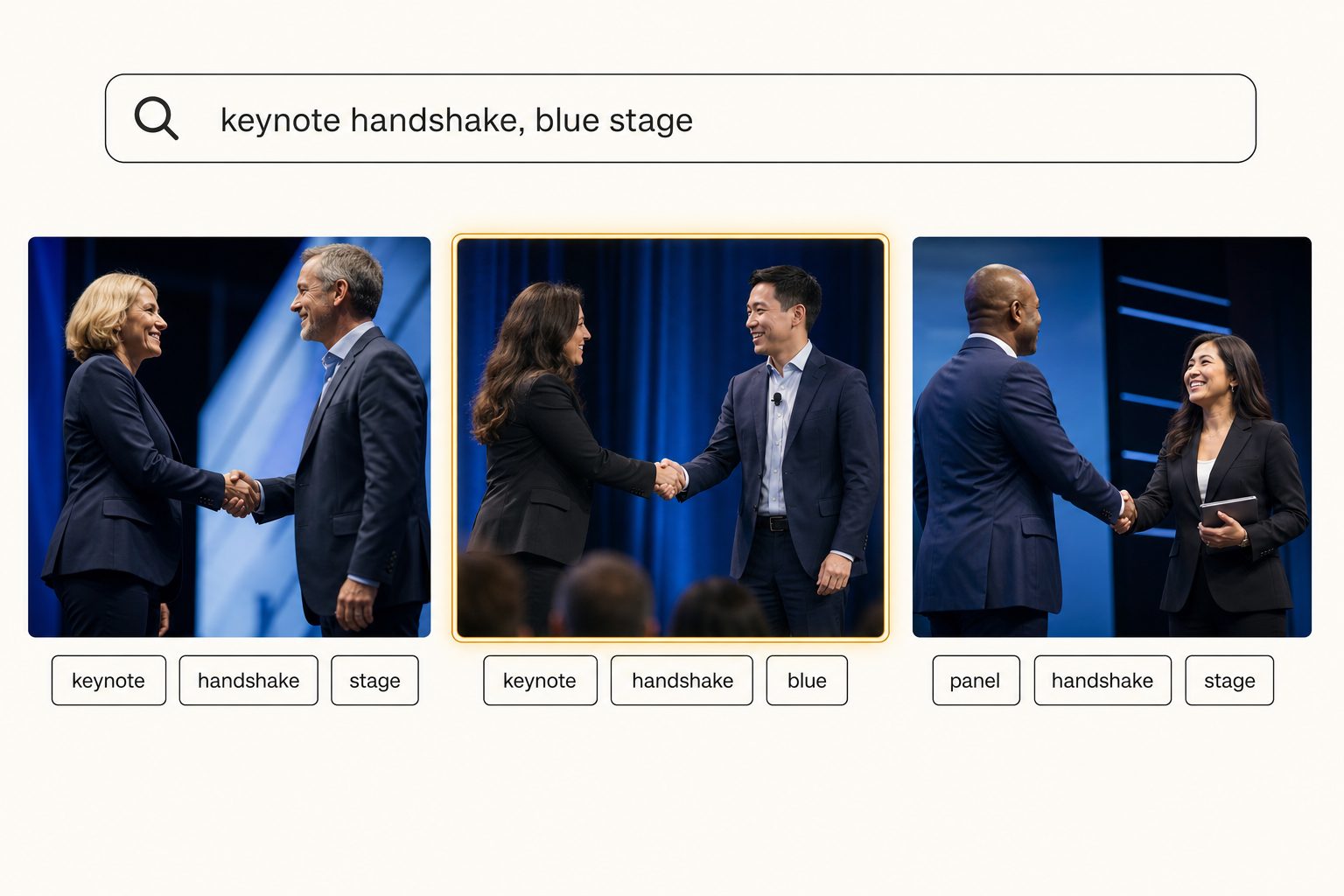
In Tagrly's own testing on a 5,000-photo set, focal-subject tagging returned the right photo as the top search result in roughly 9 of 10 queries. That is what turns the keynote handshake from an event months ago into a search, not an afternoon of opening folders. The connection stays read-only the whole time (the drive.readonly scope, no write access), so the scan cannot move, rename, or delete a single original.
Tip. Want to see this on your own events? Tagrly's free tier tags the first 500 photos in any Drive or Dropbox folder, no credit card. Run it on one old event folder and search the results before you connect the whole archive.
Tagrly is one option for that retrieval layer, not the only one. Delivery tools like Foto Owl and Picflow are built around uploading each event into their own gallery, so they present one event well but do not search a years-deep Drive or Dropbox archive in place. Whatever catalog you try, what separates them is tag quality, so judge each on the words it writes for your own photos before paying for a plan.
Which delivery setup fits you
There is no single right setup, only the one that matches how many events you shoot and how often old clients come back.
- A solo photographer, a handful of events a year. A proofing and delivery gallery for delivery, plus a strict folder-and-naming system for the archive. Free to cheap, and enough. Do not add a catalog before the archive gets big enough to be slow.
- A photographer covering large attendee-facing events. Add a face-recognition delivery tool like Foto Owl so attendees self-serve by face, on top of your client gallery for the booking client. That is the delivery layer hand-sorting cannot replace.
- A busy solo or a two-person studio. Keep the gallery for delivery and add an image catalog over your Drive or Dropbox so finding old shots stops eating your week. The reuse and reprint requests are where this pays off.
- A studio or in-house team covering dozens of events a year. A gallery for the client experience plus a searchable archive for the team, with per-collection sharing so any photographer or coordinator can pull a set without exposing the rest of the library. Hotels and venues that host events face a version of this from the other side, covered in building a hospitality photo library.
The short decision matrix:
- Proofing gallery. Pick a proofing gallery like Pixieset, Pic-Time, ShootProof, or Picflow if your job this week is delivering one event to a client.
- Face-recognition delivery. Pick a face-recognition delivery tool like Foto Owl if hundreds of attendees need to self-serve by face.
- Searchable catalog. Pick a searchable catalog like Tagrly if a team needs to re-find shots across years of past events.
Most working photographers eventually run a gallery and a catalog together, because they solve the two different jobs that hide inside the word "delivery."
An event photography photo delivery workflow comes down to keeping delivery and retrieval as two clean stages. Deliver the selects through a gallery the client loves, and archive the full take somewhere you can search years later. Galleries have been solved for a decade. The searchable archive is the half most photographers still do by scrolling, and the easiest way to test the alternative is to run a catalog on one old event folder and search it. For the bigger picture, see our guide to finding any photo in your library.
Frequently asked questions
What is the fastest way to deliver event photos to a client?
Deliver a tight set of edited selects through a proofing and delivery gallery, not a raw folder dump. Tools built for photographers (Pixieset, Pic-Time, ShootProof, Picflow) give the client a branded page where they view the selects, mark favorites, and download the resolutions you allow, while your full take stays private. For same-day press or social needs, deliver a small first batch within hours and the full edit a day or two later. The rule that keeps delivery fast is culling hard before you upload: a conference client wants the 80 frames that tell the story, not all 3,000 you shot, and a curated gallery lands better and uploads faster than the whole card.
How do you deliver photos to event attendees at scale?
Use a face-recognition delivery tool built for that job. Platforms like Foto Owl and similar event-gallery services let attendees find their own photos by taking a selfie, which matches their face against the gallery and returns only their shots. That is the right tool when a festival, conference, or race has hundreds or thousands of attendees who each want a handful of photos and you cannot hand-sort by person. Pricing and limits change often, so check each vendor's current page rather than a number in a blog post. The photographer still uploads the edited gallery; the face matching just replaces manual sorting on the attendee side.
How do event photographers find a specific shot from a past event?
That is a different job from delivery, and the delivery gallery does not solve it. A proofing gallery is built to present one event once, not to answer 'find the keynote handshake from the Q2 summit' across years of past events. For that the archive has to be searchable by what each photo shows, not just by folder name. The free version is a strict folder and naming convention per event. Past a few thousand photos, an image catalog reads each shot and lets you search by plain description across every event at once, so a months-later client request becomes a quick search instead of a folder hunt through events you half remember.
Should you deliver RAW files or edited JPEGs to event clients?
Edited JPEGs for almost every event client, and only the selects. Corporate, conference, and brand clients want finished, on-brand images they can use immediately, not RAW files they have no software to open. Deliver high-resolution edited JPEGs for print and press, plus web-sized versions for social and the event recap, and hold the RAW files in your own archive. Hand over RAW only when a contract specifically calls for it, usually for a buyout, and price it accordingly. Keeping the RAW take in your archive also means a future request for a different crop or a reprint is something you can actually fulfill.
How long should an event photo gallery stay live?
Set a generous expiry rather than leaving galleries open forever. An expiring delivery link nudges the client to download promptly and keeps an old forwarded link from staying openly downloadable years later. Most delivery tools let you set an expiry date, send a reminder before it lapses, and offer paid extensions. Keep your own archived copy regardless of the gallery, because the request for a different shot from that event always arrives long after the delivery link has closed. The expiry protects the delivery link; your searchable archive is the master that answers every later request.
Do you need both a delivery gallery and a photo catalog?
Often yes, because they do opposite jobs. A delivery gallery is the outward-facing layer the client or attendee sees: branded, download-controlled, built to present one event beautifully right now. A photo catalog is the inward-facing layer your team uses: it makes your whole archive searchable by what each photo shows, across every event you have ever shot. A solo photographer covering a few events a year may only need the gallery and tidy folders. A studio or in-house team covering dozens of events, fielding reprint and reuse requests for months afterward, gets the most from pairing a gallery for delivery with a searchable catalog for everything that comes after.
Try Tagrly on your own photo library
Connect your Google Drive or Dropbox folder and Tagrly will tag every photo in bulk. Search by what is actually in the image, share specific shots with clients, and never lose a photo again.
- Free for your first 500 photos
- Read-only access, revoke anytime
- No credit card