
Your camera roll syncs to Google Photos, the client shoots live in a shared Drive folder, and Google now puts Gemini one tap away in both. So can Gemini organize your photos, or does the AI stop where your work library begins?
First, which Gemini are we talking about?
This post is about Google's Gemini, the AI assistant built into the Gemini app, Google Photos and Google Drive. Two MacPaw apps share the name and nothing else.
One is the iPhone cleaner once sold as Gemini Photos, now CleanMy Phone; the other is Gemini 2, a duplicate finder for Mac. Both are storage cleaners.
What Gemini can do with your Google Photos
Gemini now does real organizing work in a personal Google Photos library: ordinary chats search it, and Gemini tasks can curate it and build albums.
Ordinary chat finds photos. Connect Google Photos to the Gemini app and ask for photos by face group, place, date or what is in them. Google's page on connecting Gemini to your gallery apps says "the search results are provided directly by your gallery app, not Gemini," and that a chat can't "add labels, like names or locations, to your photos" or "create, edit, or move albums."
Tasks organize it. Since September 2026, Gemini tasks (the agent press coverage calls Gemini Spark) can organize Google Photos for you. Google's guide to Google Photos workflows in Gemini lists four jobs:
- Search and curate. Find photos by subject, location, date or event, choose the keepers, and filter out duplicates.
- Create albums. Build new shared or private albums and save the curated photos to them. New albums are private by default, and Gemini asks before sharing one.
- Schedule automations. Run recurring jobs, such as monthly highlight albums or sorting photos of receipts.
- Edit and create. Enhance, fix or make collages; edits land on a new copy, never the original.
Requirements, as of October 2026:
- Plan and place. Google AI Pro or Ultra, in the US (not every region), in English.
- Account. A personal Google Account, age 18 or older. Work and school accounts are excluded.
- Settings. Keep Activity on, Personal Intelligence opted in, Google Photos connected. The rollout is gradual.
Ask Photos searches from inside the Google Photos app. It is an opt-in, experimental Gemini feature for searching your library, asking about photos and making edits, on mobile only in select countries.
Albums are still collections inside Google Photos, though, not tags or descriptions written to the photos.
Can Gemini organize photos in Google Drive?
Gemini in Drive can tidy folders and answer questions about an image you open, but it does not make photos searchable by what they show. All need an eligible Google Workspace or Google AI plan.
- Side panel questions. Gemini can summarize the image you have open, pull out its text or write alt text for it. Google says it works best on scanned receipts, invoices and other text-heavy images.
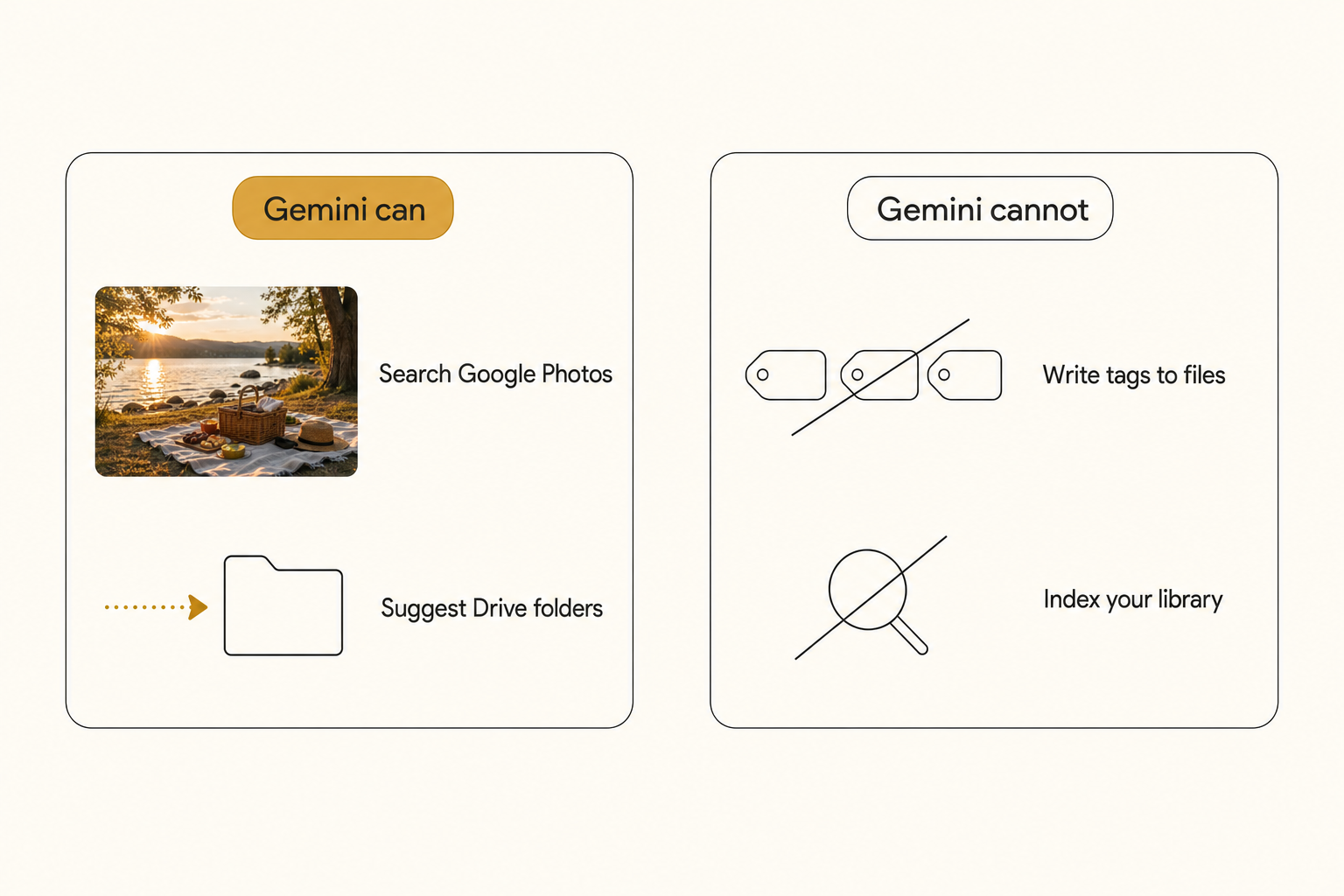
- Suggested file moves. Gemini reads loose files, images included, and suggests folders to move them into. It runs on Drive for the web in English and "will not move any files without your permission."
- File management by prompt. Ask Gemini to move, rename, share or copy named files, then review its suggested actions before confirming.
- Natural-language search. Drive's search bar now takes plain requests and can show an AI Overview, which Google's documentation describes for finding files and answering questions about their contents.
None of these writes tags or descriptions to a photo or builds a shared index of what each one shows. Drive's standard photo search still matches filenames, text printed in the image and a few broad object categories, which is why Drive search misses most photos named IMG_4827.jpg.
Where Gemini stops on a working photo library
Gemini stops at the edge of one person's Google account: it organizes a personal Google Photos library, but it writes no tags to your files, and its photo features do not read Dropbox.
- It writes no tags. Chat answers arrive as text, and tasks file photos into albums. No tag or description is attached to the photo itself.
- The Photos features are personal. They run on a personal Google Account, not a work account or the shared Drive folders where client shoots live.
- Dropbox is out of reach. None of these Gemini features reads it.
- Folders and albums are lists, not search. A folder holds one dimension: file by client and the sunset shots scatter. An album holds only what someone thought to put in it.
ChatGPT reaches Drive and Dropbox through apps on paid plans, while Gemini is built into Google Photos and Drive. Neither builds an index of what every photo in a Drive or Dropbox library shows.
Note. Privacy depends on which Gemini you use, per Google's Gemini Apps Privacy Hub and its Workspace privacy page:
- Gemini app, personal account. With Keep Activity on, Google uses your activity to provide, develop and improve its services, including training generative AI models, with help from human reviewers. Reviewed chats are kept up to three years.
- Connected photos. Connecting Google Photos or using tasks requires Keep Activity on, and a photo shared from a connected gallery app then "is used to improve Google services with the help of human reviewers."
- Gemini in Drive on Workspace and Google AI plans. Google says it "doesn't use your content to train or improve Gemini or other generative AI models."
The five checks in our guide to whether AI photo tagging is safe apply here too.
How to make a large photo library searchable
A large photo library becomes searchable when every photo is described once, up front, in one index. Then "the terrace sunset shot with the amber umbrellas" is a search, not a scroll through folders.
Describing photos by hand runs into the 1,000-photo wall: a skilled keyworder covers 100 to 200 photos per hour at editorial depth. Asking Gemini about one image at a time keeps a person in every round trip.
Connected AI catalogs take the person out of the loop. They read a Google Drive or Dropbox folder, run every photo through a vision model, and write a focal-subject label, tags and alt text to one index a team shares. The scan runs unattended in the background, and what is already read is searchable while the rest is still going.
Focal-subject tagging names the dominant element of each photo first and ranks it above the background, so "amber umbrellas" returns the terrace shot, not every photo with an umbrella in a corner. In Tagrly's own testing on a 5,000-photo set, focal-subject tagging surfaced the correct top match in roughly 9 of 10 searches, against roughly 4 of 10 for the same library under a generic object detector. That ranking is what powers Tagrly's Google Drive image search.
Tagrly connects to Google Drive (drive.readonly) and Dropbox with read-only access, so your files there never change. It keeps a hosted copy of each photo alongside its tags and alt text, and the vision model reads a smaller preview. If you upload photos from your computer instead, Tagrly stores the copy you send.
Tip. Tagrly is one catalog in this category, and it reads your first 500 photos free, no credit card. Point it at your messiest folder and search for a shot nobody ever named.
Which tool fits your photo library
Gemini fits a personal camera roll; a shared work library needs an index.
- Pick Google Photos with Gemini tasks if it is your personal camera roll and you are in the US on Google AI Pro or Ultra. Without it, ordinary Gemini chat still searches it.
- Pick Gemini in Drive if the real problem is document clutter and your plan includes it.
- Pick a desktop AI organizer like Excire Foto or Mylio if the archive must stay on one machine.
- Pick Claude's Cowork if the job is renaming and sorting local folders. Our answer on whether Claude can organize your photos covers where it stops.
- Pick a connected AI catalog (Tagrly is one option) if the photos live in Drive or Dropbox and a team needs to find shots in them.
So, can Gemini organize your photos? For a personal Google Photos library, yes: it searches and, on paid US plans, curates and builds albums on a schedule. For a working archive in Drive or Dropbox it stops at folder suggestions and chat answers, so run Tagrly on a real folder and search it by what the photos show.
Frequently asked questions
Can Gemini tag my photos automatically?
No. Gemini describes an image well: in the Gemini app or the Google Drive side panel it will tell you what a shot shows, and in Drive it can draft alt text for the image you have open. But the answer arrives as chat text. Google's help page for connected gallery apps says Gemini can't add labels, like names or locations, to your photos, and Gemini tasks organize by building albums, not by writing tags. No keyword or description is attached to the file. For a handful of photos you can paste the output into a caption or metadata field yourself. For thousands, tools built for tagging connect to your storage, read every image with a vision model, and write the results to a searchable index without a person in the loop.
Can Gemini organize photos in Google Drive?
Partly. On an eligible Google Workspace or Google AI plan, Gemini's Suggest file moves feature reads loose files in Drive, images included, and proposes new or existing folders for them. As of October 2026 it runs on Drive for the web in English only, needs Editor access, and moves nothing without your permission. You can also ask Gemini in Drive to move, rename, share or copy files by prompt, and review each action before it runs. That helps with clutter. What it does not do is describe your photos for search: no tags are written, and Drive's standard photo search still matches filenames, text printed in the image, and a few broad object categories. A photo in a tidier folder is no easier to find by what it shows.
Can Gemini create albums in Google Photos?
Yes, through Gemini tasks, which arrived in September 2026 and which press coverage calls Gemini Spark. Assign a task in the Gemini app and it can find photos by subject, place, date or event, filter duplicates, create a new shared or private album and save the curated photos to it, or run a recurring job such as a monthly highlight album. New albums are private by default, and Gemini asks before sharing one. The requirements are narrow as of October 2026: a personal Google Account, age 18 or older, the US, English, a Google AI Pro or Ultra subscription, Keep Activity on, and an opt-in to Personal Intelligence, with a gradual rollout. In an ordinary Gemini chat, Google's help page still says Gemini can't create, edit or move albums.
Does Gemini work for a business photo library?
Mostly not. The Google Photos features, connected-gallery search and tasks alike, require a personal Google Account: Google says gallery apps aren't available on a work, school or supervised account, and tasks aren't available on a work or school account. Gemini in Drive does run on business plans, but it suggests folders and answers questions about the image you have open; it writes no tags and builds no index of what each photo shows. None of these Gemini features reaches a Dropbox archive. What does work is a connected catalog that reads the storage your team already uses and keeps one searchable index every member can query. Tagrly is one example: it connects to Google Drive and Dropbox with read-only access, and your first 500 photos are free, no credit card.
Is it safe to give Gemini client photos?
Check which Gemini first, because the rules differ. In the Gemini app on a personal account, connecting Google Photos and using tasks both require Keep Activity on. With it on, Google uses your activity to provide, develop and improve its services, including training generative AI models, with help from human reviewers, and Google says a photo you share from a connected gallery app is used to improve Google services with the help of human reviewers. Reviewed chats are kept up to three years. Gemini in Drive on Workspace and Google AI plans works differently: Google says it doesn't use your content to train or improve Gemini or other generative AI models. Your client contract may also limit who can process the images at all, so read it before anything shot under contract goes into an AI tool.
Is Gemini Photos by MacPaw the same as Google's Gemini?
No, and the name collision muddies this whole topic. Gemini Photos was MacPaw's iPhone app for finding duplicate and blurry photos so you could delete them. Its App Store listing is now CleanMy Phone, and MacPaw's Gemini Photos page redirects there. MacPaw also sells Gemini 2, a duplicate finder for Mac. Both are storage cleaners with no connection to Google. Google's Gemini is the AI assistant in the Gemini app, Google Photos and Google Drive. So the answer depends on which product you meant: MacPaw's apps clear out clutter, while Google's assistant searches, curates and can build Google Photos albums, but writes no tags to your files.
Try Tagrly on your own photo library
Connect your Google Drive or Dropbox folder and Tagrly will tag every photo in bulk. Search by what is actually in the image, share specific shots with clients, and never lose a photo again.
- Free for your first 500 photos
- Read-only access, revoke anytime
- No credit card