
You are about to point a tagging tool at 20,000 photos, and the question that matters is not how fast it runs but how much of the output you will have to fix afterward. Vendors quote numbers like "99 percent accurate," and that tells you nothing about what happens across a real library.
What "accurate" means in AI photo tagging
Accuracy in AI photo tagging should mean focal-subject accuracy, because that is the score that decides whether search finds your photo. Vendors often quote an easier score instead, since the same output can be graded two very different ways.
Any-tag accuracy asks: did at least one returned tag match something visible in the photo? Nearly every tool scores in the high 90s here. A wedding photo will always earn a defensible "person" or "outdoor," so the number is real and also useless.
Focal-subject accuracy asks the harder question: did the top label name the focal subject, the one thing the photo is of? A query for "magnolia tree" should surface photos of a magnolia tree, not every photo with one in the background. The focal-subject tagging method exists because tools that treat every tag as equal fail this test.
The gap starts to cost you at the 1,000-photo wall, the point where you can no longer remember roughly where a photo lives and search becomes the only way back to it. Past that wall, a wrong top label is a photo you cannot find.
Warning. When a vendor quotes an accuracy number, ask what task it measures and whose photos it was measured on. "99 percent accurate," scored as any-tag-matches on a clean stock-photo benchmark, fits a tool that returns "person, indoor, table" for every candid in your archive.
Real accuracy numbers, hand-scored
A descriptive vision model with a focal-subject prompt named the correct subject on 26 of 30 hand-scored photos, while two generic object detectors got under half right. In the test, 30 photographs from a working library went through three systems and were scored against a hand-written ground truth:
| System | Correct focal subject | Notes |
|---|---|---|
| Generic object detector (Google Vision labels) | 11 of 30 | Most misses landed on "person" or "indoor" |
| Object detector with face strengths (AWS Rekognition) | 13 of 30 | Stronger on photos with faces |
| Descriptive vision model with a focal-subject prompt | 26 of 30 | Remaining 4 were near-misses or ambiguous photos |
The same pattern held at scale. In Tagrly's own testing on a 5,000-photo set, focal-subject tagging surfaced the correct top match in roughly 9 of 10 searches, against roughly 4 of 10 for the same library under a generic object detector, and that ranking is what its AI photo search runs on.
Two things follow from those numbers:
- Model choice moves accuracy more than any other decision. We break down why descriptive models beat object detectors in what Claude vision sees that other models miss.
- Even the best run leaves a residue of misses. It is small and predictable, which is what the next section covers.
The four ways AI photo tagging gets photos wrong
The roughly 1 in 10 photos that comes back wrong is not random. Across working libraries the misses cluster into four categories, and knowing them turns review from an audit into a targeted pass.
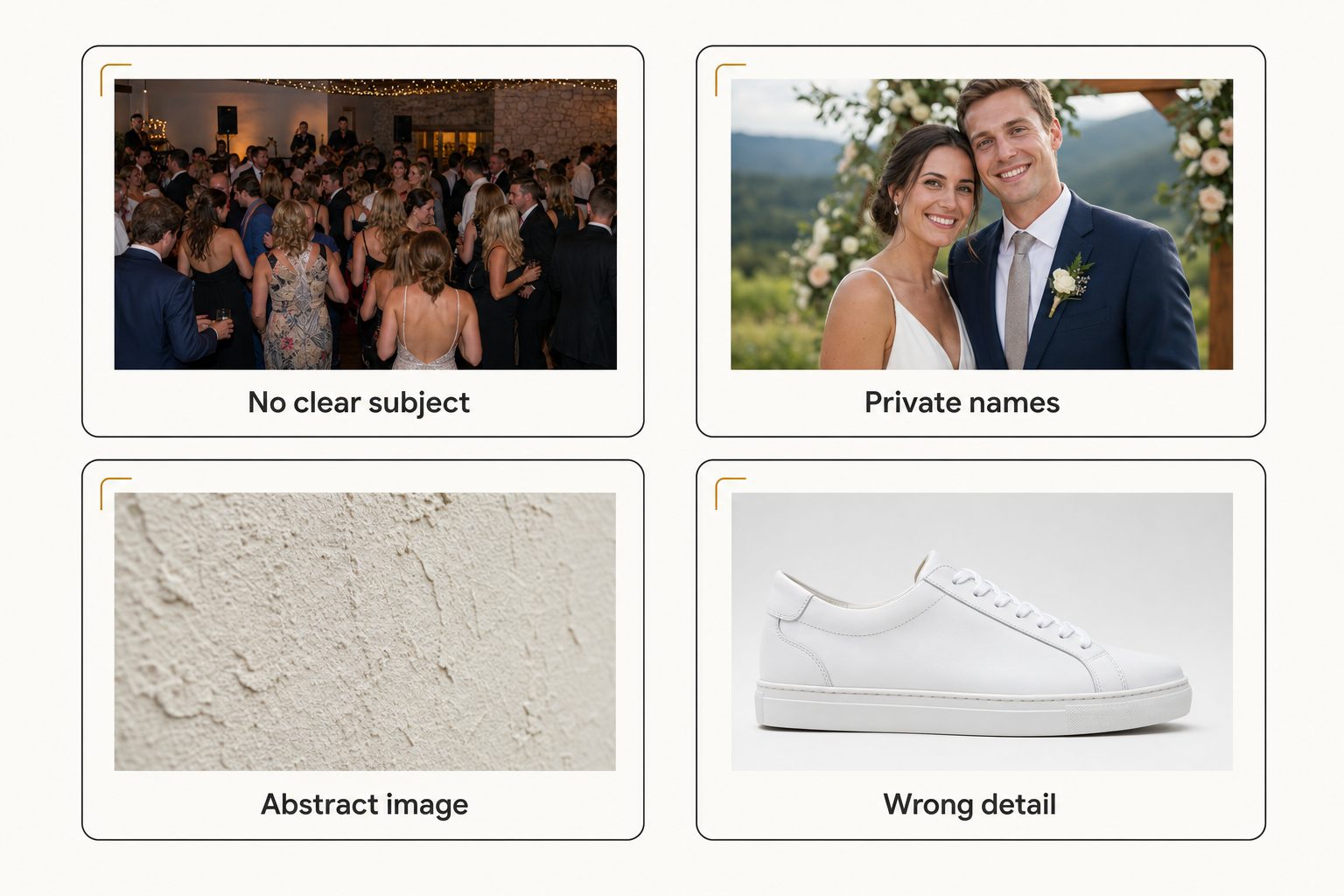
- No clear focal subject. A wide group shot, a crowded reception floor, a table covered in objects. The model must pick one dominant element when there is none, so its choice is a coin flip, and people disagree on these photos too.
- Names and private vocabulary. The model does not know your client roster, your project codenames, or which of two similar ballrooms a shot came from. It will write "a couple embracing at an outdoor ceremony," never "the Hendersons at Maple Grove." No better model fixes this, because it is context the model never had, so names belong in a field a person edits.
- Decorative and abstract images. A stucco texture, a blurred background plate, a lens-flare test frame. The literal description is correct and useless. The W3C's guidance on decorative images is to give such images empty alt text so screen readers skip them, not to describe them.
- Plausible-but-wrong specifics. The category is right and the detail is off: "a white low-top sneaker" for a specific sneaker model, "a 1970s-style jacket" for a 1968 piece. The output reads confident, so this is the category to spot-check when exact identification matters.
Note. These four categories are model-agnostic. Every vision system has them, whether it is a cloud API like Google Cloud Vision or a descriptive model like the ones in Anthropic's vision guide. Tools differ in how often they miss and how obvious the miss is when you read the output.
How to test AI photo tagging accuracy on your own photos
A 30-photo spot-check on your own library is the accuracy number that predicts your results, because published numbers, including ours, describe someone else's photos. Run it before paying for anything.
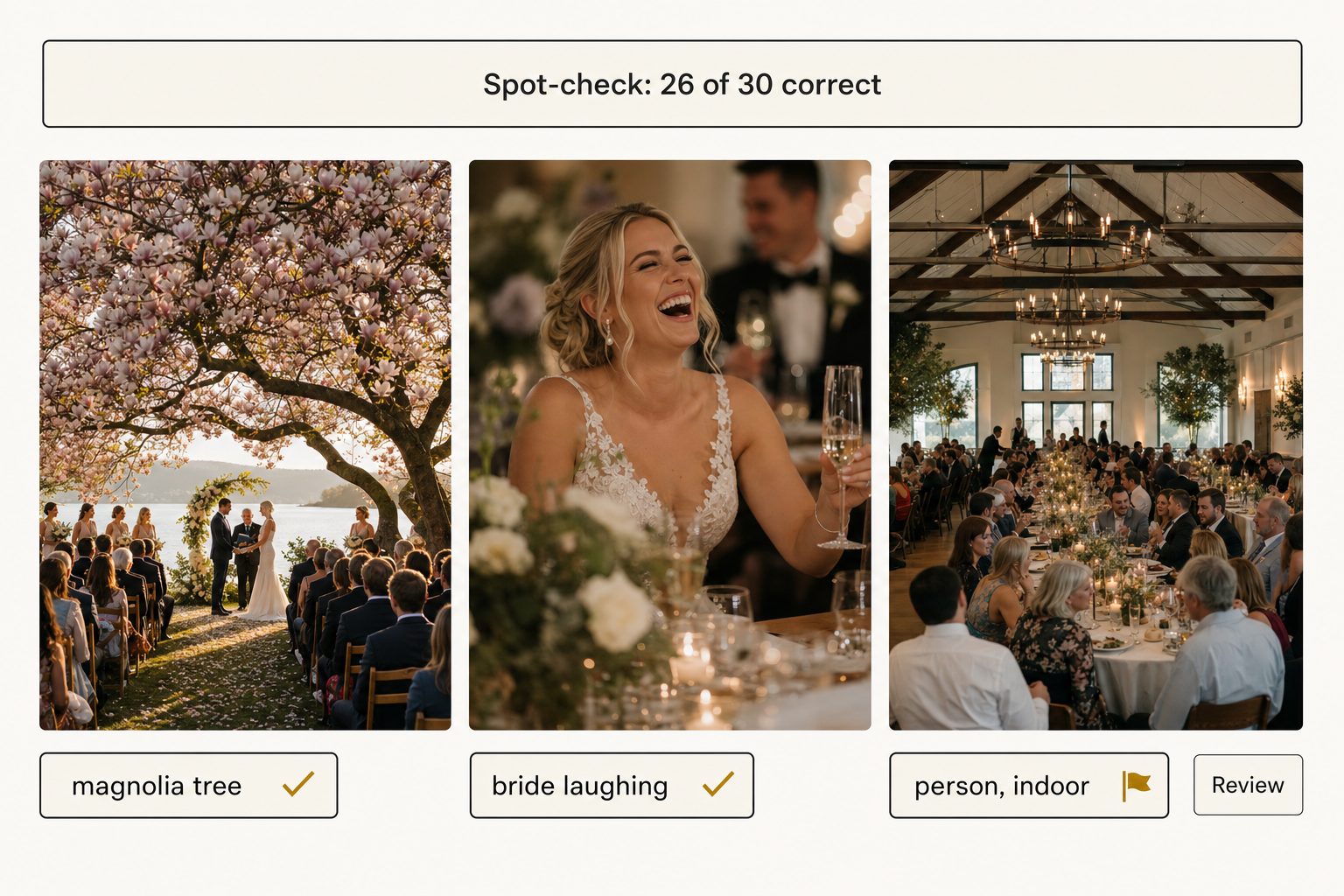
- Pick 30 photos in three groups of ten. Ten easy ones with a single obvious subject, ten busy ones with competing subjects, and ten known troublemakers: group shots, texture close-ups, detail frames.
- Write your ground truth first. One line per photo naming the focal subject, written before you run any tool, so the tool's output cannot anchor you.
- Run the tool and score the top label only. Correct, near-miss (the right subject is in the tags but not first), or wrong.
- Read your score against the table below. It shows how much review a full library will need.
| Correct out of 30 | What it means |
|---|---|
| 24 or more | Holds up across a full library |
| 18 to 23 | Usable with a heavier review pass |
| Below 18 | Creates more cleanup than it saves |
Tip. You can run this exact test without spending anything. Tagrly's free tier reads your first 500 photos, no credit card, whether you connect Google Drive or Dropbox or upload them from your computer. Score it on your own photos: every plan runs the same full analysis, so the sample shows what the whole library would get.
Does high accuracy mean you can skip human review?
No, but it turns review into a targeted pass instead of an audit. At roughly 9 in 10, a 20,000-photo library still has about 2,000 photos with an imperfect top label, and hand-checking all of them would burn most of the time the AI saved you.
The efficient pattern is search-driven review: fix tags when a real search fails, because a tag error only matters if it breaks retrieval. Most of those misses are near-misses that still answer reasonable queries, so plan on correcting 1 to 5 percent of the library, mostly in the four failure categories above.
A skilled human keyworder still beats the model on any single photo where names or context matter, but drifts across thousands of photos. The full trade-off is in AI photo tagging vs. manual keywording.
The one place review is not optional is public-facing alt text. Every photo Tagrly reads gets editorial-grade alt text, a full sentence written to publish, but a sentence going onto your website deserves a proofread like any published sentence. Put your review time into that small public slice.
So, how accurate is AI photo tagging for you?
Accurate enough to trust for search, not accurate enough to publish blind. On real libraries, expect:
- Roughly 9 in 10 correct. A well-prompted descriptive model names the right focal subject about that often, while generic object detectors land under half.
- Four predictable misses. No clear subject, private names, abstract images, and wrong details.
- A 1 to 5 percent human pass. Driven by failed searches, not a full audit.
The model behind a tool matters more than its marketing, so run the 30-photo spot-check above on any tool you are considering. Tagrly's free tier covers your first 500 photos, enough to score the sample, and the complete guide to bulk AI photo tagging covers what comes after the accuracy question, from output quality to picking the right category of tool.
Frequently asked questions
How accurate is AI photo tagging compared to manual keywording?
On focal-subject accuracy, the measure that decides whether search works, a well-prompted descriptive model is right roughly 9 times in 10. In Tagrly's own testing on a 5,000-photo set, focal-subject tagging surfaced the correct top match in roughly 9 of 10 searches. A skilled human keyworder is more accurate on any single photo, especially where names or private context matter, but people drift across thousands of photos, and two keyworders rarely pick the same words for the same shot. The strongest workflow uses both: AI for the base layer, a person for the small fraction it misreads.
Why do some vendors claim 99 percent accuracy?
Because they measure the easy thing. If accuracy means at least one returned tag matches something visible, almost any tool scores in the high 90s, since a wedding photo always yields a defensible tag like 'person.' That number says nothing about search. The measure that matters is focal-subject accuracy: did the top label name what the photo is of? In a hand-scored 30-photo test, two generic object detectors got under half right and a descriptive model got 26 of 30. Ask any vendor what task the number measures and whose photos it was measured on.
What kinds of photos does AI tagging get wrong most often?
The misses cluster into four predictable categories. Photos with no clear focal subject, like a wide group shot, where the model has to guess which element matters. Anything that depends on private knowledge, such as client names or which of two similar venues a shot came from. Decorative and abstract images, where a literal description is correct but useless. And plausible-but-wrong specifics, where the category is right but the exact model, brand, or year is off. Because these failures are predictable, you can aim review at them instead of auditing everything.
How many photos should I test before trusting a tagging tool?
Thirty, chosen deliberately: ten easy photos with one obvious subject, ten busy photos with competing subjects, and ten known troublemakers such as group shots, texture close-ups, and detail frames. Write your own one-line description of each photo before running the tool, so its output cannot anchor you, then score only the top label as correct, near-miss, or wrong. A tool that scores 24 or more out of 30 will hold up across a full library. Below 18, it will create more cleanup than it saves.
Do I still need a human review pass after AI tagging?
Yes, but a much smaller and more targeted one than most people expect. Plan for 1 to 5 percent of photos needing a correction, concentrated in the four predictable failure categories. Review by search: instead of auditing 20,000 photos up front, fix tags when a real search fails to surface a photo you know exists, because a tag error only matters if it breaks retrieval. The exception is public-facing alt text, which deserves a proofread before it goes on a page, like any published sentence.
Try Tagrly on your own photo library
Connect your Google Drive or Dropbox folder and Tagrly will tag every photo in bulk. Search by what is actually in the image, share specific shots with clients, and never lose a photo again.
- Free for your first 500 photos
- Read-only access, revoke anytime
- No credit card