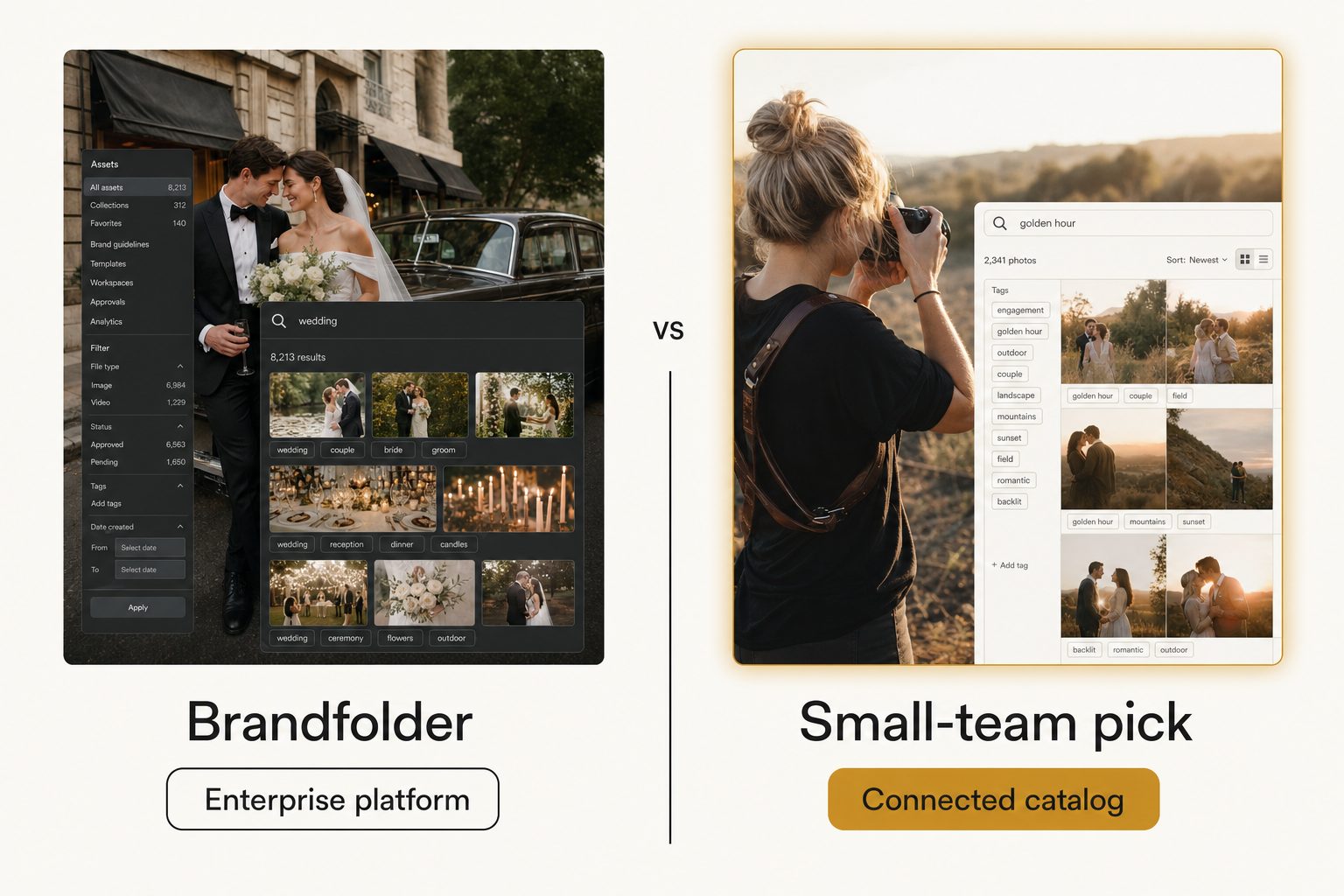
Your team is six people, the shared Dropbox folder has 14,000 photos in it, and the new hire just spent 40 minutes hunting for the three rooftop shots from last summer's launch. Someone said "we should get Brandfolder," you booked the demo, and then the quote landed with a number meant for a 200-person company. This is the guide for the moment right after that, when you need an alternative to Brandfolder for small teams that solves the actual problem without the enterprise price tag.
Why small teams outgrow Brandfolder before they grow into it
Brandfolder is a strong product. It is just built for a buyer that most small creative teams are not yet, and may never be.
It is a full brand-asset platform, now owned by Smartsheet, which acquired it in 2020. You upload assets into Brandfolder's own storage, then get governance, permissioning, brand portals, templated creative, usage analytics, and auto-tagging across hundreds of file types. The full feature list is deep.
That depth is the point for a large organization. A 200-person company with regional teams, agency partners, and a legal team that cares who used which logo where needs all of it. For a six-person studio, most of those features stay switched off.
Note. Brandfolder does not publish prices, which is itself a signal about who it is for. Its plans page lists tiers but ends in "Book a demo." As of September 2026, Vendr's pricing data from 53 purchases puts the median buyer at about 25,000 dollars a year, with a range of roughly 12,000 to 55,000. Treat those as secondhand numbers and get a current quote before you budget anything.
If you have to book a sales demo to learn the price, the product is priced for a buyer with a procurement process. That is not a knock on Brandfolder. It just means you may be shopping in the wrong aisle.
What problem are you actually solving?
Most "Brandfolder alternatives" listicles answer the wrong question. They line up Stockpress, Bynder, Canto, Air, and Acquia, then ask which enterprise platform is cheaper. That is the right move only if you need the enterprise tier.
A large share of people searching for an alternative to Brandfolder for small teams are not enterprise buyers at all. Written plainly, their problem is: "our photos are scattered, search is useless, and sending the right shots to a client is a chore." That is a find-my-photo problem, not a brand-governance problem.
The two problems need different tools:
- A find-my-photo problem. You need fast, accurate search across photos that already live in your cloud storage, plus a clean way to share a few of them. This is the common case, and the cheap tier solves it.
- A brand-governance problem. You need to enforce brand rules, control who downloads what, track usage, and manage many asset types across many users. This is the enterprise case, and only a platform solves it.
If your answer is "find-my-photo," you can stop comparing five-figure platforms and look one tier down, where the tools cost a fraction as much and set up in an afternoon.
The four tiers of alternatives, from free to enterprise
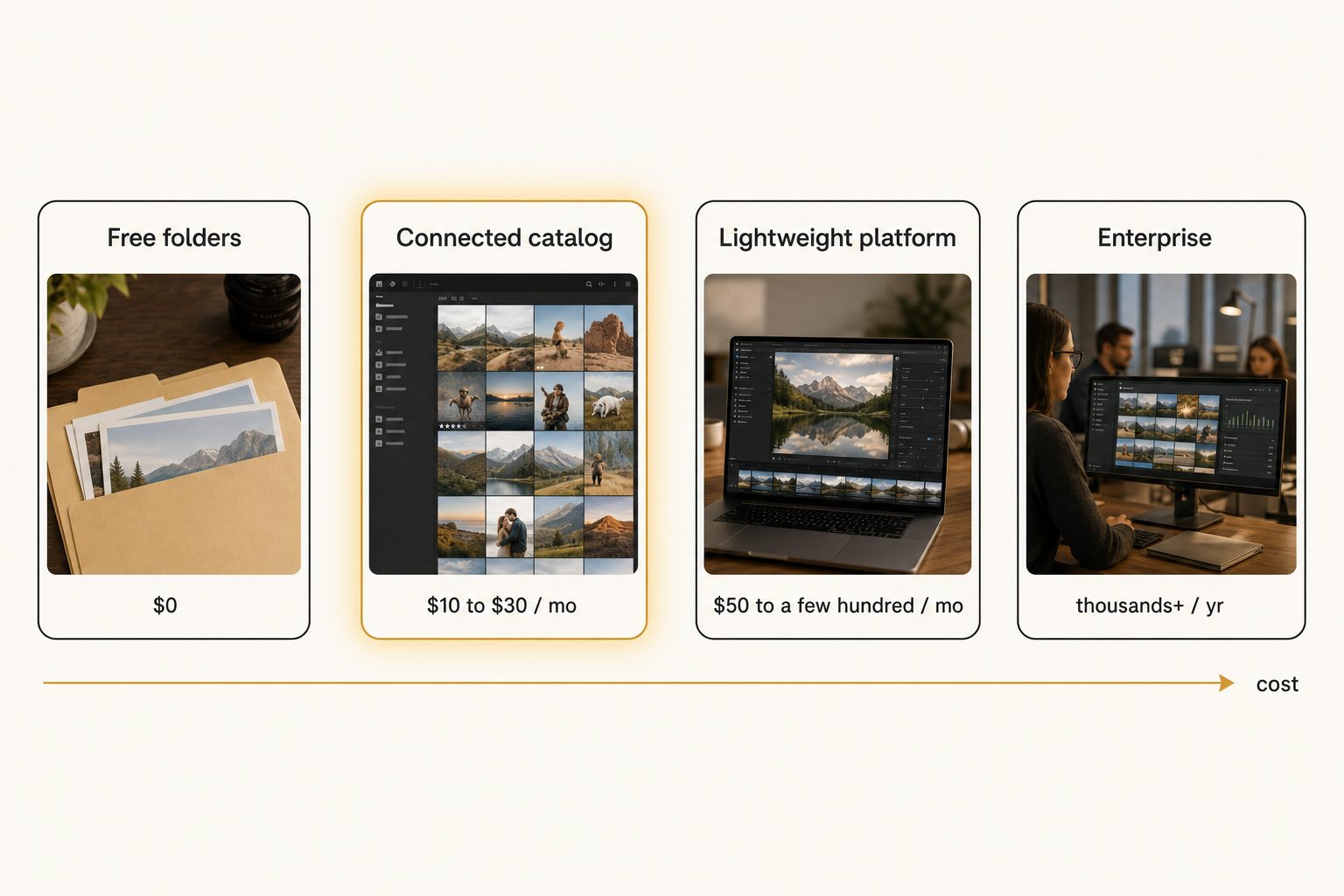
There are four real tiers. The right pick depends entirely on which problem you just identified and how big your library is.
Tier 1: Free and DIY
A shared Google Drive or Dropbox folder, a consistent naming convention, and a simple spreadsheet index cost nothing. Below roughly 1,000 to 2,000 photos, this is enough, and you should not pay for anything yet.
The free approach breaks at the wall where the library outgrows anyone's memory and the cloud's native search stops returning the right photo. We cover the setup, and where it stops working, in our guide to building a shared photo library.
Tier 2: Cheap paid, roughly $10 to $30 a month
This is where most small teams belong and where the enterprise listicles never look. Single-image tagging tools, Lightroom keyword plugins, and connected catalogs all sit here.
Connected catalogs are the most interesting option for a team, because they read the photos you already have instead of asking you to migrate. Tagrly and Pics.io are two examples, and the shared trait is a small monthly subscription instead of a yearly contract.
Tier 3: Lightweight platforms, roughly $50 to a few hundred a month
If you do need some platform features, brand portals, light access control, a public-facing asset hub, but not the full enterprise tier, tools like Canto, Air, and Dash aim at exactly this gap. Dash, for instance, lists plans from 109 dollars a month with unlimited users as of September 2026. These cost more than Tier 2 but far less than Brandfolder, and they are a fair fit when "just folders" is too loose but "Brandfolder" is too much.
Tier 4: Enterprise platforms like Brandfolder and Bynder
Quote-based, governance-first, built for hundreds of users and mixed asset types. Worth every dollar when brand control is a mandate, and expensive overkill when it is not.
If you land here, see our deeper head-to-head in Tagrly vs. Brandfolder and the Bynder comparison.
Tip. Most people searching for a Brandfolder alternative have been shown only Tier 4 when their problem, and its solution, sit in Tier 1 or Tier 2. Always check the two cheaper tiers before you compare platforms.
Where a connected catalog fits for a small team
Tier 2 is where a small team gets the most value per dollar, so it is worth understanding what a connected catalog actually does.
Instead of migrating assets into a new platform, a connected catalog reads your existing storage. Tagrly connects read-only to the Google Drive or Dropbox you already use, walks the folders you pick, sends each photo through a vision model, and writes the results to a searchable catalog. Your originals never move, and the whole team searches one shared surface.
Two methods matter for a team that mostly works with photographs:
- Focal-subject tagging. Every photo gets one dominant-subject label ranked above its background context, so a search for "rooftop sunset" surfaces photos that are about a rooftop sunset, not every photo that happens to contain a sky.
- Editorial-grade alt text. Each photo gets a full publishable sentence instead of a comma-separated keyword dump, which matters when the photos end up on a website.
We define both frameworks in the complete guide to AI photo tagging. In Tagrly's own testing on a 5,000-photo set, focal-subject tagging returned the right photo as the top AI photo search result in roughly 9 of 10 queries. A person keywording those same 5,000 photos by hand at 150 photos per hour would need more than 33 hours of work first, which is the practical reason a small team buys a catalog instead of hiring the work out.
Tip. Want to judge the tagging on your own photos instead of a marketing screenshot? Tagrly's free tier tags the first 500 photos in any Drive or Dropbox folder, no credit card. Connect a sample folder and check the focal-subject labels before you commit to anything.
The limits matter too: a connected catalog is not a brand-governance platform. Tagrly does not do templated creative, brand portals, usage analytics, or 8K video and 3D assets. If those are on your list, this tier will not replace Brandfolder, and you should look at Tier 3 or stay in Tier 4.
Comparing the alternatives by the three things small teams ask
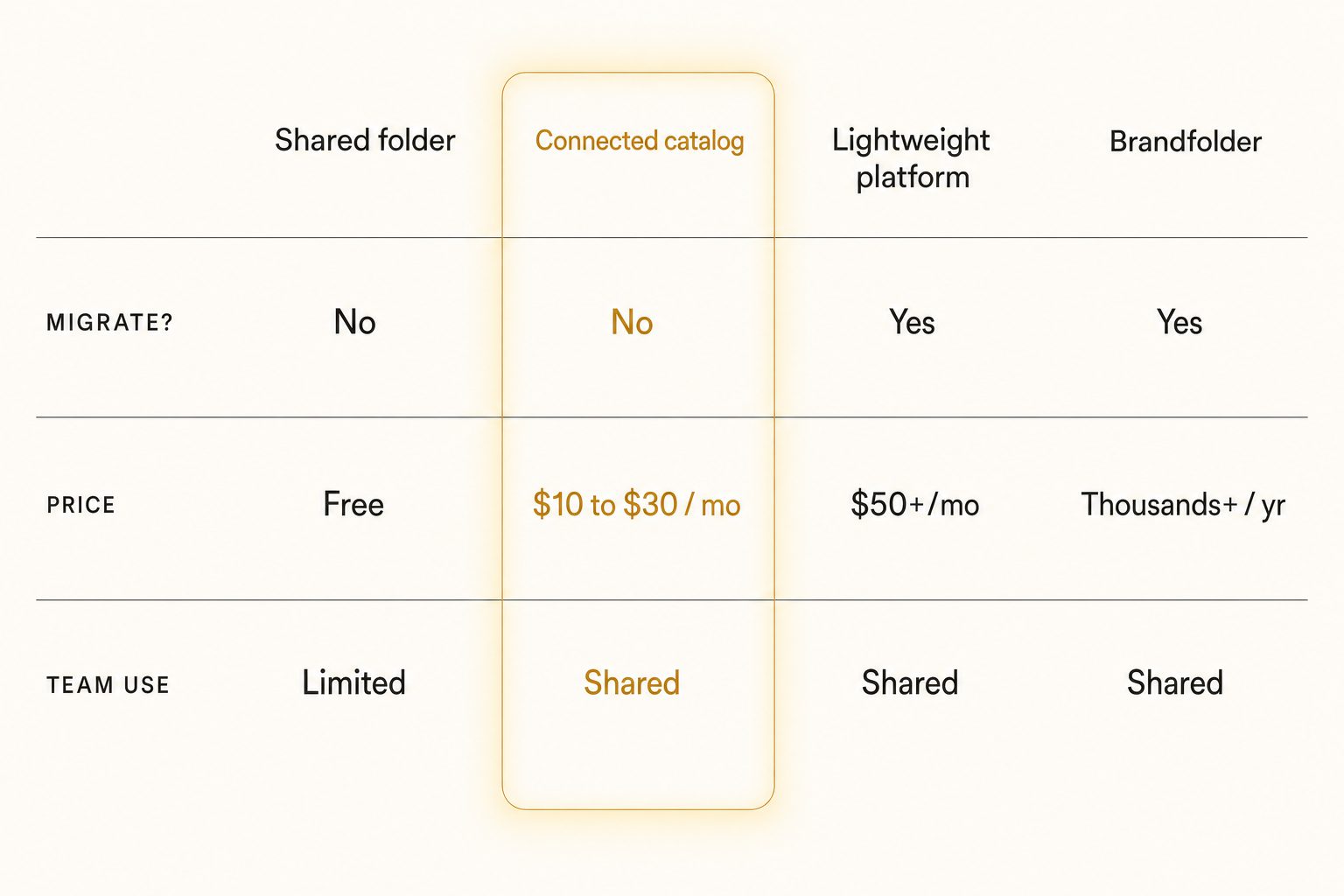
Skip the 40-row feature matrix. For a small team, three questions decide almost every choice.
Does it make me migrate?
This is the silent cost. Enterprise platforms hold your only copy of an asset, which means a migration in and a migration out if you ever leave.
Connected catalogs read your storage in place, so there is nothing to move and leaving is low-stakes. For a team that already lives in Drive or Dropbox, "no migration" is often the single biggest practical difference.
What does it cost in a year I can predict?
A monthly subscription you can cancel beats a yearly contract you negotiated under pressure, and free folders cost nothing until they cost you time. The real math for a small team is cost-per-hour-saved, not sticker price. A tool that saves each person two hours a week pays for itself fast at Tier 2 prices and slowly, if ever, at Tier 4 prices.
Can the whole team actually use it?
A tool that lives on one person's laptop is not a team tool, no matter how good its tagging is. Lightroom and desktop organizers are excellent for a solo editor and a poor fit for a group. If two people need to search the same library, you need a shared surface, which rules out single-machine tools and rules in either a cloud catalog or a platform.
How to choose: pick X if Y
Answer one question first: do you have a find-my-photo problem or a brand-governance problem? Then match it to a tier.
- Stay free if your library is under a couple thousand photos and a disciplined folder structure still works. Do not buy anything until search actually breaks. The shared photo library guide shows how to push the free tier as far as it goes.
- Pick a connected catalog like Tagrly if your photos already live in Google Drive or Dropbox, you have a small team that needs fast AI search and editorial-grade alt text, and you would rather pay a small monthly fee than sign a yearly contract. The free first-500-photo tier lets you check the output before committing. See how the pricing tiers compare once you know your library size.
- Pick a lightweight platform like Canto, Air, or Dash if you need light governance or a public asset hub but the full enterprise tier is overkill. This is the in-between tier when folders are too loose and Brandfolder is too much. If your team also publishes images to a website, Cloudinary alternatives for non-developers covers that neighboring shelf.
- Pick Brandfolder or Bynder if you have a real brand-governance mandate: formal guidelines to enforce, single sign-on, hundreds of users, asset types well beyond photos, and a budget that supports an annual platform. The governance is the product, and a catalog will not replace it.
- Pick a per-image stock tool if your real job is exporting keyworded photos to a stock agency. A catalog is the wrong shape for one-and-done batches; the comparison in photo metadata generators compared covers those.
If you are torn specifically between staying free and paying for something, the deciding signal is time. The first time your team loses a full afternoon to a photo hunt, the cheapest tool that fixes it has already paid for itself.
The short version: the best alternative to Brandfolder for a small team is rarely another enterprise platform. It is usually the tier below the one you were quoted, and for most teams that means a connected catalog that tags the cloud storage you already have, not a five-figure contract for governance you will never switch on. For the wider category, start with the complete guide to AI photo tagging and the image catalog software buyer's guide, then test a tool on a real folder of your own photos before you decide.
Frequently asked questions
What is the best alternative to Brandfolder for small teams?
There is no single best one, because it depends on what your team actually does every week. For a team under about 2,000 photos, a disciplined shared Google Drive or Dropbox folder is enough and costs nothing. For a team that has outgrown folder search and needs to find a specific shot fast, a connected catalog that tags your existing cloud storage, like Tagrly, costs a small monthly fee instead of a yearly contract. If you need brand governance, single sign-on, and templated creative, a lighter enterprise platform such as Canto or Air is the right tier. Write down the three things your team needs to do every week, then pick the cheapest tool that does those three.
Why is Brandfolder so expensive for a small team?
Brandfolder is priced for mid-market and enterprise buyers, not five-person studios. It does not publish prices. As of September 2026, the pricing tracker Vendr reports a median buyer paying about 25,000 dollars a year, with deals ranging from roughly 12,000 to 55,000 dollars (get a current quote before you budget). You pay for governance, brand portals, templated creative, analytics, and procurement-grade support. A small team rarely switches those features on, so the price feels high relative to the part you actually use, which is usually just finding and sharing photos.
Is there a free alternative to Brandfolder?
Yes, for a while. A shared Google Drive or Dropbox folder with a consistent naming convention and a simple spreadsheet index costs nothing and works up to roughly 1,000 to 2,000 photos. Below that wall, the cloud's own search plus careful folders is enough. The free approach breaks when the library outgrows anyone's memory and native search stops surfacing the right photo. At that point you are choosing between buying organization or losing time, and a cheap paid tool usually wins on cost-per-hour-saved.
Do I have to migrate my photos to switch off Brandfolder?
It depends on the alternative. Enterprise platforms like Bynder, Canto, and Air expect you to upload your assets into their storage, which is a one-time migration plus ongoing sync. Connected catalogs take the opposite approach and read your photos where they already live. Tagrly connects to Google Drive or Dropbox with read-only access, walks the folders you choose, and builds a searchable index without copying or moving a single original. For a small team that already keeps everything in shared cloud storage, skipping the migration is often the biggest practical difference between tools.
When should a small team still pay for Brandfolder?
When you have a brand-governance problem, not just a find-my-photo problem. Pick Brandfolder, or a peer like Bynder, if you must enforce formal brand guidelines, need single sign-on and granular access controls, manage many asset types beyond photos such as video and 3D, and have a budget that supports an annual platform. In that situation the governance and analytics are the product. If your real need is a team finding and sharing photographs fast, you are likely paying enterprise prices for features you will never use.
Try Tagrly on your own photo library
Connect your Google Drive or Dropbox folder and Tagrly will tag every photo in bulk. Search by what is actually in the image, share specific shots with clients, and never lose a photo again.
- Free for your first 500 photos
- Read-only access, revoke anytime
- No credit card