Your team has 14,000 photos in a shared Dropbox folder, the filenames are all DSC_0481.jpg, and the marketing director needs the four rooftop sunset shots from last month's launch by Thursday. Someone says "we need image catalog software," and an hour later you are staring at a list that runs from free folder tricks to a five-figure enterprise platform with a sales demo attached. This guide sorts that list into tiers that make sense and gives you a way to pick.
This is the hub guide for the whole category. It surveys every tier, gives you a buyer's framework, and links out to the head-to-head comparisons if you have already narrowed your choice. Even if you pick a competitor, you should leave with a framework you can defend.
What image catalog software actually is
Image catalog software is the layer that turns a pile of photos into a searchable library. A catalog indexes every image, records what it is, where it lives, and increasingly what it shows, then gives you one place to find any shot without scrolling.
The word "catalog" hides a wide range. A solo photographer thinks of Lightroom's catalog, a single database on one laptop. A marketing team thinks of a shared place everyone can search, and a developer thinks of a media library wired into an app.
They are all "image catalog software," and conflating them is how people buy the wrong tool. The useful definition is the job, not the file format: when you need a specific photo, can you get it back by yourself, without scrolling? Governance, editing, and delivery are features some tiers add on top of that core job.
Note. "Image catalog software," "photo organization software," and "photo cataloging software" describe the same category from three angles. People search all three when they have the same problem: a library that has outgrown folder search. We treat them as one category in this guide.
The 1,000-photo wall: why you start shopping
Most teams hit the same wall somewhere between 1,000 and 5,000 photos. Below it, you can usually remember roughly where a shot lives. Above it, the library goes opaque, and "find the rooftop sunset" turns into a 45-minute scroll.
The wall exists because of how photos are named. A camera writes IMG_4827.JPG, which tells a search box nothing about the bride, the sunset, the plated dish, or the rooftop. We named this the 1,000-photo wall in our complete guide to AI photo tagging, and the deeper version of the search problem lives in our guide to finding any photo in your library.
You go looking for image catalog software at the moment folders stop working. Buy for the wall you are actually at, not the one an enterprise sales team wants you to imagine. Most teams are at the find-my-photo wall, not the govern-my-brand wall, and those need different tools.
The six tiers of image catalog software
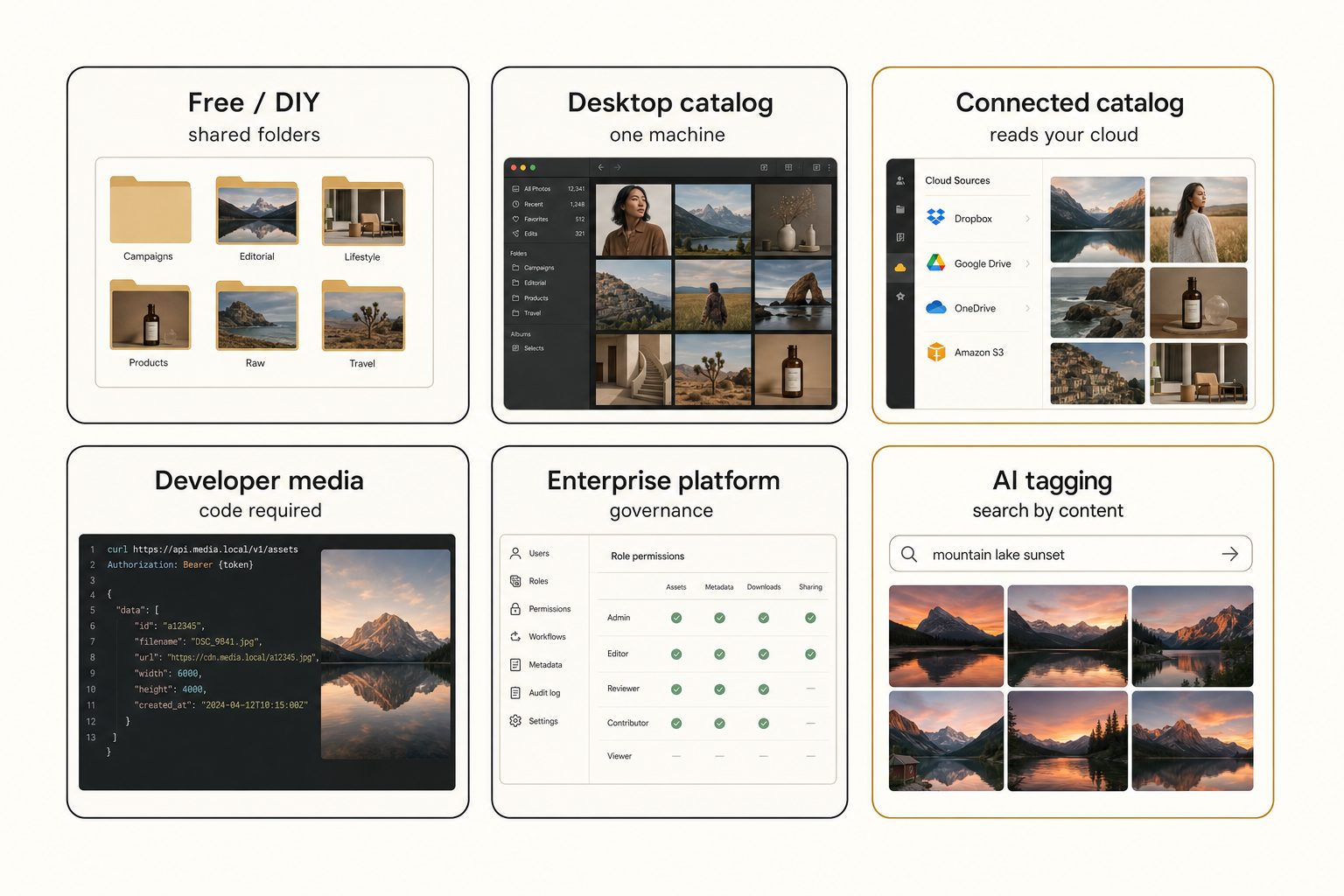
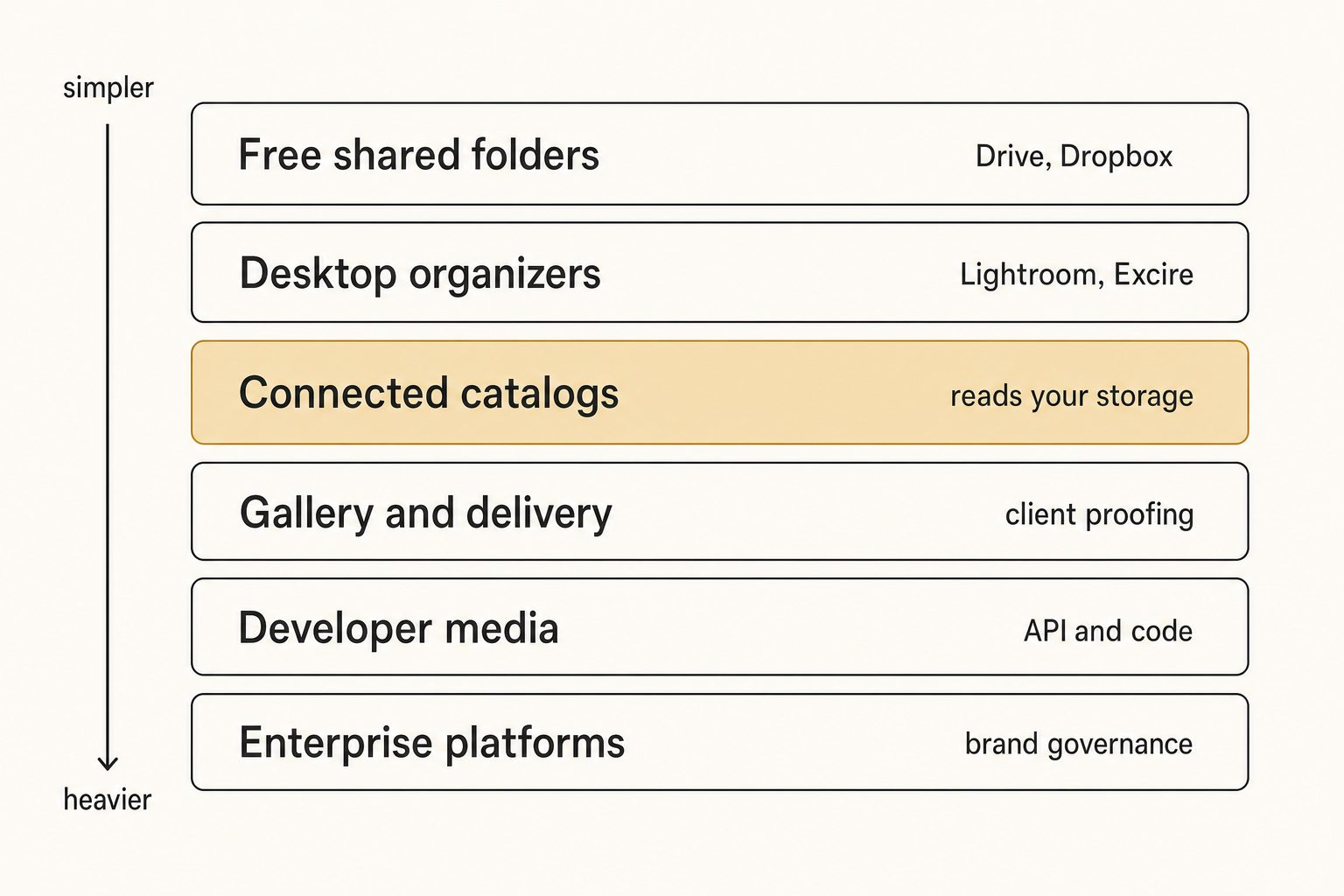
There are six real tiers, ordered roughly from cheapest and simplest to most expensive and most complex. The right pick depends on where your photos live and who needs them.
Tier 1: Free shared folders
A shared Google Drive or Dropbox folder, a consistent naming convention, and a simple spreadsheet index cost nothing. Below roughly 1,000 to 2,000 photos, this is enough, and you should not pay for anything yet.
The free approach breaks at the wall, where native search stops returning the right photo. Drive's own search is built for documents, not pixels, a gap we break down in why Google Drive photo search misses most of your photos. For what free, buy-once, and low-monthly tools each get you, see cheap photo management software.
Tier 2: Desktop organizers and catalogs
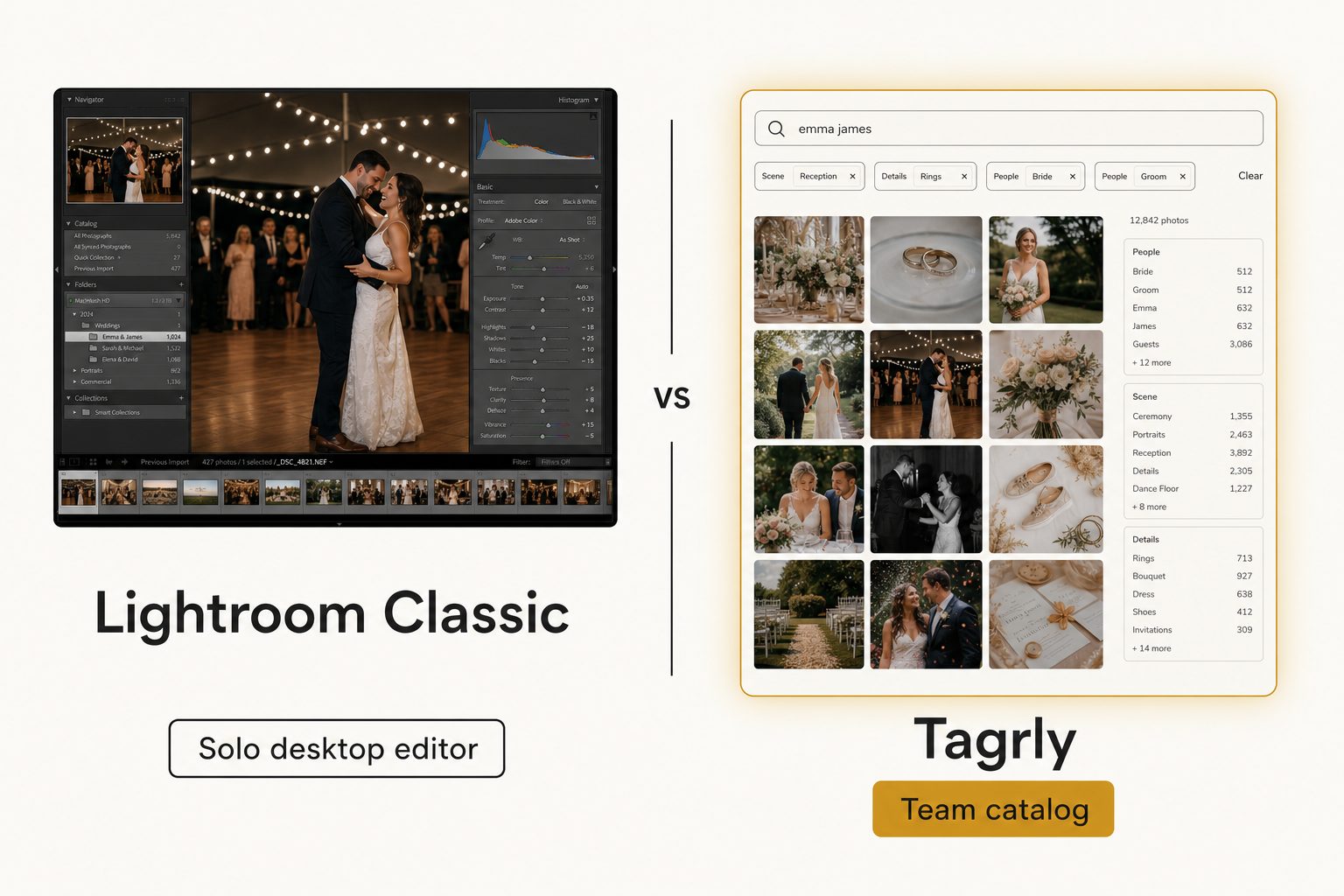
Desktop catalogs are where most photographers start, and they remain the best fit for a solo editor. Each keeps its catalog on your own machine or network, and most now add AI so you can search by content. As of September 2026:
- Lightroom Classic. Included in Adobe's Lightroom plan at $11.99 a month. Adobe's natural-language AI search shipped in the cloud-based Lightroom only; Classic still searches the keywords you add, or a plugin's.
- Excire Foto. Excire Foto 2027 is $249 once, with AI keywording and search that run offline. The Office Edition shares a database on a network drive, but one person uses it at a time.
- Mylio Photos+. Business Pro and Team plans sync one library across a team's devices, peer to peer, rather than searching the cloud folder your photos already live in.
- ON1 and single-image keyworders. ON1's keyworder is a desktop plugin, and tools like PhotoTag.ai and PhotoAITagger write keywords into files one batch at a time.
The team editions are real, but they share by syncing devices or taking turns on a database. That differs from several people searching the same Drive or Dropbox library at once in a browser. We cover the specifics in Tagrly vs. Lightroom Classic, Tagrly vs. Excire Foto, Tagrly vs. Mylio Photos+, Tagrly vs. PhotoTag.ai, Tagrly vs. ON1 Photo Keyword AI, and PhotoAITagger alternatives.
If you want to organize rather than edit, our list of Lightroom alternatives for organizing photos covers the options. If your photos live on one machine and you work alone, this tier is your home.
Tier 3: Connected catalogs
A connected catalog reads the storage you already use instead of asking you to migrate. It connects to Google Drive or Dropbox, walks the folders you pick, tags every photo with AI, and gives the whole team one searchable place in a browser. Your originals never move.
This tier is where most small teams get the most value per dollar, and the enterprise listicles rarely mention it. Tagrly sits here; Pics.io works on top of Drive or S3 too, as a broader all-file-type platform we compare in Tagrly vs. Pics.io. The shared trait is a monthly subscription instead of a yearly contract, and no migration project to schedule.
Tier 4: Gallery and delivery tools
If your real job is presenting a finished set to a client, a gallery tool fits better than a catalog. Picflow, Foto Owl, Pixieset, Pic-Time, and ShootProof handle proofing, approvals, and delivery for one project going out to one client, not a years-deep archive a team searches.
The line is worth drawing carefully, and we draw it in Tagrly vs. Picflow and Tagrly vs. Foto Owl. The short version: use a gallery to deliver one event, use a catalog to search the whole library. Many studios run both.
Tier 5: Developer media platforms
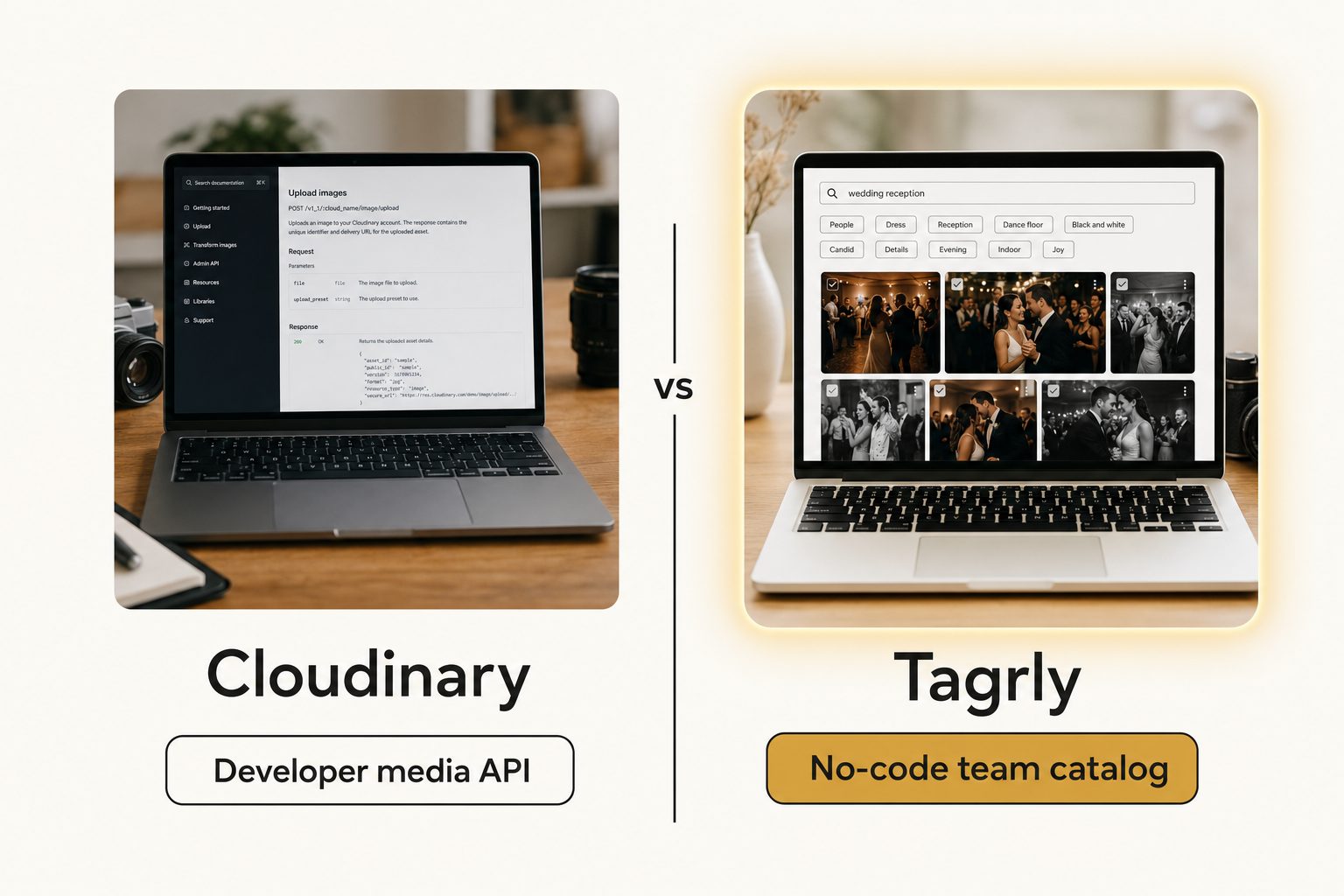
If your photos need to reach an app or website, resized and optimized through code, you need a developer media platform, not a catalog. Cloudinary, ImageKit, imgix, and Cloudflare Images store images and serve them to software through an API.
This tier confuses non-technical buyers constantly, often because a developer set one up and then left. We untangle that situation in Cloudinary alternatives for non-developers, and cover the tag-it-yourself route in photo tagging APIs. A program asking for an image needs a media platform; a person asking for one needs a catalog.
Tier 6: Enterprise asset platforms
Enterprise platforms are quote-based, governance-first, and built for hundreds of users and asset types well beyond photos. Brandfolder and Bynder are the names you will see: you upload assets into the platform, then get brand portals, permissions, templated creative, usage analytics, and procurement-grade support.
Budget accordingly. Brandfolder's pricing page lists tiers with no prices, and Vendr's buyer data puts the median Brandfolder contract at $24,999 a year as of September 2026. We compare the tier in Tagrly vs. Brandfolder, Tagrly vs. Bynder, and an alternative to Brandfolder for small teams.
Tip. Most people searching for image catalog software get shown only Tier 6 when their problem, and its solution, sit in Tier 1, 2, or 3. Price the cheaper tiers before you book an enterprise demo.
How to choose: the buyer's framework
Five questions decide almost every image catalog software purchase, in rough order of how much they matter. Skip the 40-row feature matrix.
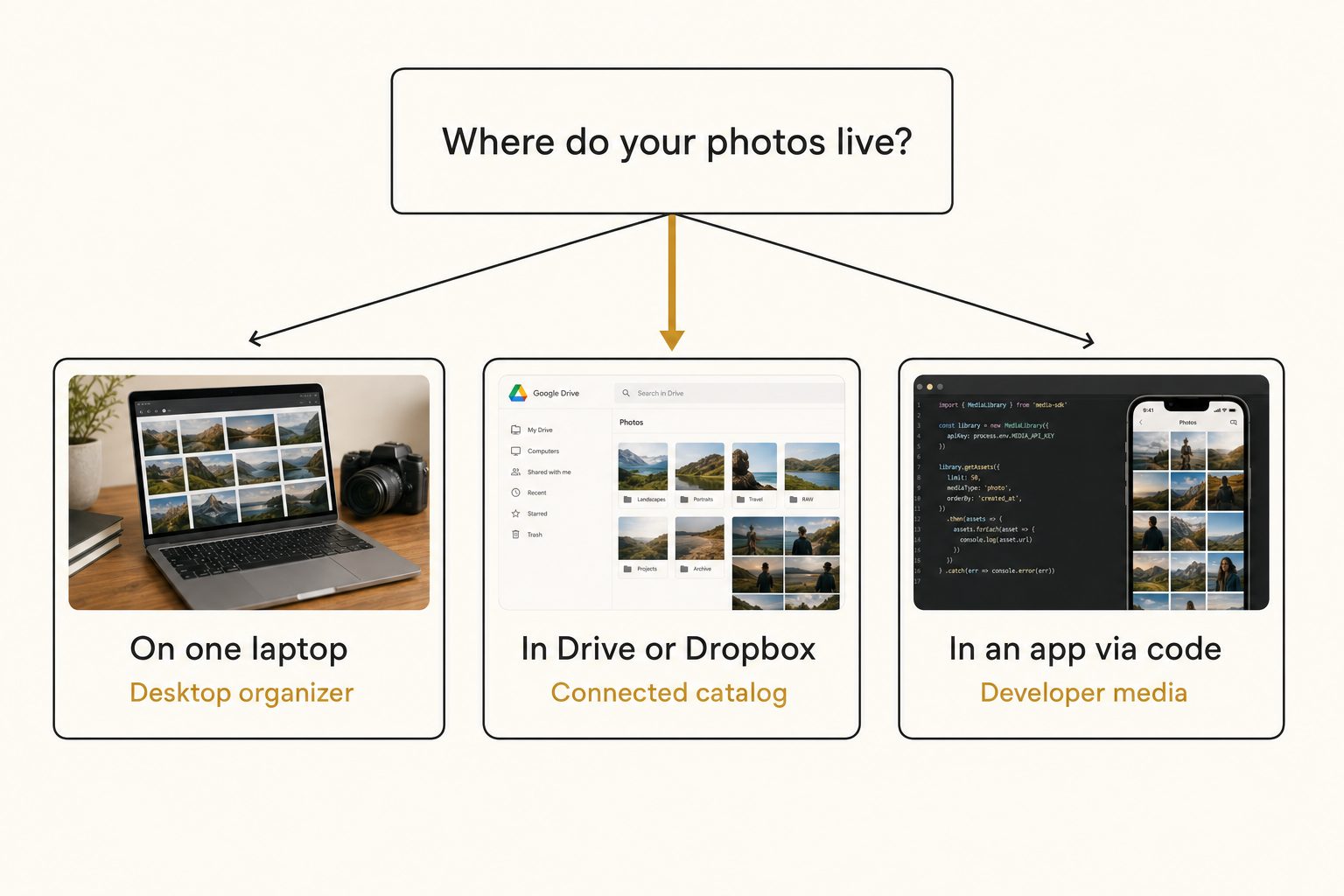
1. Where do your photos live?
Where your photos live is the first and biggest filter. On one laptop, a desktop organizer fits; in Google Drive or Dropbox, a connected catalog reads them in place; inside an app served by code, you are in developer-media territory. A tool that does not work where your photos already are means a migration you did not budget for.
2. How many people need to find a photo?
One person and a desktop catalog is a perfect match. Two or more people need a shared place to search, which is where single-machine tools, and even synced team editions, start to strain. A shared folder is shared storage; a shared catalog is shared findability, and the difference shows up the first time a teammate cannot find a shot the photographer filed.
3. How good is the search?
The question that matters most is whether the tool searches what you typed or what the photo actually shows. Older catalogs only match filenames and manual keywords, which fails on a library of DSC_0481.jpg files. Modern AI catalogs read the pixels with a vision model, the same class of capability documented in the Google Cloud Vision API.
Library size barely changes search speed, because the search reads a pre-built index of tags, a point we unpack in how fast AI image search is across 100,000 photos. Test any tool on a folder of your own unnamed photos before trusting its marketing.
4. Do you need publishable alt text?
If your photos end up on a public website, you need alt text that reads like a sentence, not a comma-separated keyword dump. Most catalogs stop at tags. A few write editorial-grade alt text, full descriptive sentences that follow the W3C's accessibility guidance, so weight this heavily if public pages are part of your job.
5. What does it cost in a year you can predict?
A monthly subscription you can cancel beats a yearly contract negotiated under pressure. The real math is cost per hour saved, not sticker price. A tool that saves each person two hours a week pays for itself fast at the cheap tiers and slowly, if ever, at the enterprise tier.
Two more checks before you commit: whether the tool makes you migrate (a cost to arrive and a cost to leave), and whether it reads your storage with read-only access. Tagrly, for instance, connects to Google Drive with the drive.readonly scope, so it can read your photos but never change, move, or delete them.
Scoring the tiers against the framework
Three tiers cover the decision most buyers actually face: free folders, a connected catalog, or an enterprise platform. The gallery, desktop, and developer tiers are real but narrower.
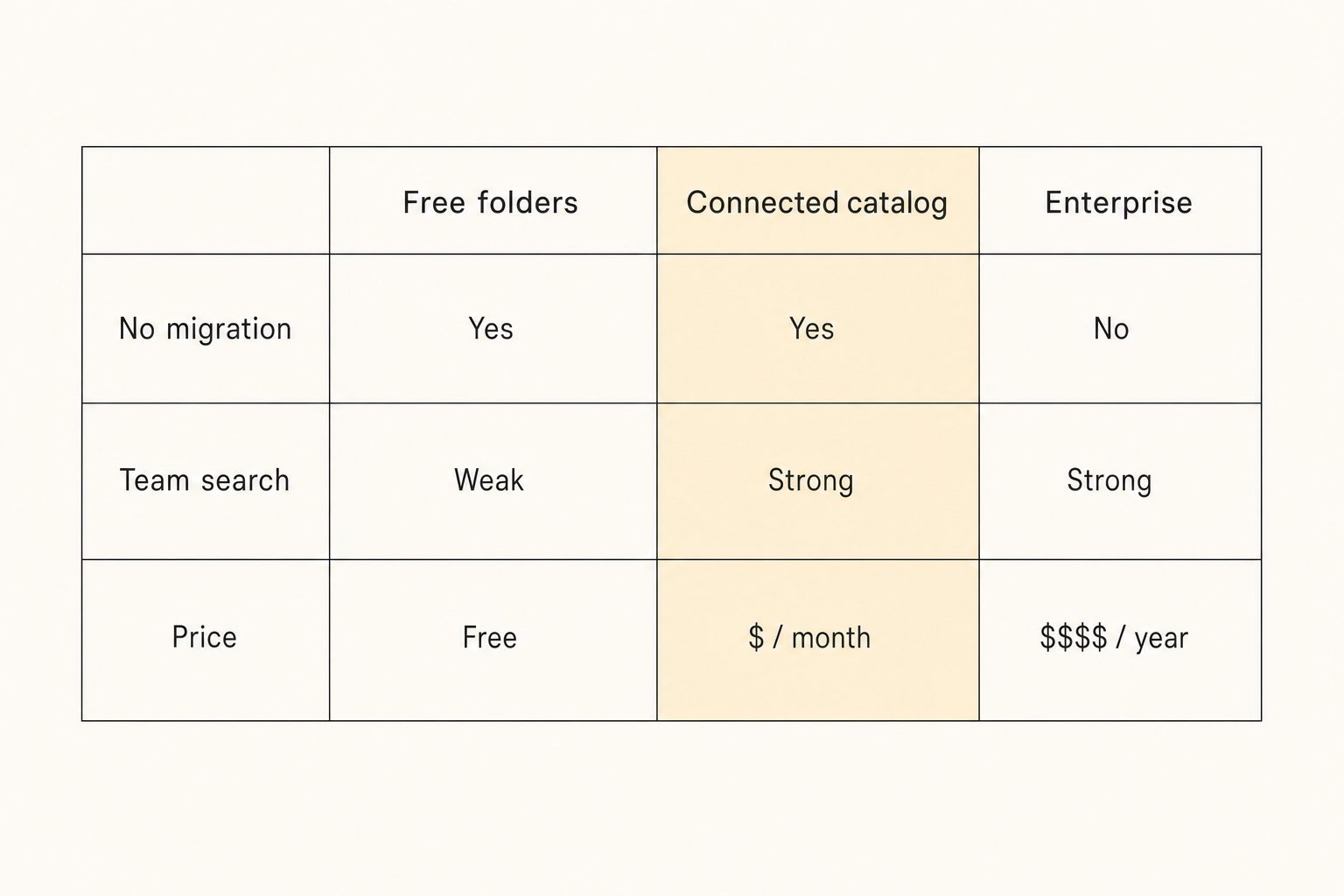
| Free folders | Connected catalog | Enterprise platform | |
|---|---|---|---|
| Where photos live | Stay in Drive or Dropbox | Stay in Drive or Dropbox | Migrate into the platform |
| Migration | None | None (read-only connect) | One-time upload + ongoing sync |
| Team search | Weak (filename only) | Strong (search by content) | Strong (governed search) |
| Search by what's in a photo | No | Yes (AI tagging) | Usually, varies by plan |
| Editorial alt text | No | Yes (every photo) | Varies |
| Governance and brand control | No | No | Yes |
| Pricing | Free | Monthly subscription | Quote-based, five figures / yr is common |
| Best for | Under ~2,000 photos | 1 to 10-person teams in the cloud | 100+ users, brand mandate |
Free folders are not a failure; they are the right answer until search breaks. Enterprise platforms are not overpriced; they are priced for governance most small teams never switch on. The connected-catalog column is where a cloud-based team solves the find-my-photo problem cheapest, which is why it gets the next section.
Where a connected catalog fits (and where it doesn't)
A connected catalog fits a team whose photos already live in cloud storage and whose problem is finding them, not governing them. Tagrly is the example we know best, and the picture cuts both ways.
Tagrly connects read-only to the Google Drive or Dropbox you already use, walks the folders you pick, sends each photo through a vision model, and writes the results to a searchable catalog. Your originals never move, and setup is a sign-in and a folder pick rather than a migration project.
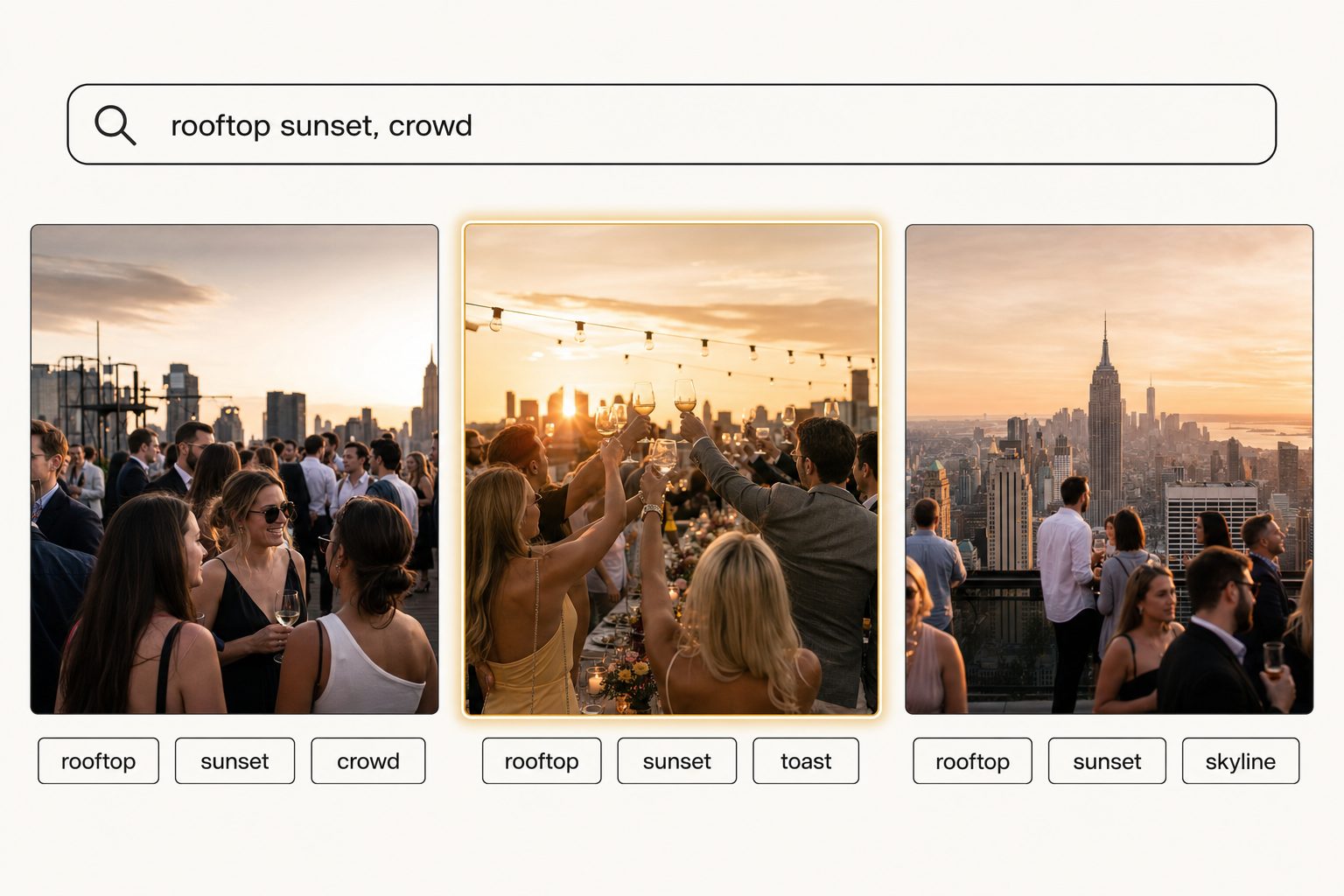
Two methods from our complete guide to AI photo tagging do the heavy lifting:
- Focal-subject tagging. Every photo gets one dominant-subject label ranked above its background, so "rooftop sunset" surfaces photos about a rooftop sunset, not every photo with a sky. In Tagrly's own testing on a 5,000-photo set, focal-subject tagging returned the right photo as the top AI photo search result in roughly 9 of 10 queries.
- Editorial-grade alt text. Every photo gets a full publishable sentence in the same pass as its tags, instead of a keyword dump, which matters when the photos end up on a website.
The scan runs unattended in the background, and what is already read is searchable while the rest is still going. By comparison, a person keywording 5,000 photos by hand at 150 photos per hour would spend more than 33 hours on it.
Tip. Want to judge the tagging on your own photos instead of a marketing screenshot? Tagrly's free tier reads the first 500 photos in any Drive or Dropbox folder, no credit card. Connect a sample folder and read the tags it writes back before you commit to anything.
The limits matter just as much. A connected catalog is not a brand-governance platform and not a photo editor: Tagrly does not do templated creative, brand portals, usage analytics, RAW conversion, or video and 3D assets. It does not deliver optimized images to a website through code either.
If those are on your requirements list, this tier will not replace an enterprise platform or a developer media tool. The comparison posts above show where the line sits.
Common mistakes when buying image catalog software
The same five mistakes show up again and again when teams shop this category, and each one costs money or weeks.
- Buying the enterprise tier for a find-my-photo problem. The single most expensive mistake. If you do not need to enforce brand rules across many users, you are paying for governance you will never switch on.
- Picking a desktop tool for a team that works in the cloud. A device-based catalog with great AI tagging still lives on devices. Syncing or taking turns works for a couple of people; it is not the same as everyone searching the shared Drive at once.
- Confusing a developer media platform with a catalog. If the setup guide starts with an API key and a code snippet, it is built for software, not for a person hunting for a photo.
- Trusting demo screenshots over your own photos. Tagging quality varies widely between tools, and between your photos and the vendor's curated samples. Always test on a folder of your own unnamed shots.
- Ignoring the leaving cost. A tool that holds your only copy of an asset makes leaving a migration project, while a read-only connector leaves your files in place. We walk through the details in what happens to your photos if you cancel.
Warning. Compare any platform against your actual weekly requirements, not its full feature list. Write down the three things your team does every week, then see which tool does those three for the lowest total cost.
How to choose: pick X if Y
Answer one question first: where do your photos live, and who needs them? Then match it to a tier. None of these picks is "Tagrly always," because the right tool depends on your situation.
- Stay on free folders if your library is under a couple thousand photos and a disciplined folder structure still works. Do not buy anything until search actually breaks.
- Pick a desktop organizer like Lightroom Classic, Excire Foto, or Mylio if you are a solo photographer, your photos live on one machine, and you already work inside an editor. A couple of people who can share by syncing or taking turns can use Mylio's Business plans or Excire's Office Edition.
- Pick a connected catalog like Tagrly if your photos already live in Google Drive or Dropbox, a small team needs AI search, and you would rather pay a monthly fee than sign a yearly contract or run a migration. The free first 500 photos let you check the output; see how the plans compare once you know your library size.
- Pick a gallery tool like Picflow or Foto Owl if your real job is presenting and delivering one project to a client, not searching a years-deep archive.
- Pick a developer media platform like Cloudinary or ImageKit if a program, not a person, is asking for the image, and you need delivery and transformation through code.
- Pick Brandfolder or Bynder if you have a procurement department, formal brand guidelines, single sign-on, hundreds of users, asset types well beyond photos, and a five-figure annual budget. The governance is the product, and a catalog will not replace it.
If you are torn, the deciding signal is almost never which tool is more powerful; it is where your photos live and how many people need them. A 200-person company enforcing brand standards should buy the platform, and a solo editor living in Lightroom should keep the desktop catalog. A six-person team that just lost an afternoon hunting for a sunset shot in a shared Drive should connect a catalog, and our comparison of the best photo organization software for teams narrows that choice.
The best image catalog software is the cheapest tool that solves the problem you actually have. For most small teams, that problem is finding a photo on a Thursday afternoon, not governing a brand. Start by trying a connected catalog on a real folder of your own photos, then read the head-to-head that matches whichever competitor you are weighing.
Frequently asked questions
What is image catalog software?
Image catalog software is a tool that makes a large pile of photos findable. It reads or indexes every image, records what each one is and where it lives, and gives you one place to search, filter, and pull any shot back out. The category is broad. At the simple end it is a desktop app like Lightroom Classic or Excire Foto that catalogs photos on one machine. In the middle are connected catalogs that read the Google Drive or Dropbox you already use and tag every photo with AI so a team can search by what is in each shot. At the heavy end are enterprise asset platforms like Brandfolder and Bynder that store your assets, govern who uses them, and add brand controls. They all answer the same question, find me the right photo, at very different prices and for very different team sizes.
What is the best image catalog software in 2026?
There is no single best one, because the right tool depends on where your photos live and who needs them. For a solo photographer who lives in Lightroom, a desktop catalog with an AI keyword plugin is the best fit. For a small team whose photos sit in a shared Google Drive or Dropbox folder, a connected catalog that tags your existing storage, like Tagrly, gives the team fast search without a migration. For a large organization that must enforce brand rules across hundreds of users and many file types, an enterprise platform like Brandfolder or Bynder is the right tier. The reliable way to choose is to write down where your photos live, how many people need them, and your budget, then pick the cheapest tool that covers those three.
How much does image catalog software cost?
It spans three orders of magnitude. Free is real: a shared Drive or Dropbox folder with disciplined naming costs nothing up to roughly 1,000 to 2,000 photos. Desktop catalogs are a one-time purchase or a monthly plan: as of September 2026, Excire Foto 2027 is $249 once, and Adobe's Lightroom plan, which includes Lightroom Classic, is $11.99 a month. Connected catalogs that tag your cloud storage run as a small monthly subscription; Tagrly's free tier reads the first 500 photos with no credit card. Enterprise platforms are quote-based: Brandfolder's pricing page lists tiers with no prices, and Vendr's buyer data puts its median contract at $24,999 a year. Match the spend to the problem: a find-my-photo problem rarely justifies an enterprise contract.
Do I have to migrate my photos into image catalog software?
It depends entirely on the type. Enterprise platforms and most desktop apps expect your photos to live inside them, which means a one-time upload or import and, for the enterprise platforms, ongoing sync. Connected catalogs take the opposite approach: they read your photos where they already live. Tagrly, for example, connects to Google Drive or Dropbox with read-only access, walks the folders you choose, and builds a searchable index without copying or moving a single original. For a team that already keeps everything in shared cloud storage, skipping the migration is often the single biggest practical difference between tools, and it makes leaving low-stakes too.
What is the difference between image catalog software and a digital asset platform?
Mostly scale and intent. A photo catalog is built to make photos findable for a person or a small team: tag, search, share, done. A digital asset platform like Brandfolder or Bynder is built to govern assets for a large organization: it becomes the system of record, controls who can download what, enforces brand guidelines, tracks usage, and handles many file types beyond photos, including video and 3D. The governance is the product, and it is priced accordingly. Most small teams searching for a catalog do not have a governance problem, they have a find-my-photo problem, and the platform tier is expensive overkill for that. Choose the catalog if you need findability and the platform if you need control at scale.
Can image catalog software search photos by what's in them?
The modern ones can, and that is the feature worth paying for. Older catalogs only search the text you type in yourself: filenames, folders, and manual keywords. That fails the moment a library is full of files named DSC_0481.jpg. AI image catalogs read the pixels of each photo, write down the focal subject and the scene, and let you type a plain-English description like 'rooftop sunset with a crowd' to get the right shot back. When you evaluate a tool, this is the line that matters most: does it search what you typed, or does it search what the photo actually shows. Test it on a folder of your own unnamed photos before you trust the marketing copy.
Try Tagrly on your own photo library
Connect your Google Drive or Dropbox folder and Tagrly will tag every photo in bulk. Search by what is actually in the image, share specific shots with clients, and never lose a photo again.
- Free for your first 500 photos
- Read-only access, revoke anytime
- No credit card