
A wholesale buyer emails on Monday morning. The line sheet goes out Wednesday, and they want the on-model shot of the sand linen blazer from your spring lookbook plus the flat lay that shows the stitching. That shoot was two collections ago.
You know both frames exist. You just don't know whether they live in SS26-FINAL, the photographer's Dropbox handoff, or the lookbook export a former intern zipped up in March, and every file in all three is named DSC_0481.jpg.
What goes in a fashion brand photo catalog
A fashion brand photo catalog has to hold every frame a style produces, and a single style is never one photo. Each garment needs a full set, then the whole set again for every colorway:
- Product-page frames. A ghost-mannequin or flat lay shot for the store.
- On-model shots. The garment worn, from several angles.
- Detail crops. Fabric, stitching, and hardware close-ups.
- Lookbook and campaign imagery. The editorial frames that sell the season.
Run the math on a modest label: 40 styles per drop, three colorways each, and ten frames per colorway is 1,200 photos per season, before behind-the-scenes and social content. Two years of spring and fall drops puts you near 5,000. Fashion shares that SKU math with the rest of online retail, covered in our guide to e-commerce product photo organization, but adds a pressure most stores don't have: seasons.
Seasons mean the archive never retires, which is why "we'll just remember where it is" fails sooner in fashion than almost anywhere. Photos from two years ago are working assets, not history, because old frames keep getting called back:
- Carryover styles. A style that returns next year reuses its original product shots.
- Press pulls. Editors and stylists request archive looks long after the drop.
- Resale channels. Archive sales and resale listings need the original imagery.
Step 1: give every shoot one home the brand owns
Every shoot belongs in one home the brand owns, not in the storage of whoever shot it. Fashion brands run on freelance photographers, rented studios, and agency partners, and every handoff is a chance for a shoot to end up in someone else's account.
Either of these survives the photographer and studio turnover a seasonal calendar produces:
- Google Workspace. A shared drive belongs to your organization, not to one person's login. If your organization allows outside members, Google's guide notes that anything a freelance photographer uploads there is transferred to and owned by your organization.
- Dropbox. A team folder owned by the business account, so it stays put when a freelancer or an employee moves on.
Copy every deliverable in the week it lands: e-commerce selects, lookbook exports, campaign finals, and usable outtakes, because outtakes are next season's social content.
Warning. If the only copy of a campaign lives in the photographer's cloud account, that account is your single point of failure. Contracts end, links expire, and you cannot re-shoot a sample that already went back to the factory.
Step 2: file by season, name by style code
Fashion has a natural filing key built in: the style code. A folder tree that holds up has four levels:
- Season at the top.
SS26,FW26, so a browse starts in the right year. - Collection or drop next. The unit your team plans and launches around.
- One folder per style. The style code is the key your line sheets, store, and factory already share.
Ecomm,Lookbook, andCampaignsubfolders inside. Product-page frames, editorial shots, and campaign finals never mix.
Name every file so the style, colorway, and shot type read at a glance, like ss26_blazer-linen_sand_onmodel-front_01.jpg. That makes a plain filename search return something instead of a wall of DSC_0481.jpg, and our photo file naming conventions guide has more patterns that hold up.
The same naming keeps product-page uploads predictable, because the Ecomm folder maps cleanly to your store's image slots. If you sell on Shopify, each variant takes only one assigned image, so a colorway's extra frames live in the product's shared gallery; the Shopify product photo organization guide maps this folder tree onto that setup.
Note. Folders and naming hold up to about 1,000 photos. Past that you hit what we call the 1,000-photo wall, described in the complete guide to bulk image tagging: the archive gets too big to remember and too big to rename by hand. A brand shooting 1,200 frames a season clears that wall with its first drop.
Step 3: make every season searchable by what's in each shot
Past the 1,000-photo wall, the fix is a catalog that reads every photo, because folders cannot answer the questions a fashion team actually asks. Folders answer "where did SS26 go," but not "the on-model shot of the sand linen blazer with the outdoor background" or "every flat lay with gold hardware."
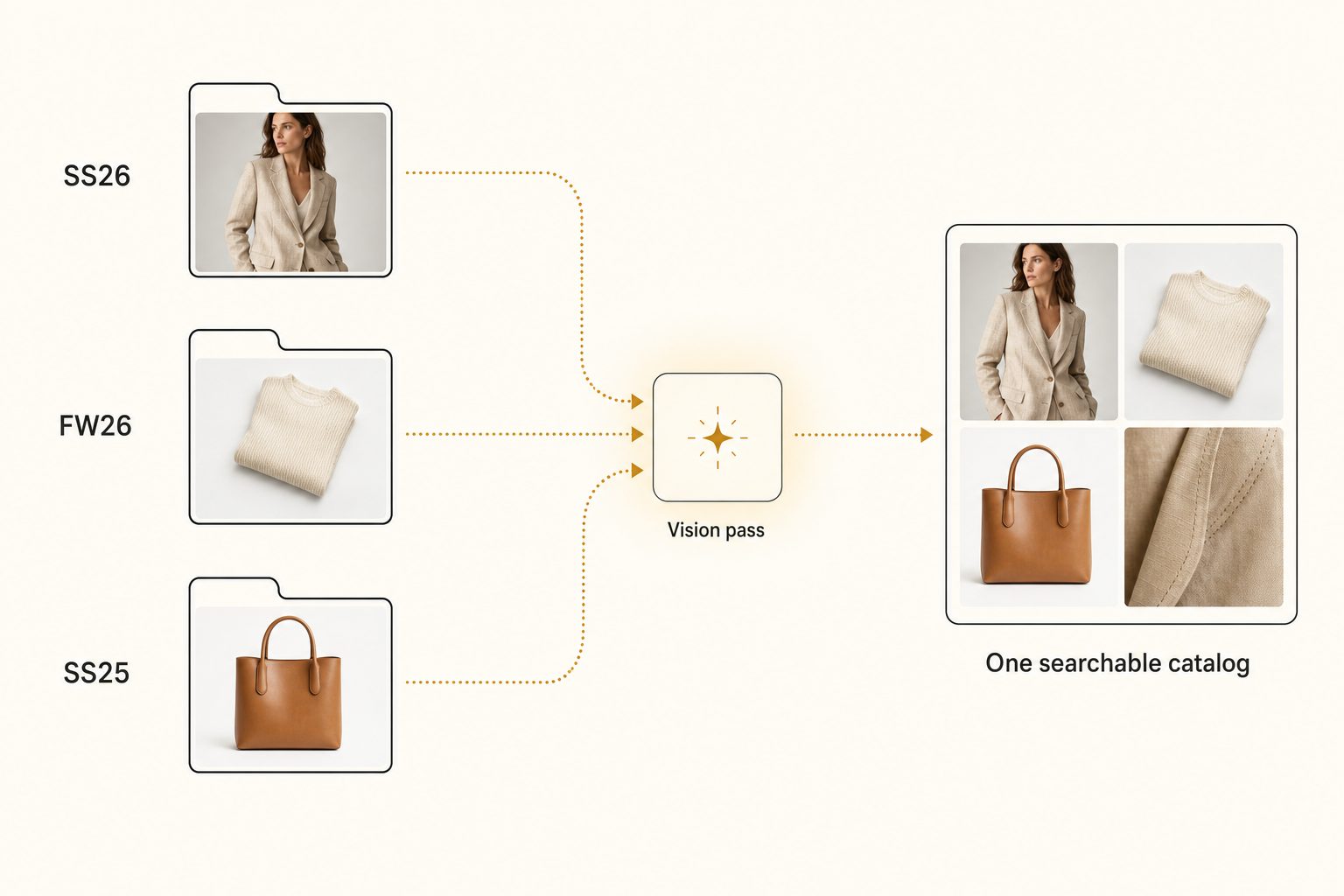
An AI photo catalog closes that gap in three moves:
- Connect. It links to your shared Drive or Dropbox with read-only access. Your originals never move, and your season folders stay exactly as they are.
- Read. It sends each photo to a vision model and writes a sentence and tags for every frame: the garment first, then the colorway, the fabric, the shot type, and the setting.
- Search. You type a plain description, "sand linen blazer, on-model, outdoor," and the matches come back ranked, strongest frame first.
Tag quality decides whether any of this is worth paying for. A weak tagger writes "clothing, person, wall," and a search for the sand blazer returns half the archive. A strong one names the focal subject first, the linen blazer, then records that it is sand-colored, worn on-model, and shot outdoors.
That discipline is focal-subject tagging, and the full method lives in the 3-tier focal-subject tagging method. In Tagrly's own testing on a 5,000-photo set, focal-subject tagging surfaced the correct top match in roughly 9 of 10 searches, which is the difference between searching photos by description and scrolling five seasons of folders.
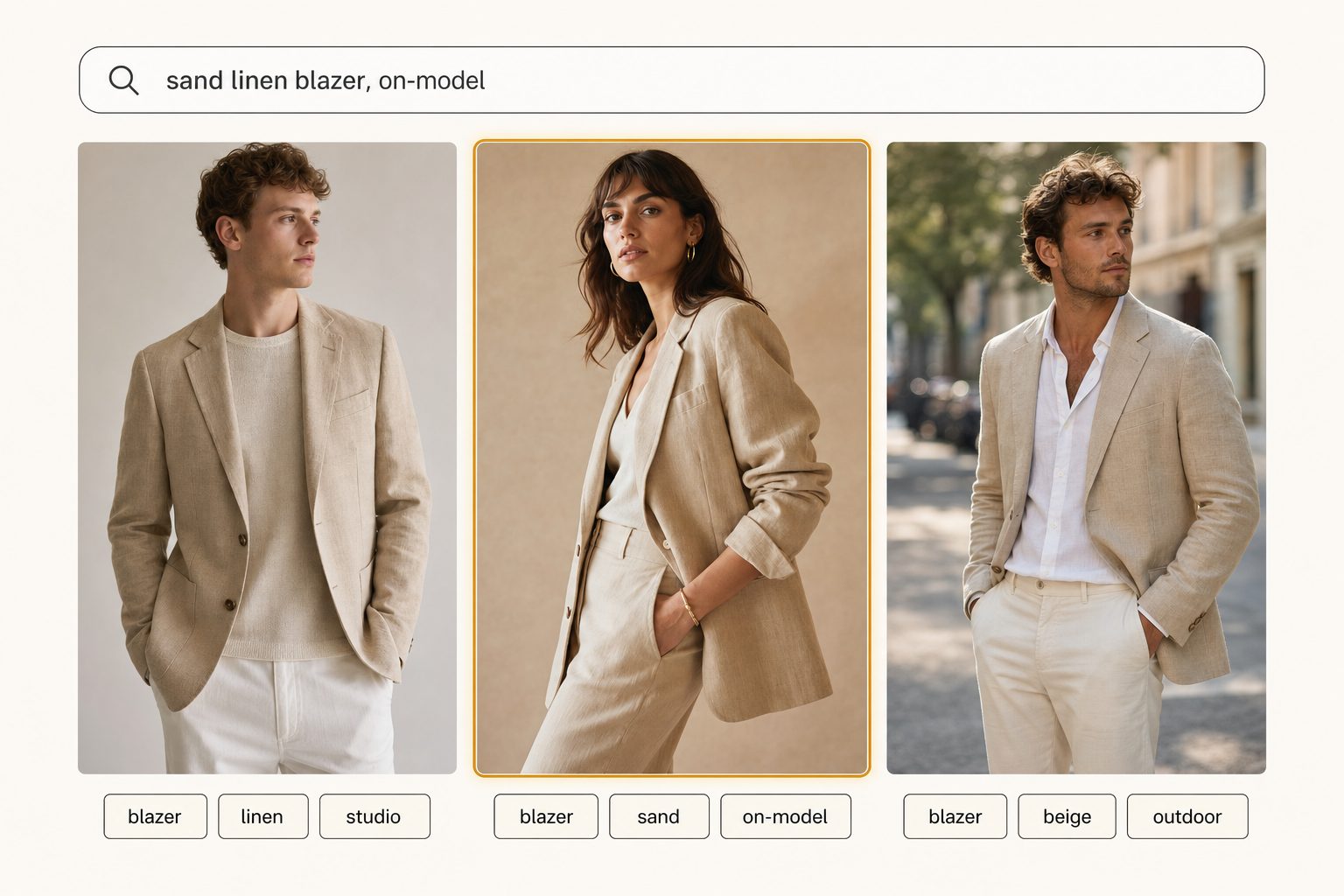
Tagrly is one tool that does this, not the only one that connects to a shared drive, so judge any of them on the words they produce for your own garments before paying for a plan. If you sell online, Tagrly's page for e-commerce brands shows the same plain-words search on colorways, flat lays, and on-model shots.
Tip. Want to see this on your own collection? Tagrly's free tier tags the first 500 photos in any Drive or Dropbox folder, no credit card. Run it on one season's shoot, search the results, then point it at the whole archive when you are ready.
Step 4: pull past looks for press, line sheets, and product pages
A searchable archive turns three routine fashion jobs from folder hunts into searches:
- Press requests. A press or stylist request for an archive look becomes one description typed into a search box.
- Line sheets. A line sheet pulls the exact frames for every carryover style without re-opening old season folders.
- Returning colorways. A returning colorway's product page reuses the original shoot instead of booking a new one.
Delivery needs the same discipline as storage: never share the whole archive outward. Next season's unreleased looks are fashion's version of an embargo, and a folder link that exposes them is one careless click from a leak. Pull only the cleared shots into a collection and send that as a single link, the model we cover in how to share specific photos with clients.
The tagging pass also clears a backlog most fashion teams never finish: alt text. A catalog with editorial-grade output writes a full descriptive sentence per image, ready for the product page, which matters both for shoppers using screen readers and for search engines.
The W3C's image guidance is the standard worth reading on what a good description says. For the fashion-specific catch, five frames of one blazer that each need their own wording, see our guide to alt text for product images.
Which setup fits your brand
The right setup depends on how many seasons deep your archive runs and how often old frames come back to work.
- A new label under 1,000 photos. A brand-owned shared drive, a season-and-style-code folder tree, and a strict naming convention. That is enough, so do not pay for a catalog yet.
- A growing brand with seasonal drops. Keep the drive and the naming, and add an AI photo catalog over the archive so anyone can pull a past look by description and export alt text in the same pass. This is the sweet spot for a connected catalog.
- A brand built on freelance shooters and studios. Fix ownership first: every deliverable into the brand's drive the week it lands. Then add search on top, because discipline beats tooling here.
- A large house with procurement and brand governance. An enterprise platform with approval flows and rights management can justify its price. For a small brand team it is usually overkill, and a connected catalog covers the find-and-share job for far less.
A fashion brand photo catalog comes down to one rule with a seasonal twist: one brand-owned home the whole team can search, because in fashion the archive never stops working. Folders and style codes carry a new label up to the 1,000-photo wall, and there is no reason to pay before then.
Past it, a catalog that reads every garment, colorway, and shot type turns a pile of DSC_0481.jpg files across five seasons into a library you can build a line sheet from.
The surest way to know if it fits is to test it on a real season folder and search the results. For the bigger picture, read our guide to finding any photo in your library.
Frequently asked questions
What is a fashion brand photo catalog?
It is the single organized home for every photo a fashion brand produces: e-commerce shots, on-model and flat lay frames, lookbook and campaign imagery, and detail crops, across every season and colorway. The point is findability. A brand shoots thousands of frames a year, and the same photos keep working long after the drop: carryover styles return, press pulls archive looks, and resale channels need the original imagery. A catalog keeps all of it in brand-owned storage, filed by season and style code. Past roughly 1,000 photos, it adds a search layer that reads each image, so anyone on the team can find a frame by describing what it shows instead of guessing which folder it landed in.
How should a fashion brand organize product and lookbook photos?
Start with one brand-owned home, a shared drive in Google Workspace or a Dropbox team folder, filed by season at the top, then collection, then one folder per style with subfolders for e-commerce, lookbook, and campaign shots. Name every file so the style, colorway, and shot type read at a glance, like ss26_blazer-linen_sand_onmodel-front_01.jpg. That convention means a plain filename search returns something useful, and uploads to your store stay predictable. The structure carries a label to roughly 1,000 photos. Past that, folders stop answering the questions the team actually asks, like which past season shot a garment outdoors, and a catalog that reads each photo takes over.
How do you find one garment shot across past seasons?
By searching what the photo shows instead of where it was filed. Camera filenames carry no information about the blazer, the colorway, or the setting, so a filename search only finds frames someone renamed by hand. An AI photo catalog reads every image once, writes tags and a sentence describing the garment, color, fabric, shot type, and setting, and stores them in a searchable index. You then type a plain description like 'sand linen blazer, on-model, outdoor,' and the matching frames come back ranked, strongest match first, no matter which season's folder they landed in or which photographer delivered them. In Tagrly's own testing on a 5,000-photo set, focal-subject tagging surfaced the correct top match in roughly 9 of 10 searches.
Can AI tag fashion photos by garment, colorway, and shot type?
Yes, and it is the main reason fashion teams reach for one. A vision model recognizes the garment as the focal subject, then records the colorway, the fabric where it is visible, whether the frame is a flat lay, a ghost mannequin, or on-model, and the setting around it. The whole archive becomes searchable by any of those attributes across every season, which folders and filenames cannot do. Quality varies between tools, especially on fashion-specific vocabulary like fabric and silhouette, so run a sample of your own shots through before paying anyone. Tagrly tags the first 500 photos in any Drive or Dropbox folder free, so you can judge the output on your own collection first.
When does a fashion brand need more than folders and filenames?
Around the 1,000-photo wall, which a label shooting full e-commerce and lookbook sets can reach with its first drop. Below it, a brand-owned shared drive, a season-and-style-code folder tree, and a strict naming convention are enough, and you should not pay for a catalog yet. Above it, the archive gets too big to remember and too big to rename by hand, and the cost shows up as time: an afternoon lost hunting for a two-season-old frame, or a re-shoot booked because nobody could find the original and the sample already went back to the factory. When pulling a past look for press, a line sheet, or a carryover product page means scrolling and guessing, the search layer starts paying for itself.
Try Tagrly on your own photo library
Connect your Google Drive or Dropbox folder and Tagrly will tag every photo in bulk. Search by what is actually in the image, share specific shots with clients, and never lose a photo again.
- Free for your first 500 photos
- Read-only access, revoke anytime
- No credit card