
A reporter emails at 3pm. The story runs tomorrow, and they need a high-resolution headshot of your client's CEO plus one product shot from the launch event your team covered last spring. You know both images exist. You just don't know whether they are in the Acme-2026-FINAL Drive folder, the freelancer's Dropbox from that quarter, or the zip a former account exec exported before they left, and every file in all three is named DSC_0481.jpg.
Why a PR firm's photo problem is its own thing
Every agency juggles client photos, but a PR firm carries pressures a marketing team mostly doesn't.
- Fragmentation. The library is fragmented across clients, each with its own press kit and its own approved set.
- Timing rules. The assets carry embargoes and release dates that decide what may leave the building today.
- External audience. The audience is external and unforgiving, since a journalist who gets the wrong file or a soft, low-resolution crop just uses a competitor's story instead.
Most photo-organizing advice assumes a single brand with one library. The closest sibling to the PR case is our photo asset management guide for marketing agencies, which shares the many-clients-one-firm structure. This guide adds the PR-specific parts: press kits, embargoes, and delivering to the media.
Step 1: give the firm one home it owns, split by client
The first decision is where the photos live, and for a PR firm the rule is non-negotiable: the library belongs to the business, not to a freelancer, an account exec's laptop, or whichever intern handled the last event.
A shared drive in Google Workspace or a Dropbox team folder both work, and both survive the freelancer turnover agencies live with. Inside it, give every client its own top-level folder. That keeps each client's press assets separate, so an account manager pulling shots for one brand never stumbles into a competitor's campaign, and it gives you a clean unit to archive when a retainer ends.
Warning. If a client's only launch photos live on a freelancer's personal drive, that drive is your single point of failure. The day the contract ends, the images can leave with it, and you cannot re-shoot a launch that already happened. Copy every deliverable into the firm-owned drive the week it is produced, not the quarter a reporter finally asks for it.
Our guide to setting up a shared photo library for a small team covers access roles in more detail. The PR twist is the per-client split at the top, plus a locked space for anything under embargo.
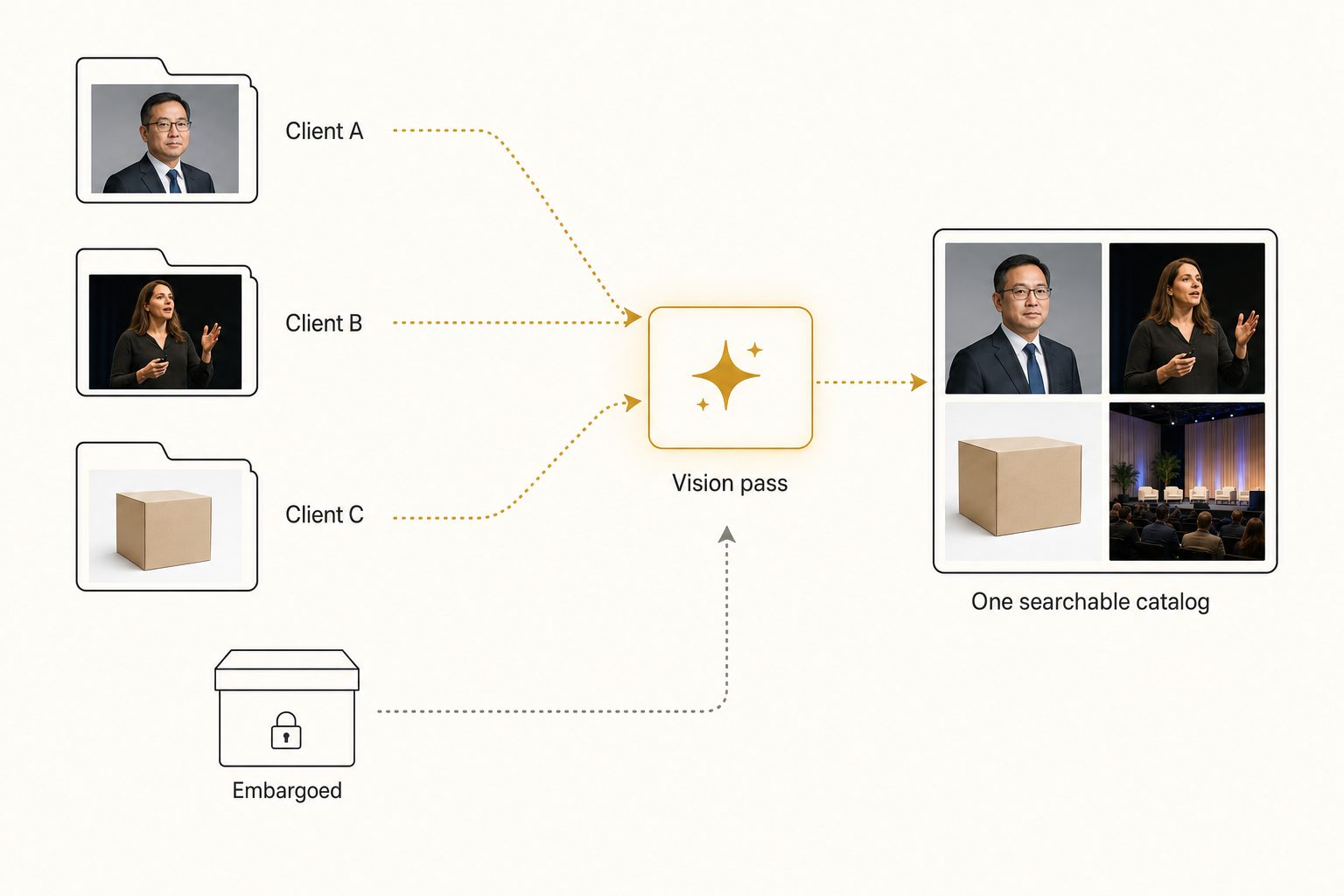
Step 2: build a real press kit inside each client folder
A PR photo library is only useful if a publicist can assemble a press kit fast, so the folder tree under each client should map to what reporters ask for, not to the order the files arrived.
A structure that holds up is a small, predictable set of folders per client:
Headshots. Executives and spokespeople, in the horizontal and vertical crops outlets request.Brand. Logos, wordmarks, product shots on clean backgrounds.Events. Launches, conferences, activations. When an outside photographer covers the event, our guide to event photography photo delivery covers getting those files into the firm's home fast.Approved. A separate folder holding only the images cleared for outside release.
Name every file so the client, the subject, and the use read at a glance, like acme_ceo-headshot_horizontal_01.jpg. That makes a filename search return something instead of a wall of DSC_0481.jpg, and handing a reporter the right crop a thirty-second job.
Note. Keep embargoed assets out of the
Approvedand shared spaces entirely, in a folder only the account team can open, until the embargo lifts. Storage separation is the reliable guard, not a filename tag a rushed teammate can miss. The moment an embargoed shot sits in a folder anyone can share, it is one careless link away from breaking early.
Folders and naming hold up to a few thousand photos. Past that you hit what we call the 1,000-photo wall, described in the complete guide to bulk image tagging: the library gets too big to remember and too big to rename by hand. A firm adding a client every quarter clears that wall fast.
Step 3: make the whole archive searchable by what's in each photo
The free setup above carries a firm a long way, then stops at the moment that hurts most on a media deadline: finding a specific shot across many clients, months later, when the account exec who ran the event has moved on. Folder and filename search only works if every file was named perfectly, which never survives a launch week with two freelancers in the loop, and neither folders nor filenames can answer the question a publicist asks against a reporter's deadline, like "find the CEO headshot with the neutral background."
An image catalog closes that gap. It connects to your shared Drive or Dropbox with read-only access, streams each photo to a vision model, and writes a sentence and tags for every shot, the focal subject first, then the scene around it. Your originals never move. Anyone on the team then types a plain description and the matching frames come back ranked, so the strongest match lands first.
Tag quality decides whether the catalog is worth anything. A weak tagger writes "person, room, sky" and your search for a headshot returns half the library. A strong one identifies the focal subject first, the CEO against a neutral backdrop, then records the lighting, the crop, and the setting as context.
That discipline is focal-subject tagging, and it is also what produces editorial-grade alt text clean enough to sit under a photo in a published article, both defined in the complete guide to AI photo tagging. In Tagrly's own testing on a 5,000-photo set, focal-subject tagging surfaced the correct top match in roughly 9 of 10 searches, which is the difference between searching photos by description and scrolling a client folder while a reporter waits.

Tagrly is one tool that does this, and it is not the only one that connects to a shared drive. What separates them is tag quality, so judge any tool on the words it produces for your own client work before paying for a plan.
Tip. Want to see this on your own archive? Tagrly's free tier tags the first 500 photos in any Drive or Dropbox folder at no cost, no credit card. Run it on one client's press folder, search the results, then point it at the whole archive when you are ready.
Step 4: deliver to journalists without exposing the rest
A searchable archive does a second job that matters more for a PR firm than for almost anyone else: it keeps outward delivery scoped to one story at a time.
The mistake to design against is handing a reporter a link to a folder that also holds another client's work, an unreleased product, or a raw take that was never approved.
The fix is to never share the library. Pull only the cleared shots for that one story into a dedicated collection, then share that as a single link. The recipient sees those images and nothing else, no neighboring client, no embargoed launch, no outtakes. Because each image already carries editorial-grade alt text from the tagging pass, an editor gets a usable caption with it.
This is the per-collection share model we cover in how to share specific photos with clients, applied to the PR case where the recipient is a journalist on deadline and a wrong file means a leaked embargo. Internal search and outward share run off the same catalog: the team finds the frame, scopes it to a collection, and sends one clean link.
Tip. Send press images at print resolution, not the web crop. Outlets run photos in print and on high-density displays, and a soft 800-pixel file gets rejected or replaced. Keep a high-resolution master in your archive and deliver from it. The broader intake-to-publish flow is laid out in photo workflows for marketing teams, and the W3C's guidance on image accessibility is worth a read on why the description you attach to each image matters as much as the resolution.
Which setup fits your PR firm
The right setup depends on how many clients you run and what you actually sell them.
- A boutique firm under a few thousand photos. A business-owned shared drive, a per-client folder tree, a naming convention, and a locked embargo folder. That is enough. Do not pay for a catalog yet.
- A growing firm adding clients every quarter. Keep your shared drive and add an AI photo catalog over the whole archive, so any team member can find a past shot by description and scope a clean share to one story. This is the sweet spot for a connected catalog.
- A firm with heavy freelancer churn. Prioritize the business-owned home, copy every deliverable in the week it is made, then add search on top. Ownership discipline matters more than the tool.
- A firm that runs media monitoring at scale. If your job includes coverage reporting, journalist databases, and formal rights tracking, an enterprise media platform can justify its price. For the pure find-and-deliver photo job, a connected catalog like those we weigh against Brandfolder for small teams covers the need for far less.
Setting up a PR agency photo library comes down to one rule with a PR twist: one business-owned home the whole team can search, split so every client stays separate and every embargo stays locked. Folders and naming carry a small firm past its first year, and there is no reason to pay before the 1,000-photo wall. Past it, a catalog that reads every shot turns a pile of DSC_0481.jpg files across a dozen brands into a library you can pull a press image from while a reporter waits on the phone. The fastest way to know if it fits is to run it on a real client folder, then see the bigger picture in our guide to finding any photo in your library.
Frequently asked questions
What is a PR agency photo library?
It is the single organized home where a PR firm keeps every client's press photos, executive headshots, product shots, and event coverage, so a publicist can find and hand a journalist the right image on deadline. The hard part is not one library but many, because each client has its own press kit, its own approved shots, and its own embargoes, and the work moves between account teams, freelancers, and reporters. A good library keeps every client separate, lets the whole team search by what a photo shows rather than by filename, and makes an outward share cover only the images cleared for that one story. The free version is a firm-owned shared drive with a per-client folder tree. Past a few thousand mixed photos, a searchable catalog earns its keep.
How should a PR firm organize press kit photos?
Start with one firm-owned home, split by client, with a clear folder tree under each client: headshots, logos and brand assets, product shots, and event coverage, plus a separate Approved folder holding only the images cleared for outside release. Name files so the client, the subject, and the use read at a glance, like acme_ceo-headshot_horizontal_01.jpg, so a filename search returns something instead of a wall of DSC_0481.jpg. That structure carries a firm to a few thousand photos. Past that, folders and filenames stop answering the question a publicist actually asks, which is find the CEO headshot with the neutral background, and a photo catalog that reads each image and makes the whole archive searchable by content takes over.
How do PR agencies keep an embargoed launch photo from leaking early?
By separating pre-release assets at the storage layer and never sharing the whole library outward. Keep embargoed launch photos in a client folder that only the account team can open, out of any Approved or shared space, until the embargo lifts. When you send a journalist images, never hand over a folder link to the full archive. Pull only the shots cleared for that story into a dedicated collection and share that as one link, so the recipient sees those images and nothing else, no unreleased product, no another client's campaign. A searchable catalog with per-client collections makes this routine: the team searches one library internally, and each outward share is scoped to a single story.
Can AI tag a PR firm's mixed photo library by what's in each shot?
Yes, and it is the main reason a firm reaches for one. A vision model looks at each photo and writes a sentence and tags describing the focal subject and the scene, a CEO headshot on a neutral background, a speaker at a product launch, a plated dish at a restaurant opening, without anyone typing those words. The whole archive then becomes searchable by description across every client and campaign, which folders and filenames cannot do. Tag quality varies a lot between tools, so before paying anyone, run a sample of your own client photos through and read the words it produces. Tagrly tags the first 500 photos in any Drive or Dropbox folder free, so you can judge the output on your own work first.
Do PR agencies need an enterprise media platform, or is that overkill?
It depends on what the firm actually sells. If you run media monitoring, coverage reporting, journalist databases, and rights management for large brands, an enterprise platform with all of that built in can justify its price. Most small and mid-size PR firms do not have that problem. Their photo pain is simpler: press assets scattered across client folders and freelancer drives, no fast way to find a past shot, and the constant risk of sending the wrong client's images or an embargoed launch to a reporter. For that job, a connected catalog that reads your existing Drive and Dropbox and makes everything searchable covers the need for a fraction of the cost. Match the tool to the problem, not to the client's logo.
Try Tagrly on your own photo library
Connect your Google Drive or Dropbox folder and Tagrly will tag every photo in bulk. Search by what is actually in the image, share specific shots with clients, and never lose a photo again.
- Free for your first 500 photos
- Read-only access, revoke anytime
- No credit card