
The retainer client emails Wednesday afternoon. They want to refresh a landing page Friday, and they remember a shot from the rooftop launch your team covered last spring: the founder mid-laugh with the skyline behind her.
You know it exists. You just don't know whether it's in the freelancer's Dropbox from that quarter, the Q2-launch-FINAL Drive folder, or the export a former designer zipped before they left. Every file in all three is named DSC_0481.jpg.
Why an agency photo library is harder than a brand's
An agency photo library is harder because it is really one library per client, with work moving between staff, freelancers, and the clients themselves. A single brand has one library and one team. That fan-out is what makes agency photo asset management its own problem.
Three things stack up at once:
- Fragmentation. Each client has its own shoots, so there is no single folder to search.
- Turnover. Freelancers and contract designers cycle through and leave with photos on their own drives.
- Sharing stakes. One client's images reaching another is not a tidiness issue. It is a lost account.
Most photo organizing guides miss this. The Bynder roundup of photo organizing software and similar lists are written for one brand with one set of colors. An agency has to translate every recommendation through the per-client, many-hands reality, which is what this guide does.
Step 1: give the agency one home it owns, split by client
The photos must live in storage the business owns, not on a freelancer's drive, a designer's laptop, or whichever account handled the last shoot. For an agency, that rule is non-negotiable.
A shared drive in Google Workspace or a Dropbox team folder both work, and both survive staff turnover. Inside it, give every client its own top-level folder. That one decision does two jobs:
- Separation. A designer browsing one client never stumbles into another client's raw frames.
- A clean handoff unit. When a client relationship ends, you archive or hand over one folder.
Warning. If a client's only shoot lives on a freelancer's personal drive, the photos can leave the day the contract ends, and you cannot re-shoot a launch that already happened. Copy every deliverable into the agency-owned drive the week it is produced.
Our guide to setting up a shared photo library for a small team covers access roles and ownership in more detail. The agency twist is the per-client split at the top of the tree.
Step 2: name files so a search returns something
A naming convention keeps the library usable while it is still small enough for filenames to matter. Agencies have a natural key built in: the client.
A folder tree that holds up has three levels:
- Client at the top, one folder each.
- Project or campaign inside it, like
2026-04-rooftop-launch. Raw,Selects, andDeliveredsubfolders inside each project.
Name every file so the client, the shoot, and the subject read at a glance, like northwind_rooftop-launch_founder_01.jpg. A plain filename search then returns something instead of a wall of DSC_0481.jpg. Our photo file naming conventions guide has patterns you can copy.
Note. Folders and naming hold up to a few thousand photos. Past that you hit what we call the 1,000-photo wall, described in the complete guide to bulk image tagging: the library gets too big to remember and too big to rename by hand. An agency adding a client every quarter clears that wall faster than almost any other kind of team.
Step 3: make the whole archive searchable by what's in each photo
Searching by what a photo shows is the step that finds a specific shot across many clients, months later, after the person who ran the shoot is gone. Folders and filenames stop working exactly there.
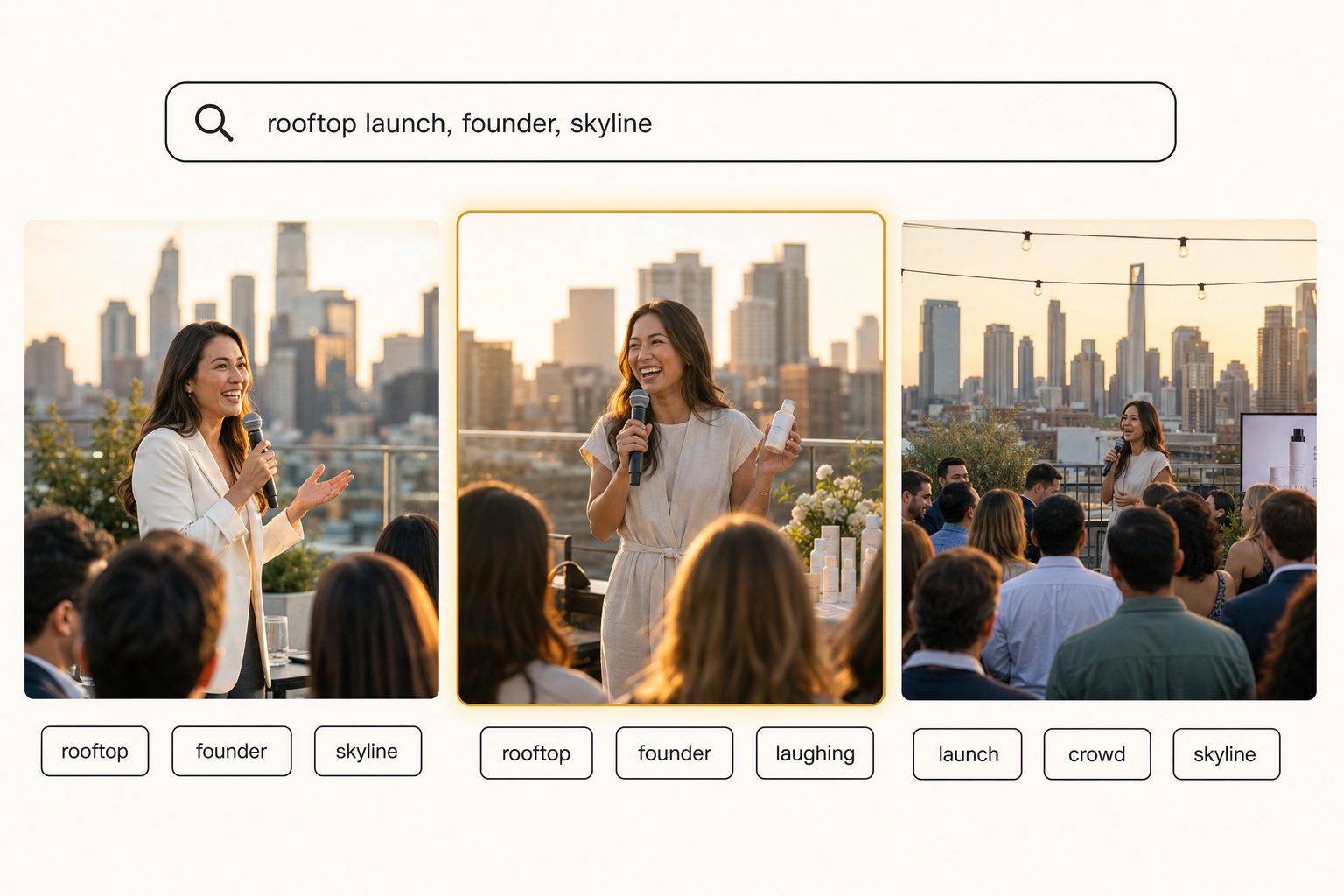
Filename search only works if every file was named perfectly, which never survives a production week with two freelancers in the loop. Neither folders nor filenames can answer what an account manager actually asks, like "the rooftop launch shot with the founder and the skyline" or "every product photo we have on a white background for this client."
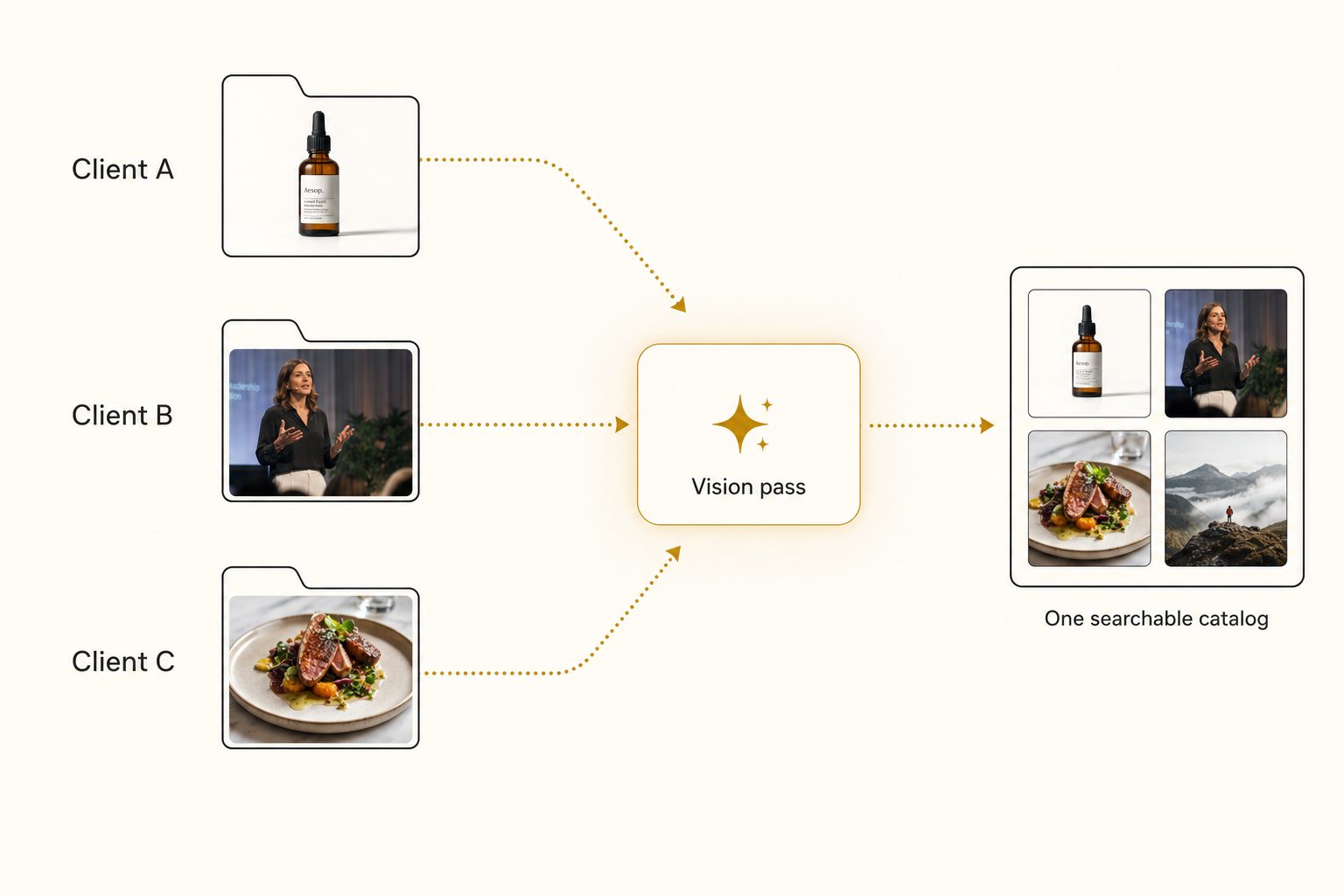
An AI photo catalog closes that gap in three moves:
- Connect. It links to your shared Drive or Dropbox with read-only access. Your originals never move.
- Read. It sends each photo to a vision model and writes a sentence and tags for every shot: the focal subject first, then the scene around it.
- Search. Anyone on the team types a plain description, and matching frames come back ranked, strongest match first.
Tag quality decides whether the catalog is worth anything. A weak tagger writes "person, building, sky," and your search for the founder shot returns half the library. A strong one names the founder mid-laugh first, then records the rooftop, the skyline, and the golden-hour light as context. That discipline is focal-subject tagging.
In Tagrly's own testing on a 5,000-photo set, focal-subject tagging surfaced the correct top match in roughly 9 of 10 searches with AI photo search. The first full scan runs unattended in the background, and photos are searchable while it is still running.
Tagrly is one tool that does this, not the only one, so judge any tool on the words it produces for your own client work before paying for a plan. Tagrly's page for marketing agencies shows the same search on mixed client shoots.
Tip. Want to see this on your own archive? Tagrly's free tier tags the first 500 photos in any Drive or Dropbox folder, no credit card. Run it on one client's folder and search the results before you point it at the whole archive.
Step 4: share the right shots with the right client, and only those
A searchable archive keeps outward sharing scoped to one client at a time, which matters more for an agency than for almost anyone else. The mistake to design against is a link to a folder that also holds another client's work or a raw take nobody approved.
The fix is to never share the library itself:
- Select. Search the catalog and pick only the approved shots for that one client.
- Collect. Put them in a dedicated collection.
- Share. Send that collection as a single link. The recipient sees those images and nothing else.
This is the per-collection share model from how to share specific photos with clients, applied to many clients at once. The broader shoot-to-delivered flow is laid out in photo workflows for marketing teams.
Which setup fits your agency
The right setup depends on how many clients you run and what you sell them.
- A small agency or studio under a few thousand photos. A business-owned shared drive, a per-client folder tree, and a strict naming convention are enough. Do not pay for a catalog yet.
- A growing agency adding clients every quarter. Keep your shared drive and your editor, and add an AI photo catalog over the whole archive so anyone can find a past shot by description. This is the sweet spot for a connected catalog.
- An agency with heavy freelancer churn. Prioritize the business-owned home and copy every deliverable in the week it is made, then add search on top. Ownership discipline matters more than the tool.
- A PR or comms agency. Press photos, executive headshots, and event coverage pile up the same way. Our PR agency photo library guide covers that variant.
- An agency that manages brand governance for large clients. If your job includes rights tracking, approval chains, and locked brand portals, an enterprise platform like Brandfolder or Bynder can justify its price. For most agencies it is overkill; see alternatives to Brandfolder for small teams.
Marketing agency photo asset management comes down to one rule with an agency twist: one business-owned home the whole team can search, split so every client stays separate. Folders and naming carry a small shop to the 1,000-photo wall, and there is no reason to pay before it.
Past it, a catalog that reads every shot and keeps each client scoped turns a dozen clients' worth of DSC_0481.jpg files into something you can ship a Friday landing-page refresh from. Try it on a real client folder, then see the bigger picture in our guide to finding any photo in your library.
Frequently asked questions
What is photo asset management for a marketing agency?
It is the system an agency uses to store, find, and share the photos it produces for clients, so a shot is reusable months later instead of lost. The hard part for an agency is not one library but many: each client has its own shoots, brand photos, and event coverage, and the work moves between staff designers, freelancers, and the client. Good photo asset management gives the whole team one place to search by what a photo shows, keeps every client's images separate so nothing crosses over, and lets an account manager pull the approved shots for one client into a single share link. The free version of this is a business-owned shared drive with a per-client folder tree. Past a few thousand mixed photos, a searchable catalog earns its keep.
How do agencies keep one client's photos from reaching another client?
By separating clients at the storage layer and at the share layer, not by being careful. Give every client its own top-level folder or its own workspace, so a designer browsing one client never sees another's raw frames. When you share outward, never hand over a folder link to the whole archive. Pull only the approved shots for that one client into a dedicated collection or share link, so the recipient sees those images and nothing else. A searchable catalog with per-client collections makes this routine: the team searches one library internally, and each outward share is scoped to a single client. The risk is real: sending a competitor's campaign or an unreleased product shot to the wrong inbox is the kind of mistake that loses an account.
When does an agency need more than folders for photos?
Around the point where finding a past shot means asking whoever ran the shoot, usually a few thousand photos across several clients. Below that, a business-owned shared drive with a per-client folder tree and a naming convention is enough, and you should not pay for a tool yet. An agency clears that line fast, because every client adds shoots, every campaign adds frames, and freelancers come and go with photos on their own drives. Once a designer spends twenty minutes hunting for a frame everyone knows exists, or the team re-licenses a stock image it already bought because no one could find it, the lost hours cost more than a catalog would.
Can AI tag a mixed agency photo library by what's in each shot?
Yes, and that is the main reason an agency reaches for one. A vision model looks at each photo and writes a sentence and tags describing the focal subject and the scene (a product on a white background, a speaker at a rooftop launch, a plated dish) without anyone typing those words. The whole archive then becomes searchable by description across every client and campaign, which folders and filenames cannot do. In Tagrly's own testing on a 5,000-photo set, focal-subject tagging surfaced the correct top match in roughly 9 of 10 searches. Tag quality varies a lot between tools, so run a sample of your own client photos through before paying anyone. Tagrly tags the first 500 photos in any Drive or Dropbox folder free, so you can judge the output on your own work first.
Do agencies need an enterprise brand asset platform, or is that overkill?
It depends on what the agency sells. If you manage brand governance for large clients, with rights tracking, approval chains, version control, and locked-down brand portals, an enterprise platform like Brandfolder or Bynder can justify its price. Most small and mid-size agencies do not have that problem. Their pain is simpler: photos scattered across client folders and freelancer drives, no fast way to find a past shot, and the constant risk of cross-sharing. For that job, a connected catalog that reads your existing Drive and Dropbox and makes everything searchable covers the need for a fraction of the cost. Match the tool to the problem, not to the client's logo.
Try Tagrly on your own photo library
Connect your Google Drive or Dropbox folder and Tagrly will tag every photo in bulk. Search by what is actually in the image, share specific shots with clients, and never lose a photo again.
- Free for your first 500 photos
- Read-only access, revoke anytime
- No credit card