
An agent calls on Tuesday. The 14 Oak Street listing goes live Thursday, and she wants the twilight exterior and the wide kitchen shot pulled to the front of the gallery. The shoot was four months and ninety listings ago, and you can't tell whether the frames are in Oak St FINAL, 14-oak-edited, or the external drive you nearly filled in March.
What's in a real estate photo library
A real estate photo library grows faster than anyone plans because a listing is never one photo. A single property pulls 25 to 40 finished frames out of 150 or more raw captures, and a busy photographer shoots dozens of properties a month.
Those frames split into categories that rarely sit in one folder:
- Exteriors. Front elevation, the twilight "money shot," the backyard, and more and more drone and aerial frames.
- Main living areas. Living room, dining, and the open-plan shots that sell the flow of a house.
- Kitchen and bathrooms. The two rooms buyers scrutinize most, usually shot from several angles each.
- Bedrooms and secondary spaces. Primary suite, additional bedrooms, the home office, the finished basement.
- Details and amenities. Fixtures, finishes, the pool, the gym, the view, plus before-and-after staging pairs.
On top of that you keep three versions of most shoots: camera originals, full-size edited JPGs, and web-size exports for the listing.
The archive matters because buyers look at photos first. In the National Association of Realtors' 2025 Home Buyers and Sellers Generational Trends report, 83% of buyers who searched online rated photos "very useful," the top-ranked website feature, ahead of property details and floor plans.
Step 1: give every listing one home the business owns
Listing photos belong in storage the business owns, not on a person's laptop or in one agent's account. That is the same rule good agencies and restaurants follow.
- Solo photographer. One studio-owned drive, not whichever external SSD was closest during the last shoot.
- Brokerage or team. A shared drive in Google Workspace or a Dropbox team folder owned by the team, not a folder buried in one agent's personal account.
Agents change brokerages and photographers re-deliver old listings for years, so the archive has to outlive whoever filed it. Our guide to building a shared photo library covers access and ownership in more detail.
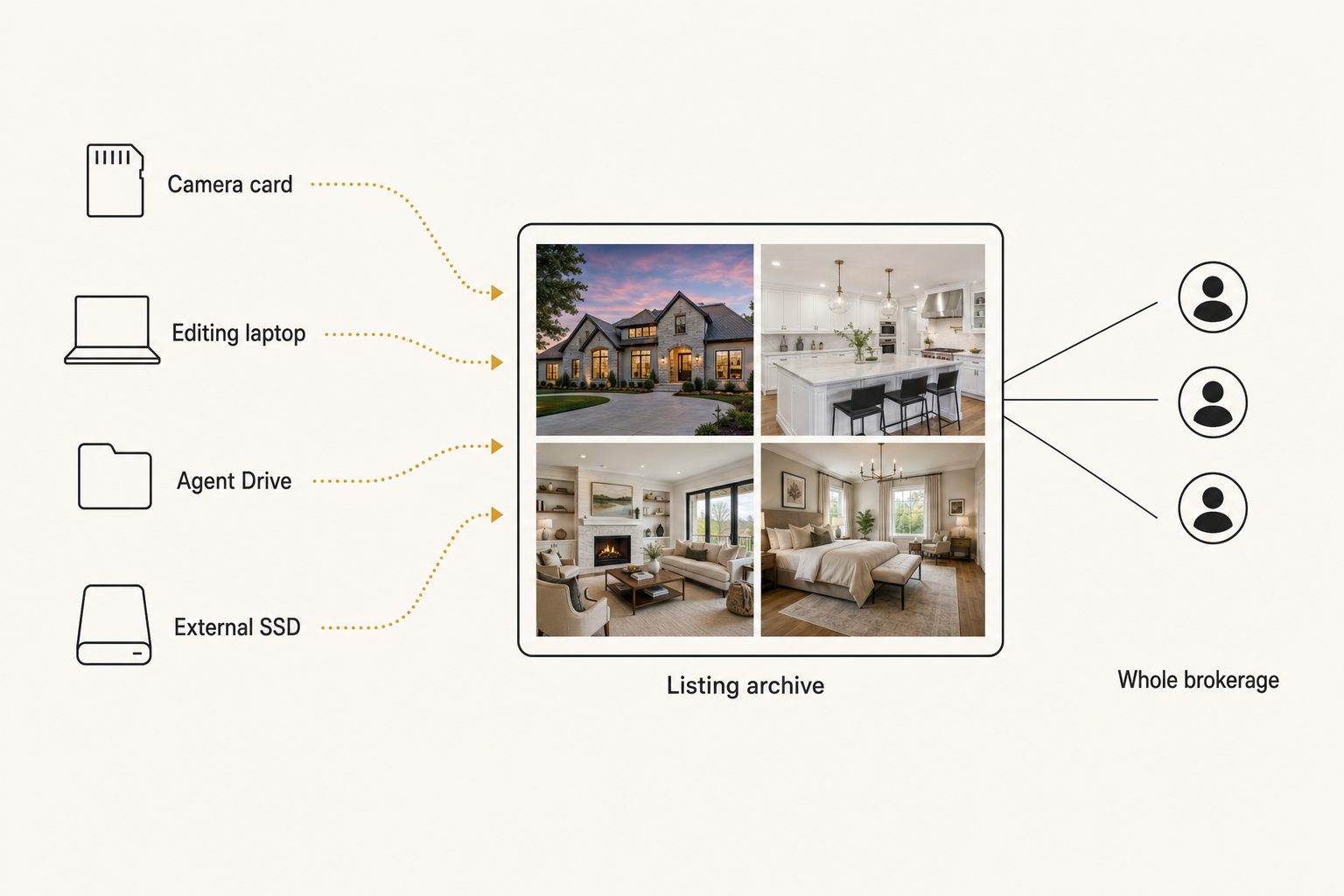
Warning. If your only copy of a season of listings lives on one laptop or one external SSD, that drive is your single point of failure. Copy everything into a business-owned shared drive with its own backup, the step most photographers skip and later regret.
Step 2: file by address, name by date
The property address is the natural filing key for real estate photos, and a date-first name makes it sort itself. A little structure here keeps the archive usable as it grows.
- Top level. One folder per year.
- Property folder. Named date-first, like
2026-06-14_14-Oak-St_Austin, so listings sort chronologically on their own. - Version subfolders.
Originals,Full, andWebinside each property folder. - File names. A pattern like
2026-06_14-oak-st_kitchen_wide.jpgtells you the shoot, property, room, and angle at a glance.
That last rule is what makes a plain filename search return something instead of a wall of DSC_0481.jpg. Our guide to photo file naming conventions has patterns you can copy.
Note. Folders and naming hold up to about 1,000 photos. Past that you hit what we call the 1,000-photo wall, described in the complete guide to bulk image tagging: the library gets too big to remember and too big to rename by hand. A full-time listing photographer clears that wall in a month or two.
Step 3: make your real estate photos searchable
Real estate photos become searchable by room and finish only when a catalog reads each image and stores what it sees. Folders and filenames can't answer the questions you ask months later, like "which listings had a marble waterfall island" or "every twilight exterior I have shot."
Filename search also depends on perfect naming, which never survives a back-to-back shooting week. A Canto survey of 500 marketing professionals found that about a third spend roughly three weeks a year just looking for files.
An AI photo catalog closes that gap in three moves:
- Connect. It links to your shared Drive or Dropbox with read-only access, and your originals never move.
- Read. It sends each photo to a vision model and writes a sentence and tags for every shot, from the room to the finishes to the light.
- Search. You type a plain description, "white kitchen, marble island" or "twilight exterior, modern build," and the matches come back ranked with the strongest shot first.
Ranking is where tools differ. In Tagrly's own testing on a 5,000-photo set, focal-subject tagging surfaced the correct top match in roughly 9 of 10 searches with AI photo search, because each photo is labeled by its main subject before its background.
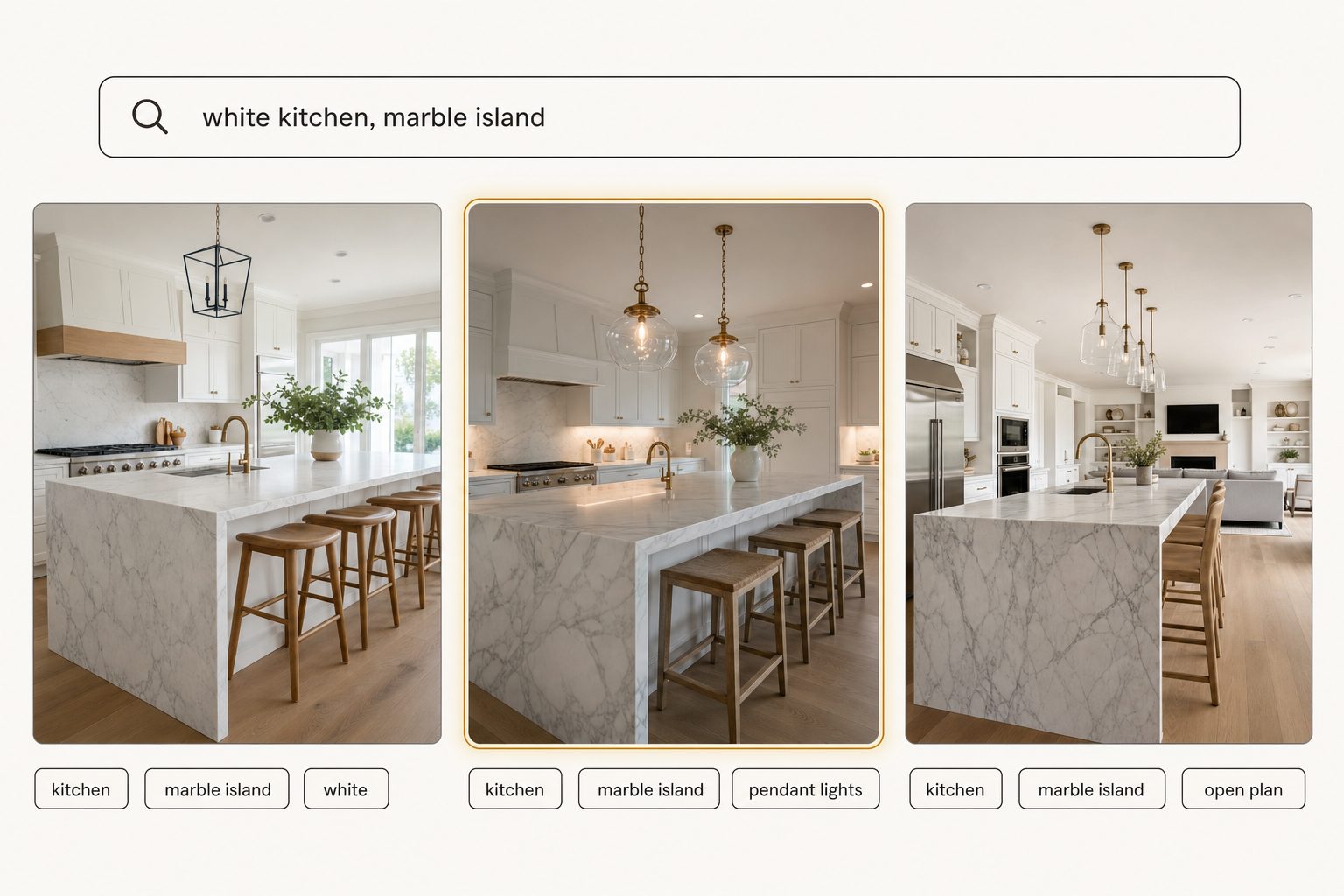
The first full scan runs unattended in the background, and photos are searchable while it is still running. Tagrly is one tool that does this, and not the only one that connects to a shared drive, so judge any tool on the words it produces for your own photos before paying for a plan. Tagrly's real estate photo library page shows the same search on listing shots.
Near-duplicates get easier here too. Five angles of the same kitchen are simple to thin out once you can deduplicate a messy library by content rather than by eye.
Tip. Want to see this on your own listings? Tagrly's free tier tags the first 500 photos in any Drive or Dropbox folder, no credit card. Run it on one recent shoot and search the results before you point it at the whole archive.
Step 4: deliver the right shots to agents and portals
Deliver listing photos as a per-property collection link, not a shared folder. Handing photos out is where folder-based setups leak.
An agent wants the finished set for one property, sized for the MLS and the listing portals, not your raw rejects and not another client's home. Sharing a whole Drive folder to send 30 photos often exposes last season's edits, blurry frames, and sometimes a different agent's listing.
- Select. Pick the approved shots for that address.
- Share. Send one link that shows only those photos, usually with an expiry date.
- Let them search. For agents who pull from your archive every week, a searchable photo gallery for clients lets them find their own shots.
Our guide to sharing specific photos with clients covers the approach, and the photo workflow for marketing teams shows where intake, search, and delivery connect for a brokerage with many agents.
Which setup fits your real estate workflow
Under 1,000 photos, a shared drive with good naming is enough; past it, add a catalog that searches by what is in the photo. Pick by archive size and how often you re-deliver.
| Situation | Setup | Pay for a catalog? |
|---|---|---|
| New or part-time photographer, under 1,000 photos | Business-owned shared drive, date-and-address naming, Lightroom for culling and editing | No, not yet |
| Full-time listing photographer with a deep archive | Keep Lightroom for editing, add an AI photo catalog on the delivered library | Yes, to re-find and re-deliver past shots by description |
| Brokerage or marketing team with many agents | One central searchable archive with per-listing collections | Yes, so no one sends one listing's photos to another agent's client |
| Large franchise with a procurement budget | An enterprise photo platform with approval flows and brand governance | Maybe; usually overkill for a single office |
Real estate photo organization comes down to one rule: one business-owned home the whole team can search. Folders, addresses, and naming carry a single photographer past the first few months, and there is no reason to pay for a tool before the 1,000-photo wall.
Past it, a catalog that reads every room and shares clean per-listing collections turns a drawer of drives into something you can work from on a Thursday deadline. The quickest test is to connect a folder of your own listings and search it, then see the bigger picture in our guide to finding any photo in your library.
Frequently asked questions
How should real estate photographers organize their photos?
Move every shoot into one home the business owns, a shared drive in Google Workspace or a Dropbox team folder, rather than leaving them on a laptop or a stack of external drives. File by property address with a date-first name, like 2026-06-14_14-Oak-St, and keep Originals, Full, and Web versions in subfolders. Give every file a name that follows one convention so a plain filename search still finds something. That structure carries a photographer to roughly 1,000 photos. Past that, add a photo catalog that reads each image so you can search by room, finish, or light instead of remembering which folder a shot landed in.
Where should a real estate team store listing photos?
In storage the business owns, not a personal account or one external drive. A shared drive in Google Workspace or a Dropbox team folder both work, and both survive staff turnover, which real estate has plenty of as agents move between brokerages. The photos a brokerage relies on for listings, portals, and social should not live on one agent's laptop, because the day that person leaves, the archive can leave too. Pick whichever platform your team already uses. The storage brand matters far less than the rule that the library belongs to the business and lives in one place with its own backup.
How do you find an old listing photo quickly?
Search what the photo shows instead of scrolling folders. Folder and filename search only works if every file was named perfectly, which rarely survives a busy shooting season. An AI photo catalog reads each image, writes a sentence and tags describing the room, the finishes, and the light, and stores them in a searchable index. You then type a plain description like 'white kitchen, marble island' or 'twilight exterior, modern build' and the matching shots come back ranked, closest match first. In Tagrly's own testing on a 5,000-photo set, focal-subject tagging surfaced the correct top match in roughly 9 of 10 searches.
When should a real estate photographer move beyond folders to a photo catalog?
Around the 1,000-photo mark, or sooner if you re-deliver old shots every week. Below that, a business-owned shared drive, an address-based folder tree, and a strict naming convention are enough, and you should not pay for a tool yet. A full-time listing photographer passes 1,000 photos in a month or two: dozens of properties, each 25 to 40 finished frames, plus exteriors, twilight shots, and drone frames. Once finding a past shot means a long scroll or guessing which drive it is on, the hours you lose, and the reshoots you book because you cannot find the original, cost more than a catalog would.
Can AI find real estate photos by room or feature?
Yes, and that is the main reason to use one on a property archive. A vision model looks at each photo and recognizes the room and its features, so it tags a shot as a kitchen with a marble island and pendant lights, or an exterior at dusk, without anyone typing those words. You can then search by feature across every listing you have shot, which folders and filenames cannot do. Tag quality varies by tool, so before paying anyone, run a sample of your own photos through and read the words it produces. Tagrly tags the first 500 photos in any folder free, so you can check the output on your own listings first.
Try Tagrly on your own photo library
Connect your Google Drive or Dropbox folder and Tagrly will tag every photo in bulk. Search by what is actually in the image, share specific shots with clients, and never lose a photo again.
- Free for your first 500 photos
- Read-only access, revoke anytime
- No credit card