Search for the best AI photo tagging software and you get lists that count to fifteen without ever saying which tools tag a whole folder and which tag one upload at a time. Meanwhile you have 8,000 untagged photos in a shared drive and a deadline.
How we judged the best AI photo tagging software
Every tool on this list cleared at least three of five bars, in the order they usually matter:
- Real bulk. The tool scans a folder or a whole library, not one upload at a time. This is the 1,000-photo wall test: past a thousand photos, one-at-a-time tools stop being tools.
- Works where your photos live. Local disk, Lightroom, Drive, or Dropbox. A tool that demands a migration loses before it starts.
- Output you can use. Keywords or alt text you can search, publish, or keep in your files, not labels trapped inside an app.
- A price shape you can predict. Free, buy-once, per-photo, or subscription. Each is fine; surprises are not.
- Team access. Whether two people can search the same tagged library without passing a laptop around.
No tool clears all five, so this list is sorted by situation, not ranked one to ten.
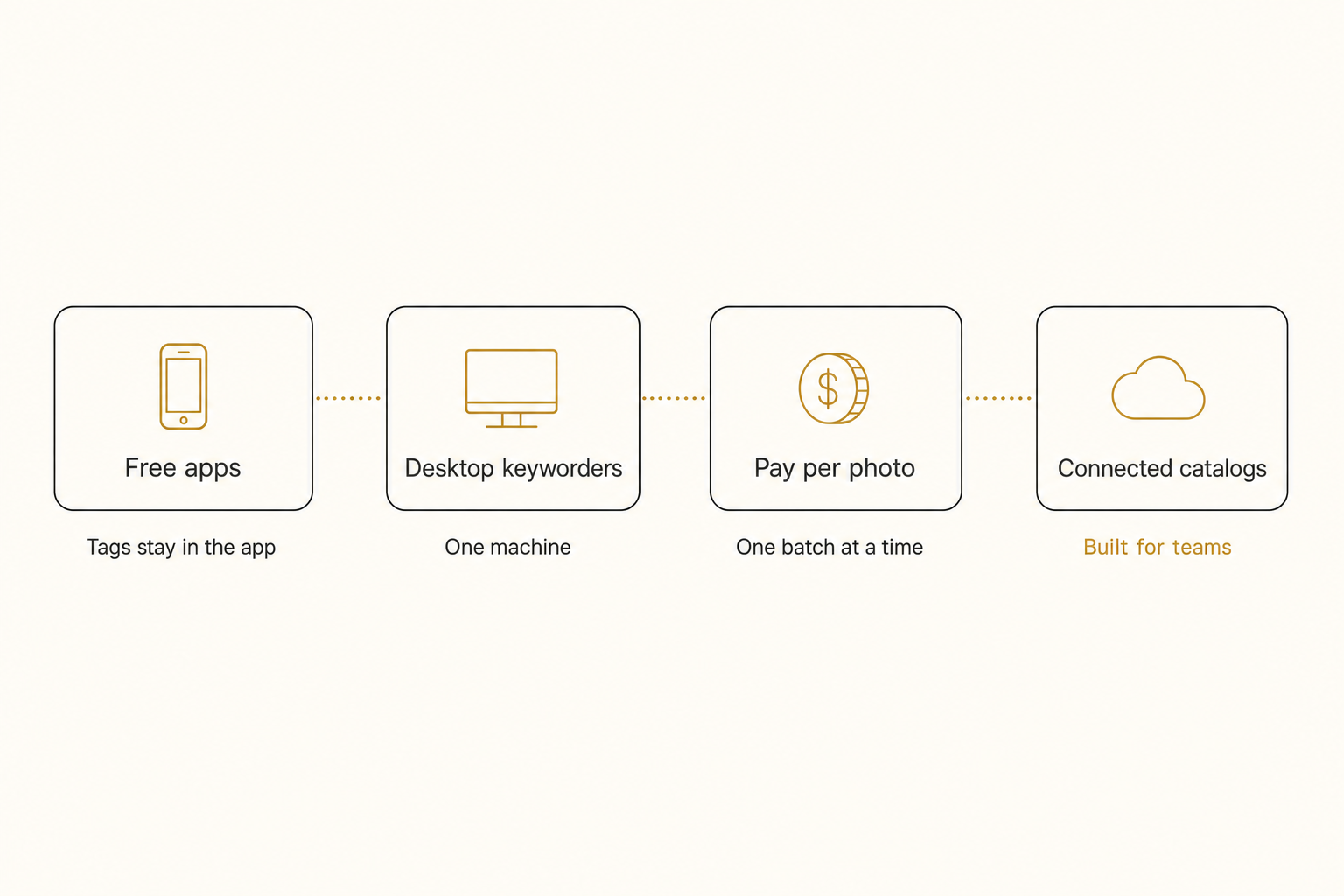
Here is the shortlist side by side.
| Tool | Kind | Price shape (as of October 2026) | Team search |
|---|---|---|---|
| Google Photos | Free app | Free; storage shared with Gmail and Drive | No shared tagged library |
| digiKam | Free desktop | Free, open-source | One computer |
| Excire Foto | Buy-once desktop | $249 one time | Office Edition shares a database, one person at a time |
| ON1 Photo Keyword AI | Buy-once desktop | $69.99 list, often discounted | One computer |
| PhotoTag.ai | Pay per photo | Credits, one per photo | No |
| Tagrly | Connected catalog | First 500 photos free, then monthly plans or one-time packs | Yes, in the browser |
| Brandfolder and Bynder | Enterprise brand library | Quote only | Yes |
Where ChatGPT, Gemini, Copilot, and Claude fit
Chat assistants miss the "output you can use" bar for a library: they hand back a chat answer, a folder, or an album, not a tagged index your team searches later. They are genuinely capable now, and several reach cloud files:
- ChatGPT. On paid plans it reaches Google Drive and Dropbox but answers in chat text.
- Gemini. On Google AI Pro and Ultra (US, English), Gemini tasks can curate a personal Google Photos library into albums.
- Copilot. With a Microsoft 365 Copilot license, it organizes folders in OneDrive for work.
- Claude. Its Google Drive connector reads images, moves files, and creates folders, asking before each action by default.
Best free AI photo tagging: Google Photos and digiKam
The best free AI photo tagging comes from Google Photos for a personal library and from digiKam for keywords you own. Google Photos is a free app whose labels stay in the app; digiKam is a free desktop keyworder, so its ceiling is one machine.
Google Photos
Google Photos search finds photos from plain phrases like "colorful sunsets" with no labeling, and finds a person by name once you label their face group. The ceiling: the labels behind search are never shown to you as keywords, cannot be edited or carried to another tool, and cover only photos you put into the app, not a shared Drive or Dropbox folder. Each Google Account's free 15 GB is also shared across Gmail, Drive, and Photos.
digiKam
digiKam is free and open-source, and since version 8.3 it auto-tags objects, places, animals, and scenes with built-in deep learning that you review. It writes the keywords into each file's standard metadata (XMP and IPTC), so you own them. Our free AI photo tagging guide covers where each free route runs out.
Best buy-once desktop keyworders: Excire Foto and ON1
For solo photographers with a local archive, the best AI photo tagging software is a buy-once desktop keyworder such as Excire Foto or ON1 Photo Keyword AI.
Excire Foto
Excire Foto does AI keywording, free-text search, and duplicate finding, all on your own machine. Excire Foto 2027 is $249 one time as of October 2026, and Excire Search 2026 is a $229 Lightroom Classic plugin.
The Office Edition, a per-user subscription, keeps databases on a network drive, but Excire's FAQ says simultaneous access is not possible, so colleagues take turns.
ON1 Photo Keyword AI
ON1 Photo Keyword AI is a desktop app and a plugin for Lightroom Classic and Capture One. It runs locally, embeds keywords into your files as XMP, and is a one-time license that lists at $69.99 as of October 2026, often discounted.
If you use the cloud-based Lightroom rather than Lightroom Classic, Adobe's own natural-language AI search shipped there in the April 2026 update, so try it before buying a plugin.
Both tools share the desktop ceiling: the catalog lives on one computer, and photos in a shared cloud folder must be synced down before a desktop tool can see them. Our photo metadata generators comparison puts ON1 beside PhotoTag.ai and Tagrly.
Best pay-per-photo tagging: PhotoTag.ai and the DIY vision APIs
For stock photographers who keyword a batch at a time, a pay-per-photo web tagger such as PhotoTag.ai fits best. Upload a batch to the web app, or use its API or free Lightroom Classic plugin, and it writes stock-ready keywords, a title, and a description. Credits are pay-as-you-go, never expire, and cover one photo each; check their pricing page.
The ceiling is that it keeps no library for you to search: the keywords leave with your files, because it serves the outbound stock pipeline. PhotoTag.ai does not connect to Drive or Dropbox either.
Developers can also call a vision model directly. Claude's vision documentation shows what comes back, but you build the ingest, database, and search yourself.
Best AI photo tagging software for teams: connected catalogs
If your photos live in Google Drive or Dropbox and more than one person searches them, a connected catalog is the category built for the job: it tags the whole library in bulk into one searchable index the team shares.
Tagrly is the example we know best. It connects to Google Drive and Dropbox read-only, so your files there never change, and also takes direct uploads and a WordPress Media Library. It keeps a hosted copy of each photo plus its tags and alt text; the vision model reads a smaller preview.
Tagrly's AI photo search ranks by focal-subject tagging, so "magnolia tree" surfaces photos of a magnolia tree, not every photo that contains one. In Tagrly's own testing on a 5,000-photo set, focal-subject tagging surfaced the correct top match in roughly 9 of 10 searches, against roughly 4 of 10 for the same library under a generic object detector.
Generic taggers return flat lists like "person, tree, outdoor," while tools built for publishing return sentences you can use as alt text. Every Tagrly plan runs the same full analysis, and the alt text reaches your site through the WordPress plugin (which never overwrites existing alt text) or the API.
Enterprise brand libraries like Brandfolder and Bynder tag in bulk too, but they expect you to migrate photos into their storage, and pricing is quote only. If team access decides it for you, see the team-first sort of the same field.
Tip. Tagrly's free tier tags your first 500 photos, no credit card. Run it on photos you already have and compare the output against the tool you use now.
Which AI photo tagging software should you pick?
Pick by where your photos live and who searches them:
- Pick Google Photos if the library is personal and stays in the app.
- Pick digiKam if you are solo and want free keywords in your files.
- Pick Excire Foto or ON1 Photo Keyword AI if you work from a local archive or Lightroom Classic and want a buy-once license.
- Pick PhotoTag.ai if you keyword stock submissions a batch at a time.
- Use a chat assistant for a one-off description or a small sort, not a searchable library.
- Pick Tagrly if your photos are in Google Drive or Dropbox and a team needs to search them.
- Pick Brandfolder or Bynder if you have 100+ users and a procurement department.
The best AI photo tagging software meets your photos where they already are and hands the results to everyone who needs them: a desktop keyworder for most solo photographers, and a connected catalog for most teams with a cloud drive full of photos.
Frequently asked questions
What is the best AI photo tagging software in 2026?
There is no single best tool, because the category splits into four kinds that solve different problems. Google Photos is the best free option for a personal library that lives inside the app. Excire Foto and ON1 Photo Keyword AI are the best buy-once desktop keyworders for solo photographers who work from a local archive or Lightroom Classic. PhotoTag.ai suits stock photographers who keyword one batch at a time. And a connected catalog like Tagrly is the best fit when the photos live in Google Drive or Dropbox and more than one person needs to search them. Pick by where your photos live and who searches them, not by a numbered ranking.
Is there good free AI photo tagging software?
Yes, with ceilings. Google Photos finds photos from plain phrases like 'colorful sunsets' with no labeling, but its automatic labels stay in the app: you never see them as keywords, cannot edit them, and cannot carry them to another tool. Each Google Account's free 15 GB is also shared across Gmail, Drive, and Photos. digiKam is free and open-source, and since version 8.3 it auto-tags objects, places, animals, and scenes with built-in deep learning that you review, then writes the keywords into each file's standard metadata. Its ceiling is one person on one machine. For a personal library, one of those two is usually all you need.
What is the best AI photo tagging software for Lightroom users?
Excire and ON1 are the two to compare. Excire Search 2026 is the Lightroom Classic plugin at $229, and Excire Foto 2027 is the standalone app at $249, both one-time prices as of October 2026. ON1 Photo Keyword AI lists at $69.99 and runs standalone or as a plugin for Lightroom Classic and Capture One. All of them run the AI on your own machine, are bought once, and write keywords you keep. If you use the cloud-based Lightroom rather than Classic, try Adobe's own natural-language AI search first; it shipped there in the April 2026 update. The ceiling is one computer: Excire's Office Edition shares a database on a network drive, but colleagues take turns rather than searching at the same time.
Can AI photo tagging software work without uploading my photos?
Yes, if it runs on your own computer. Desktop keyworders like Excire Foto, ON1 Photo Keyword AI, and digiKam work against local files with no upload at all. Tagrly reads photos where they already live in Google Drive or Dropbox with read-only access, so your files there never change. It does keep a hosted copy of each photo on its side, alongside the tags and alt text, and its vision model reads a smaller preview. Free consumer apps and pay-per-photo web taggers need you to upload photos into them first.
How much does AI photo tagging software cost?
The price shape matters more than the sticker. Free consumer apps cost nothing but keep the labels inside the app. Desktop keyworders are bought once: as of October 2026, Excire Foto is $249 and ON1 Photo Keyword AI lists at $69.99. Pay-per-photo web taggers sell credits, one per photo. Tagrly also bills in credits, and one credit reads one photo. Its plans include a monthly allowance, a big backlog is covered by a one-time credit pack, and already-read photos are never charged or read again. Your first 500 photos are free, so you can compare real output on your own photos before spending anything.
Try Tagrly on your own photo library
Connect your Google Drive or Dropbox folder and Tagrly will tag every photo in bulk. Search by what is actually in the image, share specific shots with clients, and never lose a photo again.
- Free for your first 500 photos
- Read-only access, revoke anytime
- No credit card